Pricing
Crawlbase pricing, and why your site's tier matters most
Crawlbase bills a falling ladder from $3 to $0.02 per 1,000 requests, then multiplies by JavaScript and site tier. What 25K, 300K and 3M requests cost.

Crawlbase bills a falling ladder, from $3.00 per 1,000 successful requests down to $0.02, with no monthly fee, and sells optional $99 to $599 monthly blocks on top. Two things then move your bill more than the plan does: JavaScript rendering doubles it, and your target site’s difficulty tier multiplies it by anything from 1 to 20. Pricing, verified 2026-11-12.
Below I priced the ladder by hand, worked out 25K, 300K and 3M requests a month, showed how to read your site’s tier from a response header, and flagged the places where Crawlbase’s own pages disagree.
Short on time?
Here's my take
- Trying it on your targets
- Free credits
- 1,000 credits with no card, up to 5,000 after setup. Use them to read your site's tier before you budget.
- Under about 143K standard requests a month
- Pay as you go
- No monthly fee: 25K costs $31.40 and 100K costs $76.40. Below 143K it beats the $99 Starter block.
- About 143K to 400K a month
- Starter, $99
- 300K costs $149 with overage, against $177.50 on pay as you go, because overage continues at the bracket you've already reached.
- About 400K to 800K a month
- Scale 500K, $199
- Also the cheapest way to buy 300K JavaScript requests: $249 with overage, against $355 on pay as you go.
- 800K and up, including 2M to 3M
- Scale 1M, $349, plus overage
- 3M costs $593.40, against $699 on Growth plus overage and $771.90 on pay as you go.
- Hard targets (Complex, x2, or higher)
- Zyte API as your benchmark
- At x2, 300K requests cost $355 on pay as you go; at x20, $3,550. Price the same targets on Zyte's published tiers before committing.
Prices verified . Sponsors cannot buy a verdict or a position.
| Band of successful requests | Rate per 1K | Band cost | Running volume | Running total |
|---|---|---|---|---|
| First 1K | $3.00 | $3 | 1,000 | $3 |
| Next 10K | $2.00 | $20 | 11,000 | $23 |
| Next 100K | $0.60 | $60 | 111,000 | $83 |
| Next 1M | $0.50 | $500 | 1,111,000 | $583 |
| Next 10M | $0.10 | $1,000 | 11,111,000 | $1,583 |
| Next 100M | $0.05 | $5,000 | 111,111,000 | $6,583 |
| Next 1B | $0.04 | $40,000 | 1,111,111,000 | $46,583 |
| Beyond | $0.02 | – | – | – |
Source: Rates from crawlbase.com/pricing, read 12 Nov 2026. Band costs and running totals are my arithmetic, for standard requests on a standard-tier site. Scroll sideways for more columns.
This page sits in the scraping APIs hub. If credits are new to you, what scraping API credits buy explains why a credit isn’t always a page.
How does the Crawlbase ladder work? #
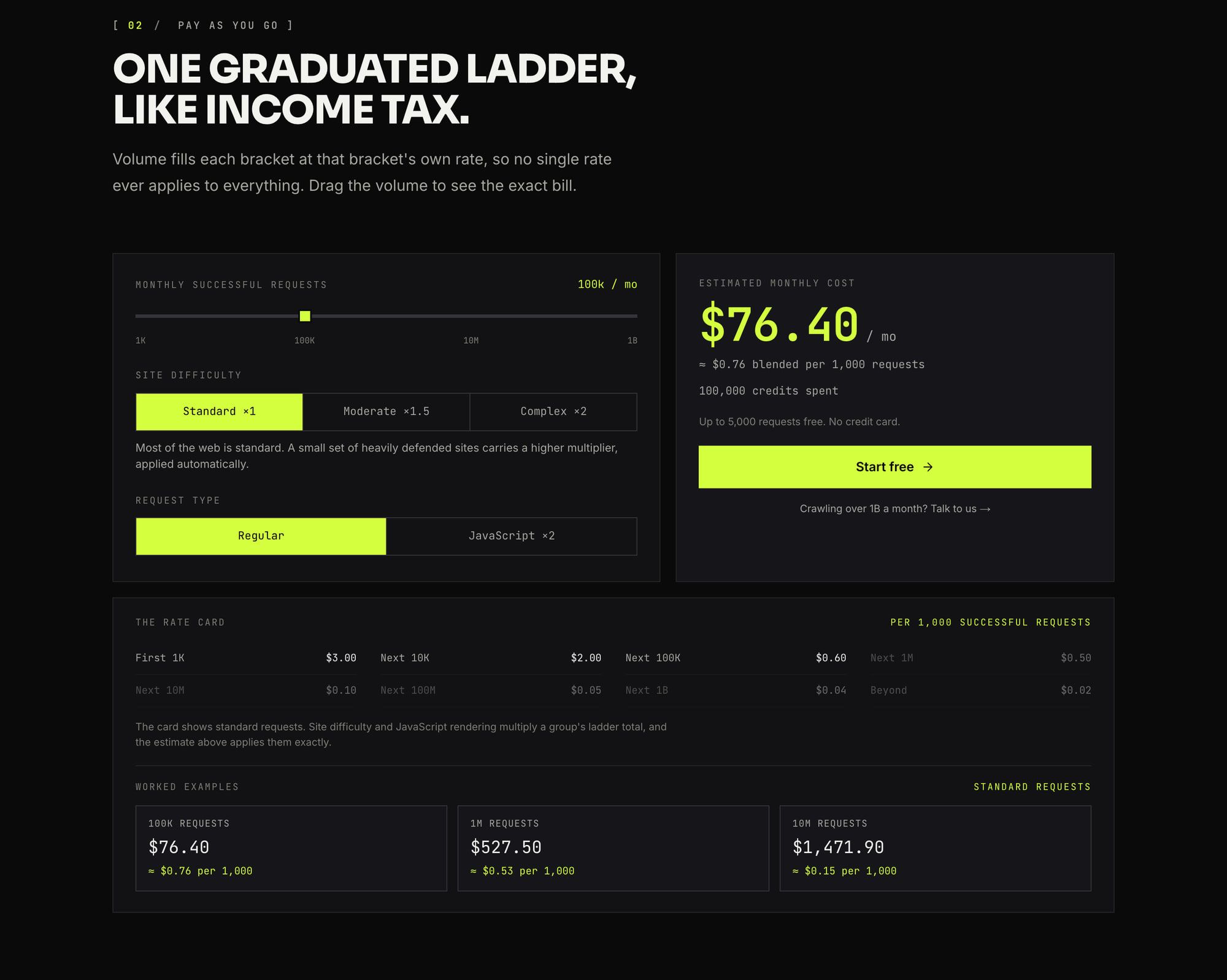
It works like a tax bracket. Each band of successful requests in a month is billed at its own rate, so your first 1,000 cost $3.00 and the requests past 1.111 million cost $0.10 per 1,000. Pricing, verified 2026-11-12.
There’s a “$0” monthly fee and “no card to start”. Usage is “Billed monthly in arrears, for what you used”, and you can set a hard spend cap: “Cap the account or a single workspace and usage pauses before the bill passes it.” Pricing.
To price any volume by hand, take the running total at the last band edge below your volume and add the rest at the next band’s rate. For 25,000 requests that’s $23 + 14,000 at $0.60 per 1K = $31.40.
Crawlbase’s own examples are 100K for $76.40, 1M for $527.50 and 10M for $1,471.90, and my arithmetic reproduces all three. I priced different volumes below so this page doesn’t repeat the cheapest web scraping API comparison.
The steep part is the start. The first 11,000 requests average about $2.09 per 1,000, while everything from 1.111M to 11.111M costs $0.10. Small, steady jobs pay the most per request.
Is a subscription cheaper than pay as you go? #
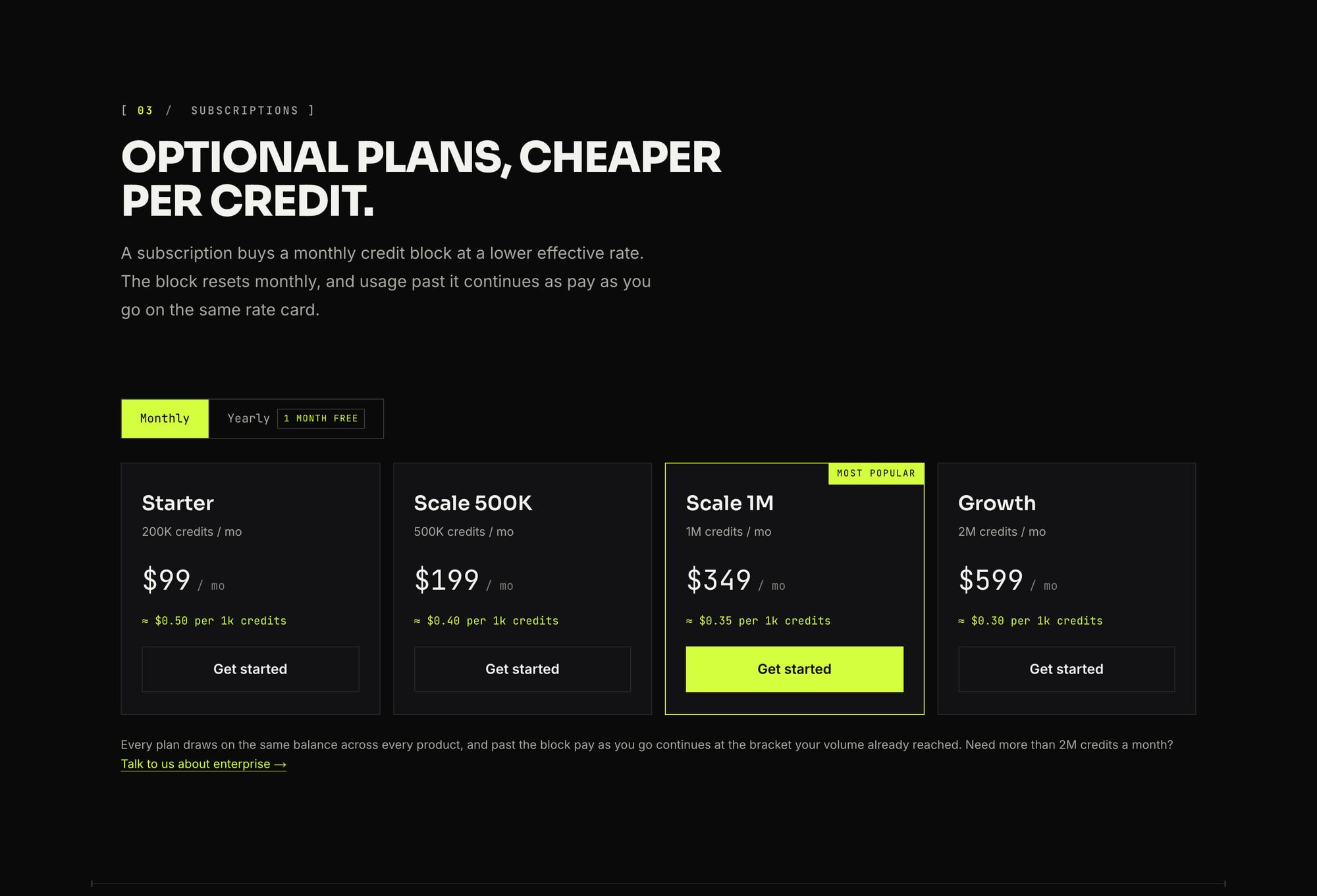
Above about 143,000 requests a month, yes. Below that, the ladder costs less than the cheapest block: $83 + 32,000 at $0.50 per 1K = $99, which is exactly Starter’s price. Here are the four blocks, verified 2026-11-12. Pricing.
| Block | Monthly | Yearly | Credits a month | Per 1K credits |
|---|---|---|---|---|
| Starter | $99 | $1,089 | 200K | $0.50 |
| Scale | $199 | $2,189 | 500K | $0.40 |
| Scale (“Most popular”) | $349 | $3,839 | 1M | $0.35 |
| Growth | $599 | $6,589 | 2M | $0.30 |
Two blocks share the name Scale, so I refer to them as Scale 500K and Scale 1M. Yearly billing is labeled “1 month free” and “8% off”, and every yearly price is exactly 11 times the monthly one, which works out to 8.3% off.
Past the block, the page says: “Usage past the block continues as pay as you go on the same ladder, at the bracket your volume already reached.” Turn pay as you go off and “requests pause at the block instead”, which gives you a hard stop. Pricing.
That overage sentence decides which block wins. Overage doesn’t go back to the top of the ladder: a Starter customer at 200K already sits in the $0.50 band, so the next 100K cost $50.
| Requests a month | Pay as you go | Cheapest option |
|---|---|---|
| 150K | $102.50 | Starter, $99 |
| 300K | $177.50 | Starter + 100K, $149 |
| 750K | $402.50 | Scale 500K + 250K, $324 |
| 1.5M | $621.90 | Scale 1M + 500K, $443.40 |
| 2M | $671.90 | Scale 1M + 1M, $493.40 |
| 3M | $771.90 | Scale 1M + 2M, $593.40 |
My arithmetic on published rates, standard requests on a standard-tier site. Starter hands over to Scale 500K at 400K, and Scale 500K hands over to Scale 1M at 800K. Growth never wins, because Scale 1M plus overage drops to $0.10 per 1,000 above 1.111M and stays $105.60 cheaper from 2M up.
So Growth at $599 is not the obvious pick for 3M that its size suggests.
One thing the page doesn’t settle. The pricing FAQ says blocks reset “with each monthly cycle” and pay as you go has “nothing to expire”, but rollover of unused block credits isn’t mentioned. On credits, the calculator counts 100K JavaScript requests as “200,000 credits spent”, so I’d expect a rendered request to draw two block credits.
What does JavaScript do to the bill? #
It doubles it. The pricing page says “A real browser render doubles the request” and “JavaScript rendering doubles any tier”, and the Smart AI Proxy page agrees: “A normal request uses one credit, a JavaScript request uses two.” Pricing, Smart AI Proxy, verified 2026-11-12.
You get two tokens. The Normal token is “Faster, cheaper”, and the JavaScript token is “Required to use page_wait, ajax_wait, scroll, and css_click_selector”. If you add javascript=true to a Normal key, “the request is billed as a JavaScript request.” Crawling API docs.
A few other things also bill as JavaScript:
- Scrolling: “The first 8 seconds (page load + scrolling combined) count as 1 request”, then “every full 5 seconds beyond that adds 1 more billed request, and a partial block is not billed.” So a 20-second scroll is billed as 3 JavaScript requests. Parameters.
- PDFs: “billed the same as a JavaScript-rendered request, since they share the headless pipeline”. Crawling API docs.
- Screenshots: “A full-page capture through the Crawling API spends two credits.” Pricing.
The cheapest habit is to send only the pages that need a browser through the JavaScript token. At 300K requests, rendering everything costs $355 on pay as you go, against $177.50 for none.
Which difficulty tier is your site in? #
You find out from the response, not from a list. The docs say the X-Domain-Complexity header (and the domain_complexity field) is “one of standard, moderate, or complex”, and that the tier “maps directly onto the pricing tier billed for the request”. Response docs, Crawling API docs, verified 2026-11-12.
The pricing page lists eight tiers, though, and says “Heavily defended sites carry a higher tier, applied automatically.” Its calculator shows only the first three, and there’s no public site-by-tier list. Pricing.
| Tier | Multiplier | 300K standard requests, pay as you go |
|---|---|---|
| Standard | ×1 | $177.50 |
| Moderate | ×1.5 | $266.25 |
| Complex | ×2 | $355 |
| Complex I | ×3 | $532.50 |
| Complex II | ×4.5 | $798.75 |
| Extreme | ×9 | $1,597.50 |
| Extreme I | ×13.5 | $2,396.25 |
| Extreme II | ×20 | $3,550 |
Multipliers from the pricing page; the dollar column is my pay-as-you-go arithmetic. Crawlbase’s 2024 explainer also named a “Fixed” tier, “a special category for domains that require a dedicated crawling setup with fixed pricing”, with LinkedIn as “the headline example”. Today’s pricing page doesn’t show it. Pricing explained.
My advice: spend some free credits on your real targets and log the header before you pick a plan. If a target comes back complex, treat ×2 as your floor, because the header can’t tell you whether you’re in one of the five tiers above it.
Does the multiplier apply before or after the ladder? #
After. The page says “Site difficulty and JavaScript rendering multiply a group’s ladder total, and the estimate above applies them exactly”, and elsewhere that the multipliers “scale a group’s whole ladder total”. Pricing, verified 2026-11-12.
The calculator on the same page confirms it. At 100K standard requests it shows $76.40. Switch JavaScript on and it shows $152.80 and “200,000 credits spent”; add Complex and it shows $305.60 and “400,000 credits spent”.
If 200,000 credits ran down the ladder first, they’d cost $127.50, not $152.80. So price your requests on the ladder, then multiply the dollar total: 300K JavaScript requests on a standard site cost 2 × $177.50 = $355.
So what will your month cost? #
Here are five jobs, priced on published rates and verified 2026-11-12. These are calculations, not invoices, and they assume every request succeeds.
| Job a month | Pay as you go | Best block |
|---|---|---|
| 25K standard | $31.40 | None; Starter’s $99 is too big |
| 300K standard | $177.50 | Starter + 100K overage, $149 |
| 300K JavaScript, standard site | $355 | Scale 500K + 100K credits overage, $249 |
| 300K standard, Moderate site | $266.25 | Scale 500K, $199, if 450K credits are drawn |
| 3M standard | $771.90 | Scale 1M + 2M overage, $593.40 (Growth + 1M: $699) |
The 25K row is where pay as you go shines: no subscription comes close, and you pay nothing in a quiet month. That steep first band costs you, though, as the effective rate is $1.26 per 1,000.
The 300K JavaScript row is the one to read twice. Six hundred thousand credits fit Scale 500K plus overage for $249, $106 less than pay as you go, as long as a rendered request draws two block credits, as the calculator’s “credits spent” count suggests.
At 3M, Scale 1M plus overage is $105.60 cheaper than Growth and $178.50 cheaper than pay as you go.
What counts as a billable request? #
Successful ones, with a wider definition of “successful” than most people expect. The docs bill a request only when cb_status is 200 or 207 and the target’s original_status is 200, 201, 301, 302, 303, 307, 308, 404 or 410. “Statuses you list in custom_success_codes are charged too.” Response docs, verified 2026-11-12.
So these are billed:
- 404 and 410 pages. A crawl of a stale URL list pays for every dead link.
- Empty pages. A 207 means “The target answered
200with an empty body. Counts as a success and is charged.” - Any status you add to
custom_success_codes.
And these are free:
- Blocks and CAPTCHAs. A 503 means “Crawlbase recognized a block or CAPTCHA page”, even when the target returned 200. Response docs.
- Timeouts and target 5xx errors. “Failed requests (timeouts, blocks, 5xx from the target) are free”. Crawling API docs.
- Retries. “All retries against this API are free - only successful responses (
cb_status: 200/207) count against your quota.” Crawling API docs.
One exception: on the async Crawler, webhook delivery retries are billed. Its docs say “Failed deliveries are charged” and “Every retry counts as a successful crawl for billing purposes”, so a flaky webhook endpoint costs real money. Crawler docs.
What do the free credits cover? #
You start with 1,000 credits and no card, and can reach up to 5,000. The pricing FAQ says “1,000 free credits and no card on file”, rising to 5,000 after setup steps it doesn’t name, while the hero says “Up to 5,000 requests free”. Pricing, homepage, verified 2026-11-12.
“Requests” and “credits” aren’t the same once JavaScript doubles a request: 1,000 credits are about 500 rendered pages. The ScraperAPI comparison page spells out the grant as 1,000 on signup plus onboarding steps. Crawlbase vs ScraperAPI. For other vendors’ free offers, see the free web scraping API roundup.
The credits come from one balance shared by every product: the Crawling API, the Enterprise Crawler, the Smart AI Proxy and Cloud Storage. Storage costs “Half a credit” to keep “one stored page for a month”. Pricing, Smart AI Proxy.
The Smart AI Proxy has no plans of its own. Bandwidth is “billed on requests rather than gigabytes”, and it draws the same “Optional subscriptions from $99 / mo.” The homepage also lists a Web MCP Server, but I found no price for it. Homepage.
Where Crawlbase’s own pages disagree #
Six places the official pages don't match
- JavaScript cost. The pricing page says rendering “doubles any tier”. The Crawling API docs say “Pricing is the same per successful response either way” when describing the fast and rendering paths, yet bill
javascript=trueas a JavaScript request. Pricing, docs - How many tiers. The pricing page lists eight, up to ×20. The docs and the header list three, with complex as the “Highest pricing tier”. The 2024 blog adds “Fixed”. Docs, blog
- Where tier prices live. The docs say “For tier-specific pricing see your subscription plan or contact sales”, though the multipliers are public on the pricing page. Docs
- The free grant. “Up to 5,000 requests” in the hero, “1,000 free credits” in the FAQ. Pricing
- Failed requests. The product page says “Only successful requests are billed”, but the response docs bill 404s, 410s and empty pages. Product page, response docs
- Retries. Crawling API retries are free, but Crawler webhook retries are charged. Crawler docs
Where they conflict, I trust the pricing page for rates and the response docs for what’s billed. Both are the most specific pages on their topic. The “optional” and “commitment-free” wording on the comparison page and blog does match the blocks: you never need one to use any feature.
What changed in 2026? #
The plan list was rebuilt more than once this year. A third-party tracker, PulseSignal (run by IA MARKETING SAS and structured with AI from the pricing page), logs plan sets replaced on three dates. PulseSignal, read 2026-11-12.
| Date | What changed | Source |
|---|---|---|
| Dec 23, 2024 | Crawlbase’s pricing explainer published; no dollar figures, tiers Standard/Moderate/Complex/Fixed | Crawlbase blog |
| May 28, 2026 | Plan set replaced | PulseSignal (third party) |
| Jul 12, 2026 | Plan set replaced; a same-day snapshot still lists separate Smart AI Proxy and Storage plans | PulseSignal, apis.io |
| Jul 23, 2026 | Plan set replaced again | PulseSignal (third party) |
| Nov 12, 2026 | One balance, the eight-band ladder, $99–$599 blocks, 1,000 to 5,000 free credits | Pricing |
Crawlbase doesn’t publish an effective date for today’s model. PulseSignal’s own summary table still marks the old proxy and storage plans “Unchanged”, which conflicts with its log, so I treat the dates as a rough guide.
What other pages still say, checked against crawlbase.com on 2026-11-12
- “$29/mo” entry plan: Scrapfly’s comparison page (a rival, undated). Today there’s no $29 plan, only pay as you go or the $99 block. Scrapfly
- “Up to 10,000 free requests”: apis.io (generated 2026-07-12, self-labeled unverified); Prospeo says 10,000 “if you add payment info”. Today it’s 1,000, up to 5,000. apis.io, Prospeo
- Smart AI Proxy at $149, $229 and $449; Storage at $29 and $249: apis.io and PulseSignal’s summary. Today there are no separate plans, and storage is half a credit per page per month.
- LinkedIn at “$15 per 1,000”: Prospeo (undated, a rival). Crawlbase publishes no per-site prices today.
- Every request billed “whether or not it returns usable data”: ScraperAPI’s comparison page (a rival). Crawlbase’s docs say blocks, timeouts and 5xx errors are free. ScraperAPI
How does it compare at 300K requests? #
On easy pages, Crawlbase is mid-pack. On JavaScript pages it ties ScrapingBee. Each cell is the cheapest published way to cover 300,000 successful requests a month at list price, verified 2026-11-12.
| Service | 300K plain pages | 300K JavaScript pages | Catch |
|---|---|---|---|
| Zyte API | $39 PAYG (tier 1 HTTP) | $200 ($200 commitment floor, tier 1 browser) | Per-site tiers 1–5; harder tiers cost far more |
| ZenRows | $88.50 (L1 + 50K pack); $99 plan-only | $279 (G2, 1.5M credits at 5 each) | Packs only on Build and Launch |
| ScrapingBee | $99 (Startup, JS off) | $249 (Business, 1.5M credits at 5 each) | JavaScript is on by default |
| Crawlbase | $149 (Starter + overage); $177.50 PAYG | $249 (Scale 500K + overage); $355 PAYG | Standard tier; harder tiers multiply the bill |
Inputs: Zyte pricing, ZenRows pricing, ScrapingBee pricing, and my Zyte API, ZenRows and ScrapingBee pricing breakdowns. These are list prices for each vendor’s easiest case. Tiers and credit weights differ, so they aren’t the same work.
Crawlbase’s edge isn’t 300K of easy pages. It’s no monthly fee for small or spiky jobs (Zyte’s pay as you go shares that), free retries, and a rate that falls to $0.10 per 1,000 past 1.111M. ZenRows and ScrapingBee are monthly plans, so a quiet month still costs the plan price.
What about enterprise and very high volume? #
There are two separate “Talk to us” points. The pricing page asks “Need more than 2M credits a month?” next to a “Talk to us about enterprise” link and, at the far end of the ladder, “Crawling over 1B a month? Talk to us”. It says “Enterprise adds custom volume, SLAs and invoicing.” Pricing, verified 2026-11-12.
Throughput numbers are thin. The docs say only that “Concurrency limits scale with your plan”. The one figure I found is on the Zyte comparison page, in its Enterprise Crawler row: “3,000 RPM on standard plans, raised on request”, a vendor claim I couldn’t check. Crawling API docs, Crawlbase vs Zyte.
The async Crawler has published defaults. Pushes are “capped at 30 URLs/sec per token by default”, with 100K URLs per queue, 1,000,000 across crawlers, and a default concurrency of 20. Crawler docs.
What do customers say about the bills? #
The sample is small. Crawlbase’s Trustpilot profile, still filed under proxycrawl.com, had a TrustScore of 3.3 from 14 reviews when I read it. Trustpilot.
Support speed gets praise: “They responded immediately and it was unblocked in less than 24 hours” (July 2026). The price complaints are pointed. One two-star review (May 2026) called the pricing “unacceptable to me”, and a one-star review (June 2026) reported “Significant extra charges since September with no notification”, with no company reply shown.
Fourteen reviews prove nothing on their own. But surprise charges are what you’d expect from tiers applied automatically and billed in arrears, so I’d set the spend cap from day one.
Which plan should you pick? #
Trying it out: the free credits. Spend them on your real targets, log the X-Domain-Complexity header, and render only where you must.
Under about 143K standard requests a month: pay as you go. 25K costs $31.40, and a quiet month costs nothing.
About 143K to 400K: Starter at $99, with pay as you go left on for overage. 300K comes to $149, because overage continues at the $0.50 bracket.
About 400K to 800K, or 300K rendered: Scale 500K at $199. It’s also the cheapest fit for 300K JavaScript requests, at $249.
800K and up, including 2M to 3M: Scale 1M at $349 plus overage, which comes to $593.40 at 3M. That beats Growth plus overage ($699) and pay as you go ($771.90).
Hard targets at Complex or above: use Zyte API as your benchmark. A ×2 site can take 300K requests to $355, and Crawlbase won’t tell you in advance whether you’ll land in a ×9 or ×20 tier. Zyte publishes rates for each of its five tiers, so put the same targets through both before committing. If price is all you need on easy pages, the cheapest web scraping API comparison covers more options.
FAQ #
Does Crawlbase charge for failed requests? #
Mostly no. Blocks, CAPTCHA pages, timeouts and 5xx errors from the target are free, and so are retries. But the docs bill 404 and 410 responses and empty 200 pages (reported as 207). On the Crawler product, failed webhook deliveries are charged too. Response docs, Crawler docs.
How many free requests does Crawlbase give? #
1,000 free credits with no card, rising to up to 5,000 after setup steps the pricing page doesn’t name. Pages that still quote 10,000 free requests are out of date. Because JavaScript rendering doubles a request, 1,000 credits cover about 500 rendered pages. Pricing.
Does JavaScript rendering cost double on Crawlbase? #
Yes, according to the pricing page and the Smart AI Proxy page. One docs sentence says pricing is the same per successful response either way, but the same docs page bills javascript=true as a JavaScript request. I’d budget on double. Pricing, Crawling API docs.
Do unused Crawlbase subscription credits roll over? #
Crawlbase doesn’t say. The pricing FAQ says subscription blocks reset with each monthly cycle and doesn’t mention rollover, so I’d plan as if unused block credits are lost at the reset. Pricing.
Is ProxyCrawl the same as Crawlbase? #
Yes, ProxyCrawl is the old name. The docs note that the cb_status field was formerly named pc_status, the old ProxyCrawlAPI .NET package is marked deprecated as legacy, and Trustpilot still files reviews under proxycrawl.com. I couldn’t find an official rename date. Response docs, NuGet.
How do I know my site’s difficulty tier on Crawlbase? #
Read the X-Domain-Complexity header (or the domain_complexity field) on a response. It reports standard, moderate or complex, the tier you’re billed at. Spend some free credits on your real targets before you budget, because there’s no public list of sites by tier. Response docs.
Sources
22 sources, accessed .
Official pricing, docs, changelogs and status pages 14
- Crawlbase pricing, ladder, subscriptions and FAQ
- Crawlbase homepage
- Crawling API product page
- Smart AI Proxy product page
- Crawling API docs
- Crawling API response docs (billing statuses, X-Domain-Complexity)
- Crawling API parameters (scroll billing)
- Crawler docs (limits and webhook billing)
- Crawlbase pricing explained (Crawlbase blog, Dec 23, 2024)
- Crawlbase vs Zyte (vendor page)
- Crawlbase vs ScraperAPI (vendor page)
- ScrapingBee pricing
- ZenRows pricing
- Zyte API pricing


