Pricing
ScrapingBee Pricing Has a Default Worth Checking
ScrapingBee starts at $19 for 75K credits, but default JS rendering uses five credits a request. See three workloads, billable errors and renewals.

ScrapingBee pricing starts at $19 monthly for 75,000 credits, but its HTML API defaults to JavaScript rendering at five credits per ordinary request. I would explicitly select plain mode when it meets the job’s needs, and budget renewals separately from request weights. Plans, HTML API.
For hypothetical generic successful requests, 30,000 plain pages fit Hobby, 30,000 default-JS pages fit Freelance, and 300,000 default-JS pages fit Business. The difference comes from feature weights and monthly capacity, not a measured success or speed advantage. Pricing, credit rules.
Short on time?
Here's my take
- For a small plain job
- Hobby with render_js=false
- $19 includes 75K credits; the plain configuration uses one rather than the default five.
- For uncertain protection needs
- Auto mode with a reviewed max_cost
- Bound the allowed configuration and separately decide how much recurring spending is acceptable.
- Before scaling
- Review renewal and add-on settings
- A credit balance does not cap payments when optional auto renewal is enabled.
Prices verified . Sponsors cannot buy a verdict or a position.
What does each plan cost? #
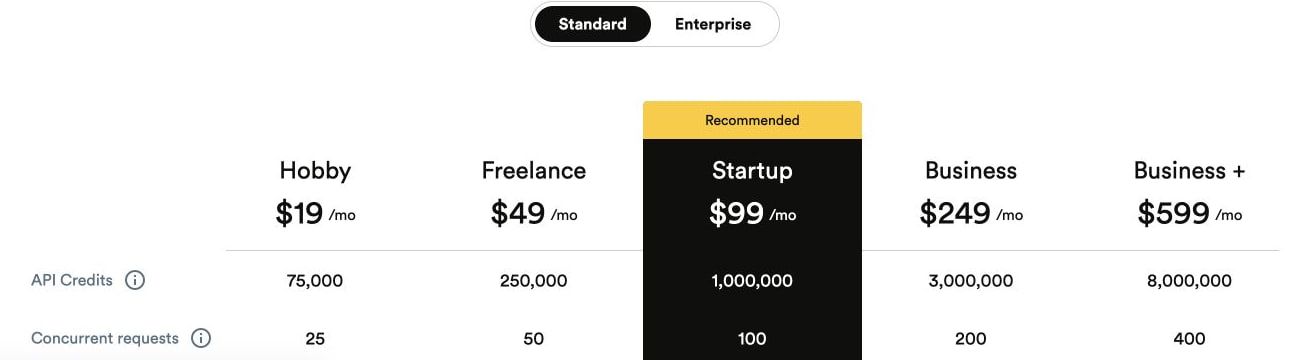
Monthly plans run from $19 (Hobby) to $5,799 (Enterprise: 120M), and I use the current canonical pricing page for this ladder. An older plan-support article differs on prices and concurrency, so I have not blended its figures into the table or treated the older values as a current entitlement. Prices and specifications verified: 2026-11-11; listed prices exclude VAT. Current pricing, older plan article.
| Plan / published capacity | Monthly price | Credits | Concurrency |
|---|---|---|---|
| Hobby | $19 | 75,000 | 25 |
| Freelance | $49 | 250,000 | 50 |
| Startup | $99 | 1,000,000 | 100 |
| Business | $249 | 3,000,000 | 200 |
| Business+ | $599 | 8,000,000 | 400 |
| Enterprise: 14M | $999 | 14,000,000 | 500 |
| Enterprise: 24M | $1,599 | 24,000,000 | 600 |
| Enterprise: 41M | $2,399 | 41,000,000 | 700 |
| Enterprise: 69M | $3,599 | 69,000,000 | 800 |
| Enterprise: 120M | $5,799 | 120,000,000 | 900 |
Concurrency limits simultaneous work; it is not a monthly page count or a measured requests-per-second result. I would choose a tier from the needed allowance and work pattern, then establish real durations and output quality in an authorized evaluation. Pricing.
How many credits does a request use? #
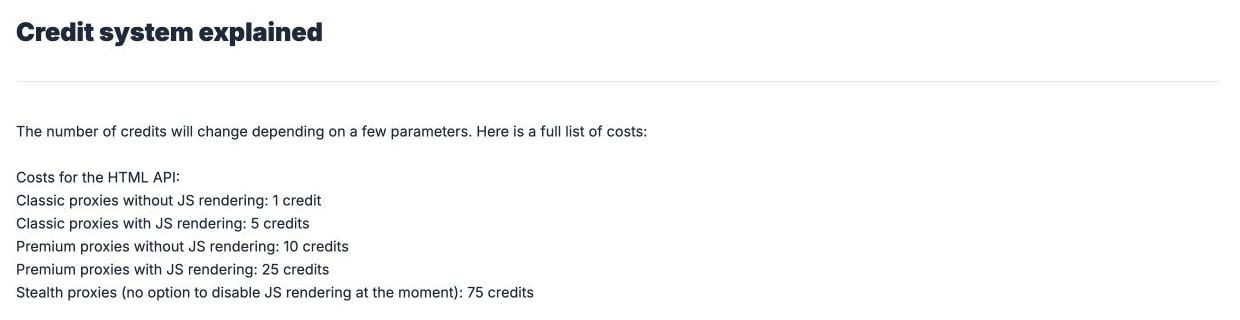
Between one and 75 on the ordinary HTML API, depending on features, and its default is render_js=true. If plain HTML contains the required fields, render_js=false changes the documented total from five to one; I would make that choice deliberately rather than rely on a silent default. Specifications verified: 2026-11-11. HTML API.
| Ordinary HTML configuration | Published total credits | Decision |
|---|---|---|
| Plain, no premium | 1 | Explicitly disable JS if it is unnecessary |
| Default JS, no premium | 5 | Budget rendered requests at five each |
| Premium, no JS | 10 | Select the required protection level |
| Premium + JS | 25 | Use the documented combined total |
| Stealth | 75 | JS is required on this path |
Auto GET mode selects among successful configurations priced at one, five, ten, 25 or 75 credits. The max_cost control requires auto mode; I would use a ceiling that permits the intended features and treat the returned data as something still needing validation. HTML API, credit guide.
AI is a limit to my arithmetic here. The main documentation describes an extra five credits, but the help guide’s premium-AI example gives 20, so I cannot confidently promise one universal premium-AI total. Main documentation, credit-system article.
Google and Amazon endpoints price differently #
The Google proxy example lists 20 credits, while the generic HTML guide lists 15 for its Google path; the dedicated Google endpoint lists light at ten and regular at 15. The dedicated Amazon endpoint lists light at five and regular at 15, so I would quote the actual transport/endpoint rather than reuse the ordinary JS weight. Proxy mode, credit guide, Google endpoint, Amazon endpoint.
The official CLI provides another interface to the service; it is not an extra free allowance. Its commands need the selected account and configuration, and this research does not include executing them. CLI documentation.
What does a month of scraping cost? #
The table prices three hypothetical monthly volumes and assumes successful generic HTML API requests, either plain with JS explicitly off or default JS only. It excludes premium/stealth, AI, special targets, geography, tax, trials, add-ons, rollover, private rates and client retries; the candidate is the lowest listed monthly plan with enough credits. Plans, HTML API weights.
| Monthly requests | Plain: requests × 1 | Listed plain candidate | JS: requests × 5 | Listed JS candidate |
|---|---|---|---|---|
| 3,000 | 3,000 credits | Hobby, $19 | 15,000 credits | Hobby, $19 |
| 30,000 | 30,000 credits | Hobby, $19 | 150,000 credits | Freelance, $49 |
| 300,000 | 300,000 credits | Startup, $99 | 1,500,000 credits | Business, $249 |
At 3,000 requests, the subscription minimum dominates both configurations; five-times the weight still fits the same plan. At 30,000 requests, rendering changes the listed plan candidate because 150,000 credits exceed Hobby’s 75,000.
At 300,000 requests, Startup’s one-million balance fits plain work but not the 1.5-million rendered estimate. Business’s three million provides listed capacity, without proving that the workload’s target permissions, quality or throughput requirements are satisfied. Pricing, API documentation.
For a mixed job of 10,000 plain, 2,000 JS and 1,000 premium-plus-JS requests, I calculate 45,000 credits: 10,000 + 10,000 + 25,000. That fits Hobby’s listed allowance under the same successful-generic assumptions, but it is not an observed account bill. Credit rules, plans.
If you are weighing ScrapingBee against a specific rival, I put the same kind of workload side by side in ScraperAPI vs ScrapingBee and ZenRows vs ScrapingBee.
Which responses do you pay for? #
More than successful pages: the normal HTML documentation includes 200, 404, 410 and 413 in billing and says 500 is free. Its shorter FAQ is not the entire status policy, so I would avoid quoting it as “only useful 2xx pages cost money.” HTML API, FAQ.
With transparent_status_code=true, every target status below 500 is billable and automatic retry is disabled; 5xx responses are free. The normal API timeout defaults to 140,000 milliseconds and permits 1,000–140,000, so timeout and retry settings deserve their own budget review. HTML API.
A failed-request help article can guide troubleshooting, but a technical failure description is not a promise that every retry is free or that every response contains usable fields. I would log the status, configuration, cost and validation result instead of treating the presence of HTML as success. Failed-request guidance, credit guide.
Proxy mode retains API costs and defaults, and browser subresources can add requests. I would also avoid copying examples that disable TLS certificate verification: the transport example is not a reason to weaken the client’s connection checks. Proxy documentation.
Is there a free trial, and do credits roll over? #
The signup trial is 1,000 credits without a card; no recurring free grant was established by this research. If the selected account permits the ordinary features, that is at most 1,000 plain or 200 default-JS requests before billable errors and other weights. Pricing, trial support, API costs.
Ordinary unused credits do not roll over. Upgrade and downgrade support describe immediate changes and carryover for those particular transitions, which I would read separately from the ordinary renewal rule rather than imply every balance lasts indefinitely. Unused credits, upgrade, downgrade.
Paid add-ons are documented, but their account rates were not published in the reviewed material and they expire at renewal. The usage-based/prepay help also does not give me a universal published PAYG price; that is why the worked table uses listed subscriptions rather than claiming the cheapest attainable invoice. Add-on rules, usage-based/prepay support.
Early manual renewal loses leftover credits. Optional automatic renewal at 98% usage charges again and carries the remaining 2% into a reset billing cycle. Manual renewal, auto renewal.
The service terms also say a billing cycle ends when its credits are fully used and the subscription renews unless terminated. That wording goes beyond support’s optional early-renewal switch; I would confirm the applicable contract and account behavior before treating exhaustion or a disabled switch as a spending stop. Terms, §8(b). No renewal setting or exhaustion behavior was exercised here.
I would review the usage dashboard and renewal switch before scheduling a batch, and check cancellation timing before changing subscriptions. These are recommendations from the documented rules, not settings I observed in an account. Usage monitoring, cancellation instructions.
What about user reviews? #
I reviewed zero independent user reports for this article. That means I have no basis to invent a support consensus, rank success rates, claim a reliable SLA or turn an isolated pricing-page promise into measured performance.
The findings here concern documented capacity, weights and billing conditions. Before choosing a recurring subscription, I would separately evaluate authorized representative targets and count validated distinct records; those results would be a new evidence sample, not something this research already supplied.
Which plan would I choose? #
I would start with Hobby for a qualifying small workload whose credit mix fits 75,000, use Freelance when a 30,000-page generic JS estimate needs 150,000, and use a larger tier only after identifying the allowance and simultaneous-work requirement. I would confirm AI combinations or unpublished add-on rates in writing if they affect the budget. If no tier fits the way you work, my ScrapingBee alternatives guide matches other providers to the reason you’d switch.
The service terms require the customer’s target authorization and the acceptable-use rules apply. Their nonconformity remedy is conditional, not a universal money-back policy; payment does not establish data rights or permission to run arbitrary tests. Terms, acceptable use.
For context, start with the scraping API pillar and credit explainer. The free API guide separates signup trials from recurring allowances, while ScraperAPI and ZenRows pricing apply the same three workload levels.
FAQ #
What is ScrapingBee’s cheapest plan? #
The current Hobby plan is $19 for 75,000 credits and 25 concurrency, with VAT excluded. Older plan-support values are not the current pricing-page figures. Pricing, older support article.
How many credits does a default request use? #
Five for ordinary default-JS rendering; setting render_js=false makes the plain total one. Premium and stealth configurations use their own totals. HTML API.
Is ScrapingBee free every month, or just a trial? #
The documented offer is a 1,000-credit signup trial without a card. I did not establish a recurring grant. Pricing, trial support.
Are error pages free? #
No general rule says that. Normal billing includes 404, 410 and 413 as well as 200; transparent mode charges target statuses below 500 and disables automatic retry. HTML API.
Do unused ScrapingBee credits roll over? #
The ordinary rule is no rollover; specific plan changes have separately described carryover. Add-ons and early renewal also have their own expiration rules. Unused credits, add-ons, manual renewal.
Does auto renewal cap my bill? #
It can charge the subscription again at 98% usage, so I would review it as a payment setting, alongside separate per-request limits. Auto renewal, HTML API.
Sources
22 sources, accessed .
Official pricing, docs, changelogs and status pages 22
- ScrapingBee plans
- HTML API
- ScrapingBee FAQ
- Service terms
- Proxy mode
- Credit system
- Failed request guidance
- Older available plans
- Cancellation
- Upgrade
- Downgrade
- Unused credits
- Add-on eligibility
- Early renewal
- Trial allowance
- Prepay and PAYG
- Auto renewal
- Monitoring credits
- CLI
- Google API
- Amazon API
- Acceptable use


