Explainer
Scraping API Credits Aren't Pages. Here's What They Buy
A credit isn't always a page. How JavaScript and premium weights, billable errors, retries and renewals decide what scraping API credits really buy.

Scraping API credits are a vendor-specific billing unit, not a standard number of pages. I would budget the total weight of each request configuration, then check which errors and retries can be charged before choosing a monthly allowance.
I compared credit and billing documentation from ScraperAPI, ScrapingBee and ZenRows, then checked other units such as target-tier requests and compute hours. The useful comparison is identical work that produces usable data, rather than equal headline credit balances. ScraperAPI, ScrapingBee, ZenRows.
Short on time?
Here's my take
- For a first budget
- Request mix × documented total weight
- Separate plain, rendered and protected requests before selecting capacity.
- For cost control
- Bound the client and the provider
- A per-request ceiling and a monthly allowance do different jobs.
- For provider comparisons
- Cost per validated record
- A billable response can still contain nothing your application can use.
Prices verified . Sponsors cannot buy a verdict or a position.
Why isn’t one credit one page? #
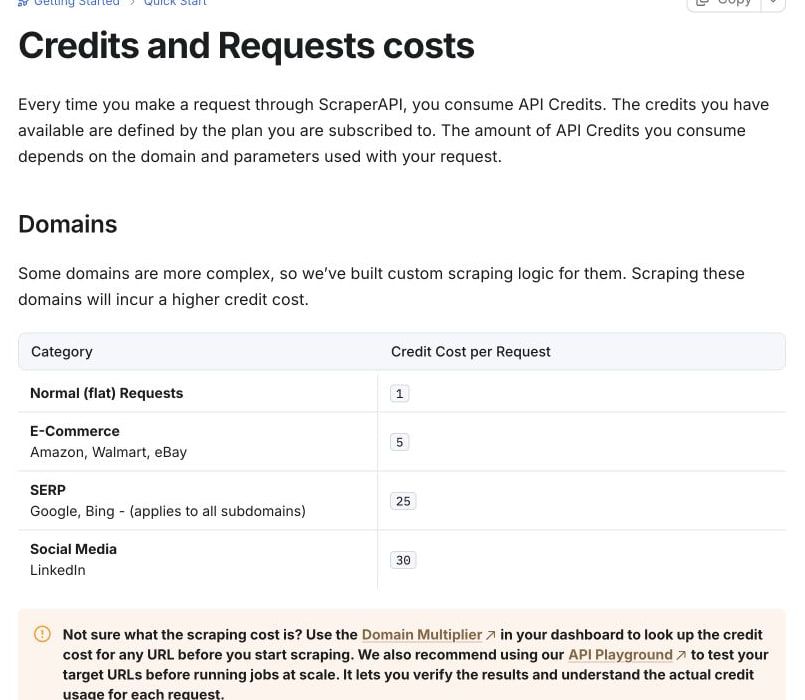
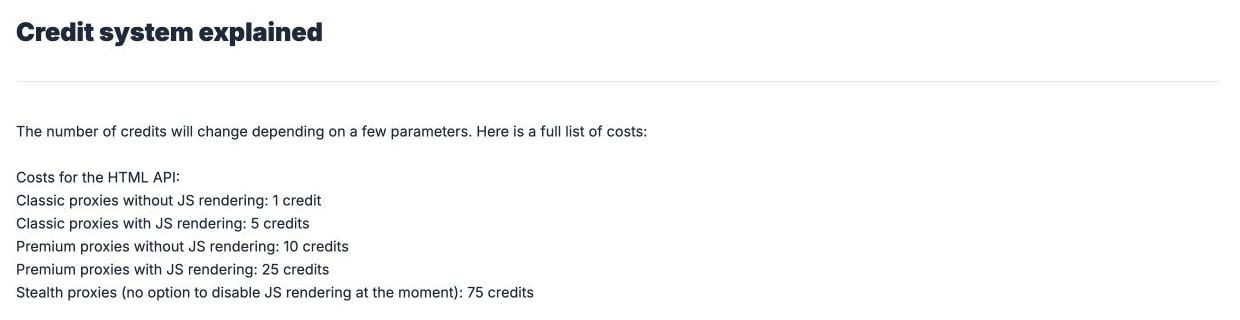
Because each configuration carries its own total weight, and the same generic successful request can consume different amounts at different providers. The table below compares published totals for ordinary configurations; it does not establish costs for every target, protected domain or AI option. Prices and specifications verified: 2026-11-11. ScraperAPI costs, JS FAQ, ScrapingBee HTML API, ZenRows pricing.
| Successful generic configuration | ScraperAPI credits | ScrapingBee credits | ZenRows Fetch credits |
|---|---|---|---|
| Plain HTTP | 1 | 1 with render_js=false |
1 |
| JavaScript only | 10 | 5; default rendering | 5 |
| Premium proxy without JS | 10 | 10 | 10 |
| Premium proxy and JS together | 25 | 25 | 25 |
| Higher protection option | Ultra 30; ultra + JS 75 | Stealth 75, with JS | Choose the actual Fetch configuration |
A multiplier is often a total, not another line to add. ScraperAPI’s 25-credit premium-plus-JS configuration is not the sum of its 10-credit premium and 10-credit JS options, and optional parameters can change the selected path. Credit table, supported parameters.
I would also avoid treating a default as free. ScrapingBee renders JavaScript by default, so plain-request arithmetic requires an explicit render_js=false; its credit guide also contains a premium-AI example that conflicts with the main documentation’s extra-five-credit description. I have left that combination out of the examples. API defaults, credit guide.
Does the target site change the cost? #
Yes, and so can the endpoint. ScraperAPI lists generic requests at one credit, e-commerce at five, Google/Bing at 25 and LinkedIn at 30, and it lists bot-protection bypasses such as Cloudflare, DataDome and Akamai at ten credits per scrape. I would look up the selected target and combination rather than multiply a generic number by a guessed protection surcharge. Target costs.
The July 2026 DataPipeline update says the old five-times uplift was removed and describes parity with standard requests. Yet the current DataPipeline table lists generic premium-plus-JS at 20 where the standard table lists 25; I cannot use that conflict to promise one universal pipeline cost. July update, DataPipeline table, standard table.
ZenRows Batch charges successful tasks, plus tasks whose target answered 404 or 410, at the same weights as Fetch; adaptive mode says it charges the successful configuration. Neither definition tells me that the returned page passed my application’s data checks. Batch FAQ, adaptive mode.
What does a mixed job cost? #
For a hypothetical monthly job with 10,000 plain requests, 2,000 JS requests and 1,000 premium-plus-JS requests, I get the following. Assume every request is a successful generic page, with no special target, AI, extra endpoint, free grant, tax or retry adjustment; no job was executed. ScraperAPI, ScrapingBee, ZenRows.
| Provider | Arithmetic | Credits needed |
|---|---|---|
| ScraperAPI | 10,000 × 1 + 2,000 × 10 + 1,000 × 25 | 55,000 |
| ScrapingBee | 10,000 × 1 + 2,000 × 5 + 1,000 × 25 | 45,000 |
| ZenRows | 10,000 × 1 + 2,000 × 5 + 1,000 × 25 | 45,000 |
This is why I would not rank products by the largest credit number. The smaller weight helps this particular request mix, but plan prices, eligibility, geography and useful-output rates still determine the purchasing decision. Two head-to-heads put those factors next to each other: ZenRows vs ScrapingBee and ScraperAPI vs ScrapingBee.
The same distinction changes a limited allowance. Where the account permits the feature, 1,000 ScraperAPI monthly credits cover at most 100 generic JS requests at ten each, and 5,000 ZenRows credits cover at most 1,000 at five each; billable errors reduce useful results. ScraperAPI billing, JS costs, ZenRows plans.
Do failed requests still cost credits? #
Some do, so I would read the status-code policy before copying a phrase such as “successful requests.” These providers do not equate every billable outcome with an HTTP 200 or a useful extracted record. Specifications verified: 2026-11-11.
| Provider/path | Documented chargeable cases that matter | Why I would budget for them |
|---|---|---|
| ScraperAPI | 200, 404 and client cancellation before 70 seconds | A missing page or an abandoned wait can consume credits. Costs, general FAQ |
| ScrapingBee normal mode | 200, 404, 410, 413; 500 free | The main API documentation includes 413 in addition to ordinary missing-page cases. HTML API |
| ScrapingBee transparent status | All target statuses below 500; automatic retry disabled | The selected response mode changes both billing and retry behavior. HTML API |
| ZenRows Fetch | 404 and 410 are billable | A returned error page is not evidence that a desired record exists. Pricing and billing |
A client retry can be another operation, even if it targets the same URL. ScraperAPI’s own retries may continue for 60 seconds, and its asynchronous API describes work lasting up to 24 hours with batches up to 50,000 URLs; immediate client cancellation is not a proven shortcut to a free result. General FAQ, asynchronous overview.
ZenRows also documents that a cancelled Fetch request can retain its concurrency slot for up to three minutes. Stopping the client therefore does not establish that new work can immediately use that slot. Fetch reference.
I would record the attempt, target, configuration, status, reported cost and validation result separately. That makes a duplicate request distinguishable from a useful second page, and makes it possible to explain why an apparently full allowance produced fewer usable records.
How do you keep spending under control? #
A per-request limit, a credit balance and a recurring payment setting are three different controls. ScraperAPI exposes sa-credit-cost and documents max_cost, which rejects work above the selected ceiling with HTTP 403; it does not by itself set a monthly invoice limit. Cost controls, credit header.
ScrapingBee’s automatic mode chooses among configurations and requires auto mode for max_cost. Its usage-monitoring instructions are helpful for tracking credits, but optional automatic renewal at 98% usage charges the subscription again, carries the remaining 2% and resets the billing date. I would review that setting separately from request cost. HTML API, usage monitoring, automatic renewal.
Ordinary ScrapingBee credits do not roll over; early manual renewal also loses remaining credits. For a bursty job, compare those rules with actual plan-change and renewal dates before buying more capacity. Unused credits, manual renewal.
ZenRows key caps are off by default, checked when work starts and can overshoot through in-flight work or temporarily fail open. The cap documentation also excludes legacy proxy traffic; I would keep a client-side work ledger rather than rely on the key setting as a guaranteed zero-overspend boundary. Key caps.
My proposed client policy is simple: allow only reviewed targets, reserve the worst documented cost of a planned attempt, stop new work when the local reserve is exhausted, and bound retries. This is design advice, not an executed implementation or a promise about how a provider processes cancellations.
What if the product doesn’t bill in credits? #
Credit comparisons become misleading when the product bills a different resource, such as bytes, compute or time. Zyte distinguishes HTTP and browser requests by target tier; Apify measures compute units as memory multiplied by time, so 1,024 MB for one hour is one unit. Neither unit is a fixed number of returned pages. Zyte pricing documentation, Apify resource accounting. I work through each unit in the Zyte API pricing breakdown and the Apify pricing guide.
Firecrawl separates scraping pages, search results and browser minutes in its billing definitions. Crawlbase uses site-difficulty tiers and a JavaScript multiplier that doubles the credits; that is another reason to use the specific endpoint and target rather than a general page count. Firecrawl billing, Crawlbase pricing. I work out how much the site tier moves the bill in my Crawlbase pricing breakdown.
Even “proxy mode” can be a transport for the same API rather than raw GB pricing. ScrapingBee retains API credit rules and defaults through its proxy interface, with browser subresources capable of adding requests. Proxy mode.
What should you actually compare? #
My purchasing metric would be relevant total cost ÷ validated, distinct usable records. Include separate retry, processing and human-validation costs when you compare the whole workflow; a cheap returned HTML page is not enough if your application cannot extract the required fields.
I would first define what counts as usable: required fields present, acceptable freshness, no duplicate entity, and no error page disguised as content. Then compare the same authorized targets and configurations; without that definition, “cost per 1,000 requests” describes billing rather than the outcome you want. Keep that caveat in mind when you read any cheapest scraping API comparison, ours included.
For the next decision, start from the scraping API pillar, which compares providers on these billing rules. The separate ScraperAPI, ScrapingBee and ZenRows pricing articles apply these rules to monthly capacity, while the free API guide separates trials from recurring grants. For a provider that weights plain, rendered and premium calls differently, see what each Scrape.do request type costs.
FAQ #
Does one credit equal one request? #
Only for a documented one-credit endpoint and configuration. I would check feature and target totals before converting an allowance into pages. ScraperAPI, ScrapingBee, ZenRows.
Do JavaScript and premium credits add up? #
Use the provider’s total for the combined configuration. ScraperAPI documents premium-plus-JS at 25, rather than the 20 produced by adding its separate ten-credit options. Credit table.
Are missing pages free? #
Not necessarily. These providers document billable 404 responses, and other status or cancellation rules vary by mode. ScraperAPI, ScrapingBee, ZenRows.
Does more concurrency mean more credits? #
Concurrency describes simultaneous work, while the allowance describes billing capacity. I would not convert concurrency into throughput without request-duration and retry measurements. ZenRows plans.
What should I measure before comparing costs? #
Define a validated, distinct usable record, then count how much work and money produced it. This article has no measured output-quality sample and does not claim a provider wins that comparison.
Sources
25 sources, accessed .
Official pricing, docs, changelogs and status pages 25
- Request credit costs
- Plans and billing
- JS rendering FAQ
- Supported parameters
- Cost control
- DataPipeline credit table
- Async API
- General FAQ
- July 2026 DataPipeline billing change
- HTML API
- Proxy mode
- Credit system
- Unused credits
- Early renewal
- Auto renewal
- Monitoring credits
- Zenrows monthly pricing
- Fetch API reference
- Key credit caps
- Adaptive stealth
- Batch FAQ
- Zyte API billing
- Actor resources
- Firecrawl billing
- Crawlbase pricing


