Comparison
Firecrawl vs Apify (2026): Crawl API or Actor Platform?
Firecrawl vs Apify: page credits vs Actor compute costs at 10K–1M pages, plus billing limits and workflow fit. Verified 31 Oct 2026.

You need web data for an app or an AI pipeline, and your shortlist says Firecrawl or Apify. They aren’t two versions of the same product: one is a crawl API billed per page, the other is a platform of scrapers billed on compute.
So I priced the same job on both, crawling pages to markdown at 10K, 100K and 1M pages a month, from their own pricing pages rechecked 31 October 2026. It’s part of my wider guide to choosing a crawl API or web scraper for LLMs.
Short on time?
Short on time? Here's my take.
- Pick Firecrawl if…
- Firecrawl
- You want LLM-ready markdown from many sites you don't know in advance, at a fixed price per page. It's 1 credit a page with JavaScript rendering and proxies included, so 100K ordinary pages of markdown a month fit the $99 plan, before optional features or provider-specific routes.
- Pick Apify if…
- Apify
- You need structured data from specific sites on a schedule, a ready-made scraper someone else maintains, built-in storage, or your own code. Its Website Content Crawler is also the cheaper crawl on simple pages: about $20 for 100K on Apify's estimate.
- Use both when…
- Firecrawl + Apify
- You load docs and knowledge bases into RAG as markdown and also run scheduled scrapes of a few big sites. There's no official integration between them, so you connect the two yourself.
Prices verified . Prices verified 31 Oct 2026. Apify's per-page figures are Apify's own estimates, not measurements.
What is the difference between Firecrawl and Apify? #
Firecrawl is one API that turns web pages into LLM-ready markdown and bills a fixed credit per page. Apify is a platform that runs scrapers, called Actors, and bills the compute they use.
Firecrawl gives you endpoints for scrape, crawl, map, search, JSON extraction, agent, interact, monitor and parse. A scrape or a crawled page costs 1 credit, and the scrape docs list “js-rendered sites, PDFs” among what it handles. The core is open source under AGPL-3.0, with MIT-licensed SDKs and an MCP server.
Apify is a serverless platform for Actors, which are containerized scraping and automation programs. You can run Apify’s own Actors, pick from a public Store where each developer sets the price, or deploy your own code, and the platform adds proxies, storage, schedules, webhooks and an MCP server.
The Actor that does Firecrawl’s job is Apify’s own Website Content Crawler (WCC). It crawls a site and outputs plain text, Markdown or HTML into a dataset you can export as JSON, CSV or XML. Apify also maintains Crawlee, an open-source crawling framework for Node.js and Python under Apache-2.0, which you can run anywhere.
Firecrawl vs Apify at a glance #
The biggest split is the billing unit: Firecrawl charges per page, Apify charges for compute units (1 CU is 1 GB of RAM running for one hour), proxies and any Actor fee. Everything else follows from “one API” versus “a platform”.
| What you're comparing | Firecrawl | Apify |
|---|---|---|
| Billing unit | Credits: 1 per page scraped or crawled; +4 for JSON output | Plan fee = prepaid usage; compute units at $0.20 to $0.13, plus proxy traffic, plus any Actor fee |
| Free tier | 1,000 credits a month, no card | $5 of platform usage a month |
| Entry paid plan | Hobby: $19/mo ($16 billed annually), 5,000 credits | Starter: $19/mo ($17 billed annually), $19 of usage included |
| Output | Markdown by default; HTML, raw HTML, JSON, screenshot, links, summary and more | WCC: text, Markdown or HTML, exported as JSON, CSV or XML; other Actors vary |
| JavaScript rendering | Included in the 1 credit | WCC: headless browser, raw HTTP (Cheerio) or adaptive; browser estimate is higher |
| Proxies | Included: basic, enhanced or auto | Datacenter IPs included (5 to 500 by plan); residential $7 to $8 per GB extra |
| Ready-made site scrapers | Alexandria provider connectors; compare the specific source | Yes, the Apify Store |
| Your own code | Browser/Interact code and page actions; different from custom Actor jobs | Your own Actors in JavaScript or Python, or Crawlee |
| Scheduling and storage | Webhooks and /monitor cron/text schedules; minimum interval 5 minutes | Schedules, datasets, key-value stores, request queues |
| MCP and SDKs | MCP server and official SDKs | Hosted and local MCP server; JavaScript and Python clients |
| Concurrency | 2 to 100 concurrent browsers by plan | 5 to 256 concurrent runs by plan |
| Open source | Core AGPL-3.0; SDKs MIT | Crawlee Apache-2.0; the platform itself is closed |
Source: Firecrawl's pricing.md, billing, scrape, crawl and proxies docs; Apify's pricing page, Website Content Crawler page and platform docs. All rechecked 31 Oct 2026. Scroll sideways for more columns.
Firecrawl’s full plan list is in my guide to every Firecrawl plan and extra-credit rate. This page only uses the plans each volume needs, and both vendors’ list prices also sit in my scraping API price dataset.
Is Apify cheaper than Firecrawl for the same crawl? #
On Apify’s own estimate, a raw-HTTP crawl with Website Content Crawler is cheaper than Firecrawl at every volume I priced. Once pages need a real browser, Apify’s estimate spans from cheaper than Firecrawl to several times more, while Firecrawl’s price stays put.
The job: crawl N pages a month to basic markdown, with no LLM extraction, on monthly billing and the cheapest plan that covers it. Firecrawl figures are list prices from its pricing.md. Apify figures are the per-1,000-page ranges on the WCC page: “$0.2 per 1,000 web pages with raw HTTP crawler” and “$0.5 - $5 per 1,000 web pages with a headless browser”.
Same job on both: crawl N pages a month to markdown
Verified
| Plan | Firecrawl (list price) | Apify WCC, raw HTTP (Apify's estimate) | Apify WCC, headless browser (Apify's estimate) |
|---|---|---|---|
| 10K pages a month | $44 | $0 (inside the Free plan) | $0 to $50 |
| 100K pages a month | $99 | ≈$20 | $50 to $500 |
| 1M pages a month | $749 | ≈$200 | $500 to $5,000 |
Source: Firecrawl pricing.md and Apify Website Content Crawler page, monthly billing; Apify cost = the larger of the plan fee and usage, using Apify's own per-1,000-page ranges; the math for every cell is in the table below
Here’s the arithmetic behind each cell, so you can redo it at your own volume:
| Pages a month | Firecrawl | Apify WCC, raw HTTP | Apify WCC, headless browser |
|---|---|---|---|
| 10K | Hobby $19 (5,000 credits) + 5 packs of 1,000 extra credits at $5 = $44, or $4.40 per 1K. If Hobby’s extra-credit limit blocks that, Standard at $99 | 10 × $0.2 = $2 of usage, inside the Free plan’s $5 = $0 | 10 × $0.5 to $5 = $5 to $50 of usage. $5 fits the Free plan; $50 is Starter’s $19 + $31 pay-as-you-go |
| 100K | Standard $99 for 100,000 credits, $0.99 per 1K ($83 a month billed annually) | 100 × $0.2 = $20: Starter’s $19 + $1 = ≈$20 | 100 × $0.5 to $5 = $50 to $500 on Starter |
| 1M | Scale $749 for 1,000,000 credits, $0.75 per 1K ($599 a month billed annually, or $7,190 a year). Growth plus packs would be $399 + 200 × $5 = $1,399 | 1,000 × $0.2 = $200: Starter + $181, or Scale’s $199 fee = ≈$200 | 1,000 × $0.5 to $5 = $500 to $5,000 |
Apify’s plan fee is prepaid usage, and paid plans let you pay as you go above it. So each Apify cell is whichever is larger: the plan fee or the usage. On the Free plan, the pricing page says access is blocked until the next monthly cycle once the $5 is used up, so $5 is a hard cap there.
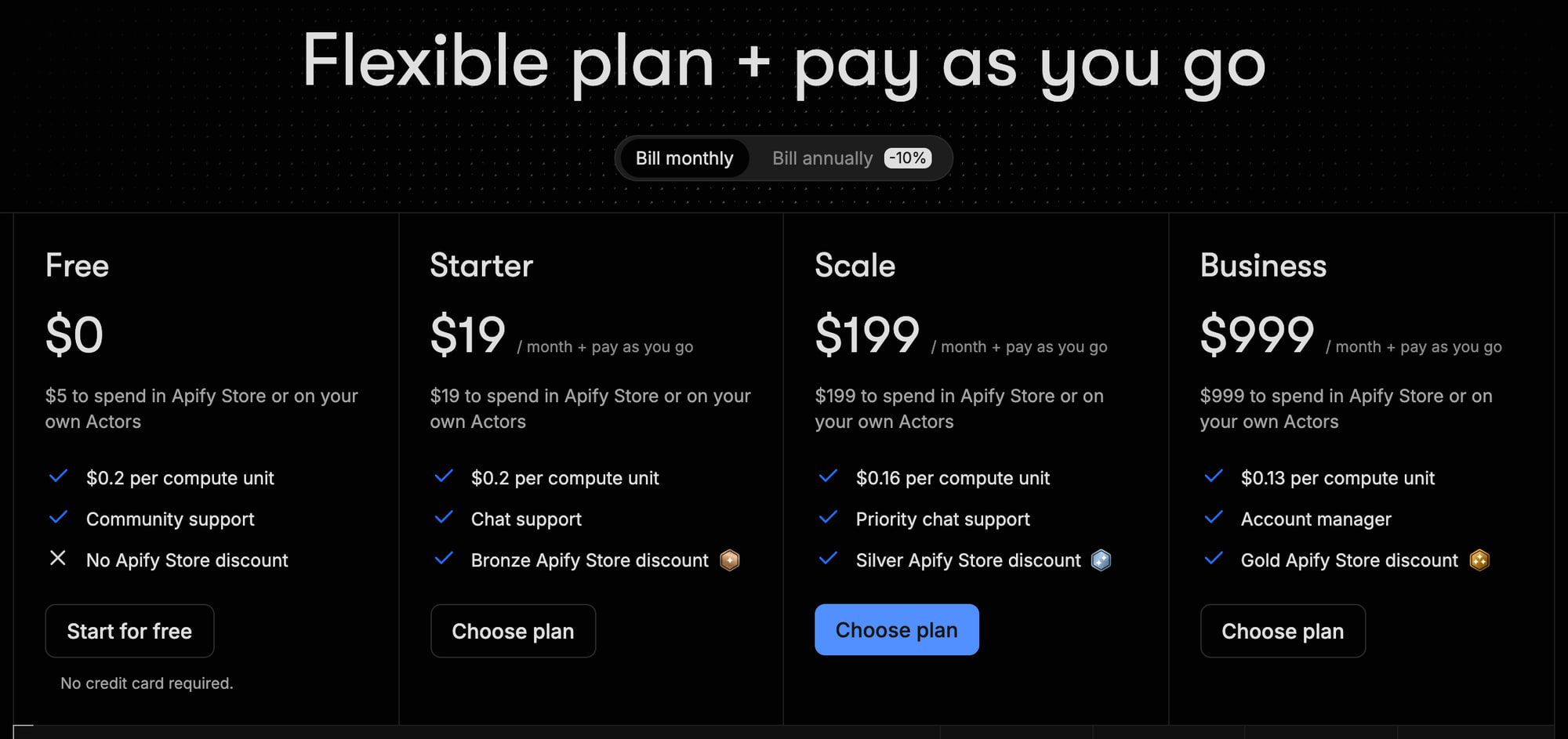
Here are the Apify plan rates behind that math, all from its pricing page:
Apify plan fees and usage rates
Verified
| Plan | Monthly fee | Usage included | Per compute unit | Residential proxy per GB | Concurrent runs |
|---|---|---|---|---|---|
| Free | $0 | $5 | $0.20 | $8 | 5 |
| Starter | $19 | $19 | $0.20 | $8 | 32 |
| Scale | $199 | $199 | $0.16 | $7.50 | 128 |
| Business | $999 | $999 | $0.13 | $7 | 256 |
Source: Apify pricing page, annual billing: Starter $17, Scale $179, Business $899 a month; Enterprise is custom; unused usage credits expire at the end of the billing cycle
Which compute-unit rate do Apify’s estimates use? #
Apify’s two pages disagree on the rate. The WCC page says its estimates use a “baseline price of $0.25/CU”, while the pricing page lists $0.20 on Free and Starter, $0.16 on Scale and $0.13 on Business. I trust the pricing page for plan rates, and the table above uses Apify’s estimates exactly as published.
If those estimates are all compute priced at $0.25, your plan’s lower rate shrinks them: × 0.8 on Free and Starter, × 0.64 on Scale and × 0.52 on Business. On that assumption, 1M browser-rendered pages on Scale would come to about $320 to $3,200 instead of $500 to $5,000. That’s my estimate, not Apify’s, and it runs the other way if residential proxy traffic isn’t included in Apify’s range, which I couldn’t confirm.
Which is cheaper for your pages? #
If your target pages work over raw HTTP, meaning the content is in the HTML without running JavaScript, Apify is the cheaper crawl at every volume on its own estimate. At 100K pages that’s about $20 against $99.
If your targets need a browser, Firecrawl’s $0.99 per 1K at 100K and $0.75 at 1M sit near the bottom of Apify’s $0.5 to $5 range. Apify only wins there if your pages land at the cheap end, and you won’t know that until you run a sample.
That’s the real trade-off: Apify can be cheaper, and Firecrawl is easier to budget. Firecrawl’s own comparison makes the same point, saying Apify’s “compute-based pricing makes cost comparison difficult”, but read that as a vendor’s claim about a competitor.
What hidden costs should you watch for? #
On Firecrawl, these are the ones I’d watch:
- JSON output costs 4 extra credits a page. That’s 5 credits a page instead of 1, so 100K pages with JSON extraction is 500,000 credits, which is the $399 Growth plan rather than $99 Standard (my arithmetic from the billing docs).
- Set a crawl limit. The crawl docs say “The default crawl
limitis 10,000 pages”. - Returned blocked/error documents still cost. Ordinary no-document scrape failures are free, but a returned 403/404 costs the base page credit plus modifiers. Billing docs also list charged no-document exceptions for threat scans, injection checks, lockdown misses, monitor checks and browser sessions.
- Plan credits reset monthly. Per pricing.md, only Scale rolls unused credits over, for one month (Enterprise terms are custom); the billing docs word it as “annual Scale plans”, so check before you count on it.
On Apify, the traps are different:
- Proxies can sit outside the estimate. Residential proxy traffic is $7 to $8 per GB on every plan, and I couldn’t confirm whether WCC’s per-page ranges include it.
- Prepaid usage expires. Per the pricing page, “unused usage credits are not rolled over”, so a $199 Scale plan you only use $50 of still costs $199.
- Store Actors and optional WCC features can add fees. Basic WCC is pay-per-usage, but its current README, checked 31 October, offers optional AI Page Summary as a paid add-on (typically $2–$3 per 1,000 pages, up to $7 without headings; Free-plan users pay 10x the underlying OpenRouter cost). It is off by default. Other Actors can price events with platform usage included or separate; inspect their specific pricing.
Firecrawl’s current prices took effect on 4 September 2026, per its pricing page. Apify’s Starter plan is $19 today. When I first read Firecrawl’s comparison page on 27 September 2026, it listed Apify’s entry plan at $29 a month; on 31 October that page shows “Last updated: Sep 04, 2026” and no Starter dollar figure. I couldn’t confirm when Apify’s price changed.
When does a ready-made Apify Actor beat one crawl API? #
When you want specific fields from a specific site, such as places from Google Maps, and someone already maintains a scraper that handles that site’s layout and pagination. Apify offers a Store of site-specific Actors and hosted custom jobs. Firecrawl has a different model: its crawl API, browser tools and Alexandria provider connectors; I would compare the particular data source rather than claim it has no specialist capabilities.

The compass Google Maps Scraper is a concrete example. Its public Store API record, checked 31 October 2026, identifies pay-per-event pricing: the base place-scraped event is $0.004 on FREE, $0.003 BRONZE, $0.002 SILVER, $0.0015 GOLD, $0.00126 PLATINUM and $0.000756 DIAMOND. These are event tiers, not a complete per-place invoice: details, reviews and filters can add charges, and the record also lists an Actor-start event at $0.00005 per GB of memory with a one-unit minimum. Confirm the applicable tier and enabled events before budgeting.
Apify’s Store docs, rechecked 31 October 2026, list two pricing models for Actors:
- Pay per event: the developer sets a price for defined events, like each place scraped.
- Pay per usage: you pay only the platform usage the run consumes. WCC works this way.
A third model, rental (a monthly Actor fee), was scheduled for retirement on 1 October 2026.
Rental retirement: docs updated, Store-wide completion unconfirmed
On my 15 October recheck, Apify’s Store docs still described renting Actors alongside the 1 October retirement date. On 31 October the same Store docs mention only pay per event and pay per usage, and the separate rental documentation page returned a 404 (not found) error. I still could not independently confirm that every remaining rental Actor has migrated.
The developer migration guide calls 30 September 2026 the “hard deadline” and describes an exception: Actors with future pricing configured before September switch to that pay-per-event pricing 14 days after 30 September instead of to pay-per-usage. Check the specific Actor’s current pricing before estimating its bill.
For the two examples here, I checked the current public Store records on 31 October: Website Content Crawler has the FREE/pay-per-usage model, and compass Google Maps Scraper has pay-per-event pricing. Neither record lists a rental tariff. FREE here means no base Actor fee, not free platform usage. This confirms these examples only; it does not establish universal rental retirement.
The convenience comes with a dependency: third-party Actors are maintained and priced by their developers. Before using one, inspect its current pricing, issues, rating and update history.
If no Actor fits, you can write your own in JavaScript or Python and run it on Apify, or use Crawlee on your own servers. That’s the build route, and its labor and infrastructure costs are a separate question.
Is Apify legal to use? #
Whether a given scrape is lawful depends on the site, the data and how you collect it, not on the tool. Apify’s terms say “You are solely responsible for the legality… of all Customer Data”. None of this is legal advice.
When should you use both Firecrawl and Apify? #
When your work splits into two jobs: turning many unknown sites into markdown for a model, and pulling structured data from a few known sites on a schedule. Firecrawl fits the first, Apify’s Store and schedules fit the second.
A typical split: Firecrawl crawls docs sites and knowledge bases into markdown for RAG, and an Apify Actor scrapes a marketplace or Google Maps every morning into a dataset. Teams do run both; one Hacker News commenter wrote that internally they use Apify and Firecrawl for workflows “that run in the cloud”, though that comment is from 2024.
Their HTTP APIs can be connected through your code or a workflow tool; check current Apify integrations and the credentials required by your selected workflow before choosing one.
What do users report about Firecrawl and Apify? #
The cited Store ratings and individual comments offer context, not a representative survey or comparative reliability test. Firecrawl comments below include praise for its results, self-hosting complaints and a site owner’s criticism of crawler behavior.
I couldn’t read Reddit, including the thread that ranks for this search, because it was unreachable from my research tools. G2 returned an error for both products, so neither appears here.
Apify #
Capterra could not be retrieved for this refresh. I am not carrying its earlier rating or quotations forward as current evidence; inspect recent reviews before deciding, and treat any one review as an individual account.
The current Website Content Crawler Store API record, checked 31 October, showed 173,371 users and a 4.61 rating from 234 reviews. These changing Store counts describe adoption and individual reviews, not measured accuracy or reliability.
Firecrawl #
On Hacker News, one commenter wrote “I am getting much better results from Firecrawl (not affiliated with them, just a happy customer)”, and another said “For crawling we use Firecrawl. They handle most of the blocking issues and proxies.”
The sharpest criticism came from a site owner who granted that its bots “seem much more well behaved than others” but added that “running a crawler fleet which is deceptive and evasive in its identification and don’t honor REP is no way to build a business” (REP is the robots exclusion protocol, robots.txt). Firecrawl’s crawl docs say robots.txt is respected by default and only Enterprise can turn that off. That’s one voice against the docs, so weigh it as such.
On GitHub, the friction is mostly self-hosting: open issues cover a RabbitMQ healthcheck, zombie processes and a self-hosted /v2/search that silently returns zero results. On cost, issue #3552 reports “Agent reached max credits”, and merged pull request #4412 makes a per-key spend limit return HTTP 402 instead of letting the request through.
Self-hosting also isn’t the same product. Firecrawl’s self-host docs say the default stack lacks the Fire-engine anti-bot layer, screenshots and page actions, and the agent and interact features, among others.
What each vendor says about the other #
Both Firecrawl and Apify publish their own comparison. Apify’s current page is dated 30 September 2026; older quotations from its September 1 version are not carried forward here. I use the current primary pricing pages and specific Actor records for the cost comparison, rather than either vendor’s verdict.
Firecrawl and Apify: pros and cons #
Firecrawl #
What stands out
- A fixed price per page: 1 credit for a scrape or a crawled page, with JavaScript rendering and proxies included
- Markdown by default, plus HTML, JSON, screenshots and links from the same call
- Most failed requests that return no document cost nothing
- Crawl respects robots.txt by default
- Open-source core (AGPL-3.0), MIT-licensed SDKs and an MCP server
What gives me pause
- No third-party scraper marketplace like the Apify Store and no hosted custom jobs like Actors; Alexandria connectors cover specific providers only
- /monitor supports cron/text schedules; ordinary page checks start at 1 credit each
- JSON output adds 4 credits a page, five times the cost of plain markdown
- Plan credits don't roll over, except on Scale for one month
- Self-hosting drops the Fire-engine anti-bot layer, screenshots, and the agent and interact features
Apify #
What stands out
- On Apify's estimate, raw-HTTP crawling at $0.2 per 1,000 pages is the cheapest option on this page at every volume
- A Store of ready-made Actors for specific sites and jobs; inspect current pricing and maintenance
- Schedules, datasets, key-value stores and webhooks built in
- Your own Actors in JavaScript or Python, plus Crawlee (Apache-2.0) to run anywhere
- A hosted MCP server and integrations with n8n, Make, Zapier and LangChain
What gives me pause
- Browser crawls range from $0.5 to $5 per 1,000 pages on Apify's own estimate, so the bill is hard to know in advance
- Residential proxies cost $7 to $8 per GB extra
- Plan usage is prepaid and expires at the end of each billing cycle
- Store Actors are priced and maintained by their developers; check each Actor's current pricing and update history
- Its crawler page and pricing page disagree on the compute-unit rate ($0.25 vs $0.20)
Which one should you pick? #
If I were building an AI product that reads many different sites, I’d start with Firecrawl for the predictable per-page price. If I needed the same few sites scraped into structured data every day, I’d start with Apify. Here’s the longer version by scenario:
- Docs sites and knowledge bases into RAG, many domains: Firecrawl. 100K pages a month is $99, JavaScript included.
- Simple static pages at volume, cost first: Apify’s Website Content Crawler over raw HTTP, about $20 per 100K pages on Apify’s estimate.
- JavaScript-heavy pages and a budget you have to quote up front: Firecrawl, because its price doesn’t depend on how heavy each page is.
- Structured data from Google Maps, a marketplace or another specific site, on a schedule: an Apify Store Actor, after you check its rating and update history.
- Custom crawl logic, your own code and storage: Apify, or Crawlee if you’d rather run it on your own servers.
- Both kinds of job: use both, and connect them yourself.
Neither fits? If you’d rather self-host an open-source crawler, see Crawl4AI vs Firecrawl. If you mostly convert single URLs to markdown, Firecrawl vs Jina Reader compares the per-token option, and my guide to turning websites into markdown for LLMs covers the approaches side by side. If your agent needs search results rather than pages you pick, see Firecrawl compared with Tavily and Exa.
For every other option, my Firecrawl alternatives guide goes wider. If you’re scraping specific sites that block basic requests, the scraping APIs guide and my cheapest web scraping API comparison are the better starting points. Every price here is re-verified at least every 90 days, as my methodology explains.
FAQ
What is the difference between Firecrawl and Apify?
Firecrawl is one API. You send it a URL or a site and get LLM-ready markdown back, at 1 credit per page with JavaScript rendering and proxies included.
Apify is a platform that runs scrapers called Actors: its own Website Content Crawler, ready-made Actors from other developers in its Store, and your own code. It bills compute units, plus proxy traffic and any fee the Actor's developer sets.
Is Apify cheaper than Firecrawl?
For simple pages, on Apify's own estimate, yes. Its Website Content Crawler costs about $0.2 per 1,000 pages over raw HTTP, so 100K pages come to about $20 a month against Firecrawl's $99.
For pages that need a browser, Apify estimates $0.5 to $5 per 1,000, so the same 100K pages land anywhere from $50 to $500. Firecrawl's price stays at 1 credit a page either way. Prices verified 31 October 2026.
What is better than Apify?
It depends on the job. If you want LLM-ready markdown from many different sites at a price you can predict, a crawl API such as Firecrawl is a candidate; compare the documented output controls and your permitted sample rather than treating a vendor comparison as independent evidence.
If you need specific sites that block basic requests, a web scraping API may suit you better. My scraping APIs guide and my Firecrawl alternatives guide, both linked in the "Which one should you pick?" section, compare those options.
Which scraping APIs are the best?
That depends on the sites you target and your volume, and it's a different comparison from this one. My guide to scraping APIs, linked in the "Which one should you pick?" section above, compares them with prices at several volumes.
Is Apify illegal?
Apify sells a scraping and automation platform. The existence of a tool or company does not decide whether a particular use is lawful.
Whether a particular scrape is lawful depends on the site, the data and how you collect it. Apify's terms, effective 9 July 2026, make the customer "solely responsible for the legality" of the data they collect. This summarizes the service terms, not a court ruling or legal advice.
What are some alternatives to Firecrawl?
Three worth a look: Apify's Website Content Crawler if you want the same markdown output on a pay-per-usage platform, Crawl4AI if you'd rather self-host an open-source crawler, and Jina Reader if you mostly turn single URLs into markdown. Crawlee (Apache-2.0) is the build-it-yourself route.
My Firecrawl alternatives guide compares them in full.
Sources
36 sources, accessed .
Official pricing, docs, changelogs and status pages 21
- Firecrawl pricing (Markdown version of the pricing page)
- Firecrawl pricing page (rate limits, effective date)
- Firecrawl docs: billing and credits
- Firecrawl docs: scrape and output formats
- Firecrawl docs: crawl
- Firecrawl docs: proxies
- Firecrawl docs: self-hosting and its limits
- Firecrawl docs index (llms.txt)
- Firecrawl changelog
- Apify pricing
- Apify Website Content Crawler (Store page)
- Apify Store API: Website Content Crawler stats
- Apify Store API: Google Maps Scraper pricing and stats
- Apify docs: Actors in Store (pricing models)
- Apify docs: MCP server
- Apify docs: integrations
- Apify docs: schedules
- Apify docs: storage
- Apify docs: JavaScript API client
- Apify general terms and conditions
- Apify affiliate program
GitHub code, issues and releases 8
- Firecrawl repository (AGPL-3.0 core, MIT SDKs)
- Crawlee repository (Apache-2.0)
- Apify Python API client
- Firecrawl issue #4750: self-host RabbitMQ healthcheck
- Firecrawl issue #4527: zombie processes when self-hosted
- Firecrawl issue #4375: self-hosted /v2/search returns zero results
- Firecrawl issue #3552: "Agent reached max credits"
- Firecrawl pull request #4412: per-key spend limits