How to choose
Website to Markdown for LLMs: APIs and Libraries Compared
Turn web pages into LLM-ready markdown: hosted APIs vs open-source libraries on JS, tables, licenses, $/1K pages and benchmarks. Verified 31 Oct 2026.
You want to hand web pages to an LLM as clean markdown, without the nav menus, cookie banners and broken tables that raw HTML drags along. I went through the docs, pricing pages, licenses and published benchmarks for about two dozen converters on 27 September 2026, rechecked every price, limit, version and license against the live pages on 31 October 2026, and sorted them by the two jobs they do and the three routes you can take.
The short answer: use a hosted API when pages need JavaScript, an open-source library when they’re static and you can run code, and the site’s own markdown when it offers some. This page is about the conversion step; if you’re choosing a crawl API overall, start at my crawl API guide.
Short on time?
Short on time? Here's my take, by job.
- JS-heavy pages, hosted
- Firecrawl
- Because it handles JavaScript rendering, main-content mode (onlyMainContent) is on by default, PDFs and DOCX go through the same call, and it publishes a price at every volume: $0.99 per 1K pages at 100K a month.
- Static articles, free
- Trafilatura
- Because it extracts and writes markdown in one Python call under Apache-2.0, and scored 0.924 word F1 on article pages in the WCXB benchmark. It scores far lower on forums and listing pages.
- RAG over a docs site
- Crawl4AI (after checking for llms.txt)
- Because it crawls and filters in one Apache-2.0 package (with an added attribution clause), with a trimmed fit_markdown output. Its cloud's Starter plan is $10 a month for 10,000 credits at 0.5 credit a plain page, and a verified email gets 1,000 free credits a month. If the site publishes /llms.txt, start there.
- An agent reading a few URLs
- Jina Reader
- Because it answers without a key at 20 requests a minute, and a new key adds 10M free tokens, labelled non-commercial use only. The ReaderLM-v2 model is CC-BY-NC-4.0, so running it yourself commercially needs Elastic's separate license.
- PDFs and Office files
- MarkItDown, or Docling for complex PDFs
- Because both are MIT-licensed file converters. MarkItDown covers PDF, Office and EPUB; Docling adds PDF layout handling and chunked JSONL output.
- You own the site
- llms.txt, or Cloudflare Markdown for Agents
- Because serving your own markdown beats anyone's guess at your main content. Cloudflare converts at the edge on Pro, Business and Enterprise at no cost, but its default Content-Signal allows AI training.
Prices verified . No pick here rests on my own tests yet. They come from vendor docs, pricing pages and published benchmarks, read on 27 Sep 2026 and rechecked on 31 Oct 2026.
How do you convert a website to markdown for an LLM? #
Fetch the page, pull out the main content, and convert that HTML to markdown. A hosted API does all three from a URL; an open-source library does the last two on HTML you supply. If the site publishes its own markdown, ask for that instead.
That gives you three routes:
- Hosted API: send the URL to Firecrawl, Jina Reader or Crawl4AI Cloud, which fetch it, render JavaScript and return markdown.
- Open-source library: fetch the HTML yourself, then run Trafilatura (Python) or Defuddle (TypeScript), which extract and convert in one step, or Readability followed by Turndown.
- Site-provided markdown: check for
/llms.txt, or sendAccept: text/markdownto sites that use Cloudflare’s Markdown for Agents.
| Your job | Start with | Route | Why |
|---|---|---|---|
| JavaScript-heavy pages | Firecrawl | Hosted API | Handles JavaScript rendering, main-content mode is on by default, and 100K pages a month cost $0.99 per 1K |
| Static articles, no budget | Trafilatura | Python library (Apache-2.0) | Extracts and writes markdown in one call; 0.924 word F1 on WCXB article pages |
| RAG over a docs site | /llms.txt first, then Crawl4AI |
Site markdown, then library or cloud | Crawls and filters in one package; its cloud’s $10 Starter plan covers 20,000 plain pages |
| An agent reading a few URLs | Jina Reader | Hosted API | Answers without a key at 20 requests a minute |
| PDFs and Office files | MarkItDown, or Docling for complex PDFs | Python libraries (MIT) | File converters; Docling adds PDF layout handling |
| You own the site | llms.txt or Cloudflare Markdown for Agents | Site-provided markdown | No guessing at your main content; Cloudflare’s version costs nothing extra on Pro, Business and Enterprise |
Extraction vs conversion: which tools do which job? #
Turning a page into LLM-ready markdown is two jobs. Extraction decides which parts of the page are the main content; conversion turns that HTML into markdown syntax such as headings, lists, tables and code blocks.

If you run only a converter, the menus and footers come along too. If you run only an extractor, you get cleaned HTML, not markdown. On a 441-point Show HN thread about a webpage-to-markdown tool, one commenter split the problem into recall, precision and formatting, which is the same split in more detail.
| Tool | Extracts main content | Converts to markdown |
|---|---|---|
| Mozilla Readability | Yes | No (returns cleaned HTML) |
| Turndown, html2text, markdownify | No | Yes |
| MarkItDown, Docling | No (document converters) | Yes |
| Cloudflare Browser Run /markdown | No main-content mode documented | Yes |
| Trafilatura, Defuddle, Crawl4AI, MinerU-HTML | Yes | Yes |
| Firecrawl, Jina Reader, Exa, Tavily, Apify Website Content Crawler | Yes | Yes |
Turndown’s own README says it only converts. That’s why the classic JavaScript stack is Readability for boilerplate removal, then Turndown for the markdown.
URL-to-markdown APIs vs HTML-to-markdown libraries: what can each do? #
Hosted APIs take a URL and do the fetching for you; libraries work on HTML (or files) you’ve already got. The three routes are a hosted API that fetches and converts for you, an open-source library you run yourself, or markdown the site serves on purpose. This table covers the first two; site-provided markdown gets its own section below.
| Tool | Route | Jobs | JavaScript rendering | Main-content control (docs name) | PDF / Office | License |
|---|---|---|---|---|---|---|
| Firecrawl | Hosted API; self-host possible | Both | Yes (docs list it as handled; no default switch documented) | onlyMainContent (on by default), includeTags, excludeTags | PDF and DOCX auto-detected | AGPL-3.0 (self-hosted core) |
| Jina Reader | Hosted API | Both | Yes (X-Engine header) | X-Target-Selector, X-Remove-Selector, ReaderLM-v2 and jina-ocr-v1 modes | Repo Apache-2.0; ReaderLM-v2 and jina-ocr-v1 CC-BY-NC-4.0 | |
| Crawl4AI | Library, plus a hosted cloud | Both, plus crawling | Real-browser mode (1 credit on Cloud vs 0.5 for a plain page) | fit_markdown via Pruning, BM25 or LLM filters | Not listed | Apache-2.0 + attribution clause |
| Cloudflare Browser Run /markdown | Hosted API | Conversion (whole page) | Yes | None documented; rejectRequestPattern | Not listed | Hosted service |
| Exa Contents | Hosted API (search add-on) | Both | Not documented | verbosity: compact, standard, full | Not listed | Hosted service |
| Tavily Extract | Hosted API (docs read only) | Both | Not documented | extract_depth: basic or advanced | Not listed | Hosted service |
| Apify Website Content Crawler | Hosted actor | Both | Yes (Firefox + Playwright), plain HTTP (Cheerio) or adaptive switching (default) | Readability (default), Extractus or Defuddle transformer | Not listed | Hosted service |
| Trafilatura | Python library | Both | Not documented; parses the HTML you pass | Built in; favor_precision, favor_recall | Not listed | Apache-2.0 |
| Readability + Turndown | JavaScript libraries | Readability extracts, Turndown converts | You supply the HTML | Readability's article parser | Not listed | Apache-2.0 + MIT |
| html2text / markdownify | Python libraries | Conversion | You supply the HTML | None | Not listed | GPL-3.0-or-later / MIT |
| Defuddle | TypeScript library | Both | You supply the HTML | Built in | Not listed | MIT |
| MarkItDown | Python library | Conversion (files) | You supply the file or HTML | None | PDF, Office, EPUB and more | MIT |
| Docling | Python library | Conversion (documents) | You supply the file | None | PDF, Office, images, audio | MIT |
| MinerU-HTML | Python library + 0.5B model (v1.1) | Extraction by model, markdown output | You supply the HTML | The model picks the content | Not listed | Code Apache-2.0; model license not stated |
| ReaderLM-v2 | 1.54B model (also a Jina Reader mode) | Both | You supply the HTML | The model | Not listed | CC-BY-NC-4.0; commercial license sold separately |
Source: Each tool's docs, README or model card, read 27 Sep 2026 and rechecked 31 Oct 2026. A dash means the docs I read don't cover it. 'Both' means extraction and conversion. Scroll sideways for more columns.
Hosted APIs that return markdown #
Firecrawl returns markdown alongside html, rawHtml, json, links and screenshots. Its /scrape defaults are onlyMainContent: true, blockAds: true and removeBase64Images: true, with a 60-second timeout, per the endpoint reference, and it auto-detects PDF and DOCX at 1 credit per PDF page.
The repo is AGPL-3.0 with 197,044 stars (31 Oct 2026). Its latest feature release is still v2.11.0 (19 June 2026); automated API image builds have followed, with tag v2.11.637 the newest on 31 Oct 2026. Its self-hosting guide calls the bundled setup a “starting point, not a production architecture”, and the Fire-engine component is separate. Plan-by-plan costs are in my Firecrawl pricing breakdown, and other options are in Firecrawl alternatives.
Jina Reader turns a URL into markdown in one request. Per its page, you get 20 requests a minute with no key, 500 with a free or paid key, and 10M free tokens per new key, billed on output tokens. Jina’s pricing page labels those free tokens “Non-commercial use only (CC-BY-NC)” and sells packs of 1B tokens for $50 and 11B for $500 (verified 31 Oct 2026).
Headers do the tuning: X-Target-Selector and X-Remove-Selector for boilerplate, X-Engine for rendering, and X-Respond-With for model-based conversion. The Reader page’s FAQ still documents x-respond-with: readerlm-v2, which the model card says uses 3x the normal token count; the Reader page now also lists a jina-ocr-v1 mode that reads the page as an image and “Costs 40× more tokens” (checked 31 Oct 2026). ReaderLM-v2 is licensed CC-BY-NC 4.0, as is jina-ocr-v1 per its model page; for ReaderLM-v2 the Reader page says “Elastic has sold that license separately since August 10, 2026”. For the head-to-head with Firecrawl, see Firecrawl vs Jina Reader.
Crawl4AI is an Apache-2.0 Python crawler (86,602 stars, v0.9.5 on 14 Oct 2026, checked 31 Oct 2026) that now has a hosted cloud. Its LICENSE adds a clause that public uses “must include” an attribution to the project. Its markdown docs separate raw_markdown from fit_markdown, which is trimmed by a PruningContentFilterLXML (the older PruningContentFilter is deprecated), BM25ContentFilter or LLMContentFilter.
The cloud bills credits at $0.001 each: 0.5 per page, 1 for a real browser and 2 for a hard site. Plans are Starter $10 a month for 10,000 credits, Builder $99 for 125,000 and Scale $499 for 750,000, with extra credits at $1, $0.79 and $0.67 per 1,000 (price API, verified 31 Oct 2026). Free use is 20 credits with no signup, then 1,000 credits a month once you verify an email, and the page calls these soft-launch prices that “can change while we learn”. I compare the two open-source-first options in Crawl4AI vs Firecrawl.
Cloudflare Browser Run’s /markdown endpoint takes a URL or raw HTML, renders JavaScript, and returns markdown of the whole page, per its docs. I found no main-content mode, so plan to trim the output yourself. It’s billed in browser-hours: 10 hours a month on Workers Paid, then $0.09 an hour, or 10 minutes a day on the Free plan (pricing).
Exa Contents and Tavily Extract return page text as a by-product of search APIs. Exa charges $1 per 1,000 pages per content type, with $10 of free credit a month, and its text output is “markdown-style” unless you set includeHtmlTags (docs).
For Tavily I read only the docs and pricing. Extract returns markdown by default, takes up to 20 URLs a request, and its advanced depth “retrieves more data, including tables and embedded content”; it costs 1 credit per 5 successful URLs (basic) or 2 (advanced). How the two compare as search APIs is in Tavily vs Exa.
Apify’s Website Content Crawler lets you pick the extractor: Readability (the default), Extractus or Defuddle, then outputs markdown, per its Store page. Apify estimates “$0.5 - $5 per 1,000 web pages with a headless browser” and $0.2 with a plain HTTP crawler. The broader platform question is in Firecrawl vs Apify.
A few other APIs return markdown too. Olostep says “All requests are JS rendered”; Spider offers “multiple markdown formats” and bills $1 per GB plus $0.0001 per CPU-minute, with failed requests free. General scraping APIs have a markdown flag as well: ScrapingBee’s return_page_markdown and ZenRows’ response_type; I compare those in my scraping API guide.
Open-source HTML-to-markdown libraries #
Trafilatura came up as the default Python choice again and again in the Hacker News threads I read, and it does both jobs. Set output_format="markdown"; tables are on by default and markdown output switches text formatting on automatically, while links and images are off by default, so switch those on if you want them (usage docs). Its docs don’t mention JavaScript rendering, so it parses whatever HTML you hand it.
Readability + Turndown is the JavaScript pairing. Readability returns cleaned HTML, and Turndown converts it, but tables need the separate turndown-plugin-gfm and code blocks default to the indented style, not fenced.
html2text and markdownify are Python converters with one big difference: html2text is GPL-3.0-or-later, and markdownify is MIT. If you ship closed-source software, that difference may decide it for you.
Defuddle is the newer extract-and-convert option in TypeScript, built for Obsidian Web Clipper. Its README says it normalizes code blocks, footnotes, MathML and callouts and is “more forgiving” than Readability.
Its 418-point Show HN (22 May 2025) was mixed. One commenter wrote “the markdown extraction quality is the most reliable Ive seen”, and another wrote “Tried it on some webpages, doesnt work well.”
MarkItDown vs Docling is a file-conversion choice, not a web one: both convert HTML but don’t pick the main content. MarkItDown (MIT, 193.0k stars) keeps “headings, lists, tables, links” and warns you to “Sanitize your inputs in untrusted environments”; Docling (MIT) handles PDF layout and outputs Markdown, JSON, DocTags or JSONL chunks.
MinerU-HTML and ReaderLM-v2 use small language models to do the extraction. MinerU-HTML v1.1 is a 0.5B model (fine-tuned on Hunyuan 0.5B; the paper’s Dripper model is 0.6B) whose code is Apache-2.0, but its README doesn’t state the model’s license; ReaderLM-v2 is 1.54B parameters, handles up to 512K tokens in 29 languages, and is CC-BY-NC-4.0.
| Library | Language | License | Latest release (checked 31 Oct 2026) | GitHub stars (31 Oct 2026) |
|---|---|---|---|---|
| Trafilatura | Python | Apache-2.0 | v2.3.1 (6 Oct 2026) | 7,044 |
| Mozilla Readability | JavaScript | Apache-2.0 | npm 0.6.0 | 11,518 |
| Turndown | JavaScript | MIT | v7.2.4 (3 Apr 2026) | 11,499 |
| html2text | Python | GPL-3.0-or-later | 2025.4.15 | 2,172 |
| markdownify | Python | MIT | 1.2.3 (30 Jun 2026) | 2,260 |
| Defuddle | TypeScript | MIT | 0.19.6 (24 Oct 2026) | 9,830 |
| MarkItDown | Python | MIT | v0.1.9 (21 Oct 2026) | 193.0k |
| Docling | Python | MIT | v2.145.0 (29 Oct 2026) | 69,878 |
| Crawl4AI | Python | Apache-2.0 + attribution clause | v0.9.5 (14 Oct 2026) | 86,602 |
| MinerU-HTML | Python | Apache-2.0 (code) | v1.1 (27 Mar 2026) | 299 |
Which tool produces the most accurate markdown? What published tests say #
For the tools most people shortlist, there is no independent quality number at all. Two large public benchmarks exist, and each was built by someone with a stake in the outcome. Neither scores Firecrawl, the Jina Reader API, MarkItDown, Defuddle or Crawl4AI.
These aren't my results
I haven’t done my own checks yet. A small-sample check on test pages I host is planned, and its raw data will go on the evidence page; this section will be updated when it’s done.
| Benchmark | Who ran it | Date | Pages | Metric | Scores markdown structure? | Tools covered | Conflict of interest |
|---|---|---|---|---|---|---|---|
| WCXB | Murrough Foley, an independent SEO consultant | Paper 20 May 2026; site updated Apr 2026 | 2,008 (1,497 dev, 511 test), 1,613 domains, 7 page types | Word-level F1 | No: plain text, word order ignored | 13 extractors, incl. Trafilatura, Readability, ReaderLM-v2, MinerU-HTML | Yes: the top system, rs-trafilatura, is the author's own and was tuned against the dev set |
| WebMainBench (Dripper paper) | OpenDataLab, the MinerU-HTML team | v1 28 Nov 2025; v3 18 Aug 2026 | 7,809, 5,434 domains | ROUGE-N (N=5) after html2text converts output to markdown | Partly: a 545-sample subset scores tables, code and formulas | About 14, incl. LLMs | Yes: the authors' own model is the subject (vendor-adjacent) |
| Trafilatura evaluation | Trafilatura's maintainers | 2 Oct 2026 (Trafilatura 2.3.0) | 990 documents, mostly German | Segment precision, recall and F | No | 13 libraries in 16 configurations | Yes: run by the tool's authors |
| Spider '1,000 URLs benchmarked' | Spider (vendor) | 11 Feb 2026 | 1,000 URLs | Success, $/1K, RAG recall@5 on 200 questions | Indirectly | Spider, Firecrawl, Crawl4AI | Yes: run by a competitor |
| ReaderLM-v2 model card | Jina AI (vendor) | 2025 | Not checked | ROUGE-L and others vs LLMs | Yes (HTML to markdown) | Jina models vs general LLMs | Yes: vendor-run |
Source: Each benchmark's paper, site, README or blog post, read 27 Sep 2026 and rechecked 31 Oct 2026. None of these numbers is mine. Scroll sideways for more columns.
Here are the headline numbers, exactly as published:
- WCXB, dev set, word F1 (site, paper): rs-trafilatura 0.859 · MinerU-HTML 0.827 · Resiliparse 0.797 · Trafilatura 0.791 · dom-smoothie 0.762 · ReaderLM-v2 0.741 · Readability 0.674 · Goose3 0.651. On the held-out test set: rs-trafilatura 0.903 · Trafilatura 0.841 · Readability 0.736.
- WebMainBench, paper v3, ROUGE-N F1 (paper): DeepSeek-V3.2 0.9098 · GPT-5 0.9024 · Dripper 0.8779 (0.8925 with fallback) · magic-html 0.7138 · Readability 0.6543 · Trafilatura 0.6402. The MinerU-HTML README adds MinerU-HTML-v1.1 0.9001, html2text 0.6042 and ReaderLM-v2 0.2279.
- Spider’s own test (vendor claim): RAG recall@5 of 91.5% for Spider, 89.0% for Firecrawl and 84.5% for Crawl4AI. Spider’s own caveat is that it’s “a specific URL list run on a specific day”. I set it beside the other vendor-run tests of Crawl4AI and Firecrawl on that comparison page.
What that means for you: the ranking depends on the metric and the pages. ReaderLM-v2 scores 0.741 on WCXB’s word F1 but 0.2279 on WebMainBench’s ROUGE-5, and Trafilatura ranges from 0.64 to 0.93 depending on who measures what.
WCXB’s paper says the ground truth was drafted with LLM help and checked in four review passes by Claude Opus agents, and it reports no formal inter-annotator agreement (paper). WebMainBench scores markdown, but only after pushing every tool’s output through html2text, so it says more about what a tool extracts than about how the tool itself writes markdown.
My takeaway: use these benchmarks to shortlist extractors for your page types, then check a sample of your own pages before you commit. No public benchmark scores markdown tables or code blocks across the hosted APIs.
Trafilatura vs Readability: which extracts more accurately? #
Trafilatura came out ahead in two of the three published comparisons and roughly level in the third. On WCXB it beat Readability 0.791 to 0.674 on the dev set and 0.841 to 0.736 on the test set; in its own maintainer-run evaluation, updated 2 Oct 2026, Trafilatura 2.3.0 scored 0.926 against readability-lxml’s 0.853.
On WebMainBench, Readability edged it: 0.6543 to 0.6402. I couldn’t confirm which Readability port WCXB used, so don’t read the gap between benchmarks as a gap between libraries.
Page type matters more than the library. On WCXB, Trafilatura scores 0.924 on articles but 0.518 on collection pages and 0.575 on forums. The community leans the same way: one Hacker News commenter dropped Readability “for Trafilatura. It works a lot better”, and another found “resiliparse-plain was my clear winner at the time” in an older comparison.
How do you keep tables, code and boilerplate right? #
Check three settings in whichever tool you pick: its main-content control, its table handling and its code-block style. Most bad markdown comes from those three places: boilerplate that wasn’t removed, tables that collapsed into text, and code blocks that lost their formatting. Here are the documented switches for each tool, plus the open issues worth knowing about.
| Tool | Boilerplate control | Markdown options | Issues worth knowing |
|---|---|---|---|
| Firecrawl | onlyMainContent (on), includeTags, excludeTags, blockAds (on) |
Formats: markdown, html, rawHtml, json, links, screenshot and more | #701: links format ignored excludeTags, closed as completed in Sep 2025, so check it on your version. PR #3809 (June 2026), a fix for glued PDF table headers, was closed without merging |
| Jina Reader | X-Target-Selector, X-Remove-Selector |
X-Md-* headers, X-Retain-Images, X-With-Generated-Alt |
#1250: output larger than the raw HTML on one test (closed as completed) |
| Trafilatura | Built in; favor_precision or favor_recall |
include_tables on; formatting on automatically with markdown output; include_links, include_images off |
#896: “Short documents … lose all Markdown structure in 2.2.0”, closed; one of a run of markdown fixes from May to Aug 2026 |
| Turndown | None; pair with Readability | GFM plugin for tables; codeBlockStyle defaults to indented, headingStyle to setext; keep() and remove() rules |
#416 “Do not support table convert”, open since 2022; #514 <br> inside <pre><code>, open |
| Crawl4AI | fit_markdown filters; content_source defaults to cleaned HTML |
raw_markdown vs fit_markdown |
None found |
| Defuddle | Built in | Normalizes code blocks, footnotes, MathML, callouts | None found |
| Exa | verbosity: compact, standard, full |
includeHtmlTags keeps HTML instead of markdown-style text |
None found |
| Tavily | extract_depth basic or advanced |
format: markdown or text |
Docs only |
If your pages are code-heavy, check Turndown’s codeBlockStyle before anything else, because its default is indented, not fenced. If they’re table-heavy, add the GFM plugin, and read Turndown #416 before you trust complex tables.
How much does website-to-markdown conversion cost per 1K pages? #
At 100K pages a month, five of the hosted APIs with per-page or per-request prices land between $50 and $140, with Crawl4AI Cloud’s plain-page rate the lowest. The spread opens up at 1M, where Crawl4AI Cloud’s plain pages (about $395), Olostep’s $399 plan and Firecrawl’s $749 Scale plan undercut Exa’s flat $1 per 1K.
| API | How it bills | At 1K/mo | At 100K/mo | At 1M/mo | Free allowance |
|---|---|---|---|---|---|
| Firecrawl | 1 credit per page; JSON formats +4 | $0 (Free plan) | $0.99 (Standard $99; $0.83 annual) | $0.75 (Scale $749; $0.60 annual) | 1,000 credits a month |
| Olostep | Per request, all JS-rendered | $9.00 (Starter $9 for 5K) | $0.99 (Standard $99 for 200K) | $0.40 (Scale $399) | 500 requests |
| Crawl4AI Cloud | $0.001 credits: page 0.5, real browser 1, hard site 2; monthly plans plus extra credits | $0 (500 credits, inside 1,000 free a month) | $0.50 page (Starter + extras), $0.99 browser (Builder), $1.58 hard site (Builder + extras) | $0.40 page (Builder + extras), $0.67 browser, $1.34 hard site (Scale + extras) | 20 credits with no signup; 1,000 a month after email verification; no card |
| Exa Contents | $1 per 1K pages per content type | $0 (inside $10 monthly credit) | $1.00 | $1.00 (enterprise discounts not published) | $10 credit a month |
| Tavily Extract | 1 credit per 5 URLs basic, 2 advanced | $0 (200 credits, inside 1,000 free) | $1.40 basic (Bootstrap + overage), $2.36 advanced (Startup + overage) | $1.30 basic, $2.90 advanced (Growth + overage; Enterprise custom) | 1,000 credits a month |
| Apify Website Content Crawler | Platform usage (vendor estimate) | $0.20 HTTP; $0.50 to $5 browser | Same estimate | Same estimate | $5 of platform usage a month (Free plan) |
| Jina Reader | Output tokens: $50 for 1B, $500 for 11B | Free inside 10M tokens per new key (non-commercial) | $0.05 of tokens at 1,000 tokens a page; packs start at $50; scales with page length | $0.05 at 1,000 tokens a page; about $0.045 on the $500 pack | 10M tokens per new key, non-commercial use only |
| Cloudflare Browser Run | Browser-hours | $0 inside 10 h a month (Workers Paid) | $0.09 per browser-hour after 10 h; per page not published | Same | Free plan: 10 min a day |
| Spider | $1 per GB + $0.0001 per CPU-minute | Not published per page | Not published per page | Not published per page | Failed requests not charged |
Source: Each vendor's pricing page or docs, captured 27 Sep 2026 and rechecked 31 Oct 2026, in USD. Effective $/1K = the cheapest documented monthly bill that covers the volume ÷ (pages ÷ 1,000), so a plan you don't fill costs more per page. Crawl4AI Cloud and Tavily allow extra credits past a plan's allowance, so their rows use plan plus extras and leave out free credits: for example, 100K plain Crawl4AI pages = 50,000 credits = Starter $10 + 40,000 extras at $1 per 1,000 = $50, and 100K basic Tavily URLs = 20,000 credits = Bootstrap $100 + 5,000 × $0.008 = $140. Jina assumes 1,000 output tokens a page, which Jina doesn't publish. Scroll sideways for more columns.
A few things change these numbers. Firecrawl’s JSON and other advanced formats add 4 credits a page, so a JSON page costs 5 credits: Standard’s 100K credits cover only 20,000 JSON pages, and 100K JSON pages need Growth’s 500K credits ($399). A 403 or 404 page “is still returned to you and costs 1 credit”. The pricing page says unused credits roll over only on Scale (one month) and Enterprise, but Firecrawl’s billing docs limit that to annual Scale (one month) and annual Enterprise (two months) plans. The two pages disagree, so check before you count on rollover.
Open-source libraries cost $0 in license fees, but you pay for your own servers, and a browser if pages need JavaScript. I don’t estimate those server costs here. The Firecrawl, Olostep, Crawl4AI Cloud and Exa rows also sit in my scraping API pricing tracker.
Is markdown good for LLMs? Tokens vs answer quality #
Yes for size, less clearly for answers. Markdown usually uses far fewer tokens than raw HTML, but the best-known figure comes from a vendor. Cloudflare’s blog measured one of its own posts at 16,180 tokens as HTML and 3,150 as markdown, an 80% cut. That’s Cloudflare’s own measurement on a single page.
The research points the same way on size. The HtmlRAG paper says a real web page averages “over 80K tokens”, mostly CSS, JavaScript and comments, and the Dripper paper cuts input to “22% compared to raw HTML” with simplification alone.
Two caveats. Jina Reader issue #1250 reported output larger than the raw HTML on one test. And in HtmlRAG’s own RAG tests with Llama-3.1-70B, plain text scored above Markdown on all three question-answering datasets, and cleaned HTML beat Markdown on all three but beat plain text only on HotpotQA and, narrowly, on ASQA’s exact-match score.
So the saving comes from removing boilerplate. Markdown is a sensible target, but that study found it no better for answer quality than plain text.
Which one should you pick for RAG and agents? #
- RAG over a docs site of about 5K pages: first check for
/llms.txtand.mdcopies of pages. If there aren’t any, use Crawl4AI: free as a library, or 2,500 cloud credits at 0.5 credit a page, which fits the $10 Starter plan (the 1,000 free monthly credits cover about 2,000 pages). Firecrawl’s Hobby plan ($19 for 5,000 credits, per its pricing) is the hosted alternative. - News and articles at 100K a month: Trafilatura, if you can run it, because article pages are where it scores highest. Hosted, expect about $99 to $100 a month at Firecrawl, Olostep or Exa, or about $50 at Crawl4AI Cloud if pages stay on its plain-page engine.
- JavaScript-heavy pages and dashboards: you need a headless browser in the loop. Firecrawl lists JavaScript rendering among what it handles and Olostep renders every request; Crawl4AI Cloud charges 1 credit for a real browser, twice its plain-page rate. Cloudflare Browser Run renders too, but converts the whole page, so budget for trimming.
- Mixed PDFs and web pages: MarkItDown or Docling for files you already have. For URLs that might be PDFs, Firecrawl auto-detects PDF and DOCX at 1 credit per PDF page, and Jina Reader supports PDFs.
- An agent reading a few URLs: Jina Reader without a key at 20 requests a minute. Firecrawl’s v2.11.0 release also added keyless
/scrapefrom its official MCP, CLI and SDK clients; its rate-limit docs now cap keyless use per IP per day without publishing the numbers (checked 31 Oct 2026). - You own the site: serve markdown yourself (next section) so agents don’t have to guess.
If I were building a RAG pipeline today with no special constraints, I’d start with Trafilatura on a sample of my own pages, and move only the pages it fails on (JavaScript, odd layouts) to a hosted API. That keeps the bill tied to the hard pages, not all of them. For the wider crawling choice, see my guide to choosing a web scraper for RAG.
If you own the site: llms.txt and Markdown for Agents #
You have two ways to serve markdown on purpose. llms.txt, proposed by Jeremy Howard on 3 September 2024 and revised as “The /llms.txt file, v2” on 10 August 2026, is a markdown index at /llms.txt where an H1 with the site’s name is “the only required section” (llmstxt.org, read 27 Sep 2026, rechecked 31 Oct 2026). Version 2 accepts .md copies of pages at either page.html.md or page.md, and recommends rel="alternate" type="text/markdown" and rel="describedby" links so agents can find them (v2 changes). It still calls itself “a proposal”, and its line that “thousands of sites publish an llms.txt file” is the spec site’s own claim, which I couldn’t verify independently; the page lists OpenAI, Anthropic and Gemini as publishing llms.txt files for their developer docs, but I found no AI lab committing to read the file.
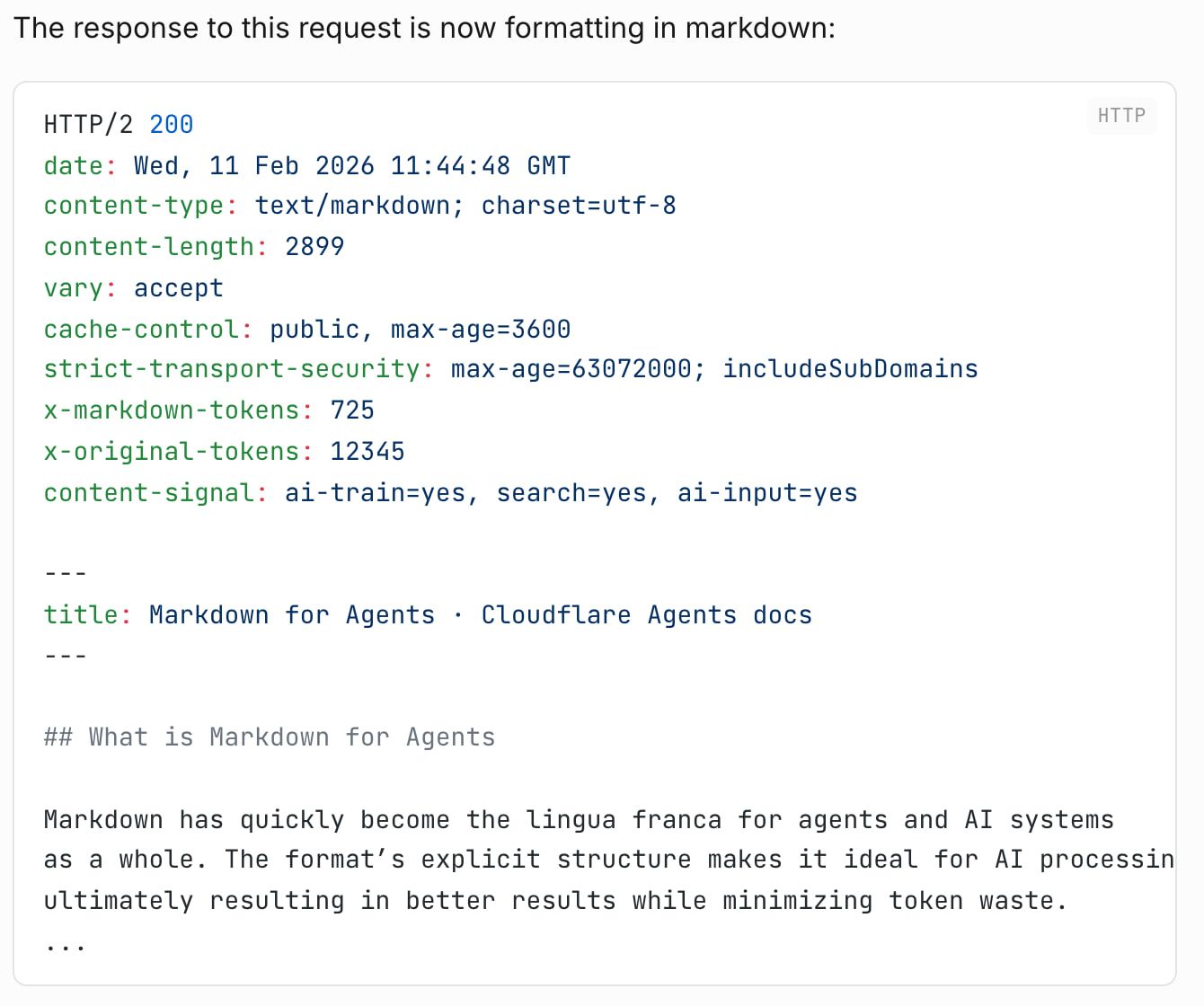
Cloudflare’s Markdown for Agents (12 Feb 2026; the launch post called it a beta) converts your HTML at the edge when a client sends Accept: text/markdown. It’s “available to Pro, Business and Enterprise plans, and SSL for SaaS customers at no cost” and converts up to 6 MiB of decompressed HTML (checked 31 Oct 2026). The changelog’s example response shows an x-markdown-tokens header, but the current reference page no longer documents token-count headers, so don’t build on them.
Check one default before you turn it on: responses carry Content-Signal: ai-train=yes, search=yes, ai-input=yes. If you don’t want to signal consent to AI training, change that.
Which licenses and site terms apply? #
- html2text is GPL-3.0-or-later, which matters if you distribute closed-source software. WebMainBench also uses it to normalize every tool’s output.
- Firecrawl’s self-hosted core is AGPL-3.0; the hosted API is a separate service.
- Crawl4AI is Apache-2.0, but its LICENSE adds a clause that public uses “must include” an attribution to the project.
- ReaderLM-v2 is CC-BY-NC-4.0, with a commercial license sold separately by Elastic since 10 August 2026, and jina-ocr-v1’s model page lists CC-BY-NC-4.0 too. Jina’s 10M free API tokens are also labelled non-commercial use only. The MinerU-HTML model’s license isn’t stated in its README.
- Benchmark datasets have their own licenses: WCXB is CC-BY-4.0.
Converting a page you fetched doesn’t change the site’s terms or its robots.txt. This is a summary of public license terms, not legal advice.
FAQ
Is Markdown good for LLMs?
It's a good cleanup format, but it isn't magic. Markdown is far smaller than raw HTML: Cloudflare measured one of its own blog posts at 16,180 tokens as HTML and 3,150 as markdown, an 80% cut, though that's the vendor's own figure on a single page.
The counterpoint comes from HtmlRAG, a WWW 2025 paper. In its RAG tests with Llama-3.1-70B, plain text scored above Markdown on all three question-answering datasets, and cleaned HTML beat Markdown on all three but beat plain text only on HotpotQA and, narrowly, on ASQA's exact-match score. The big win is stripping the page down; which format you strip it to matters less.
How can I convert a website to Markdown?
Pick one of three routes. A hosted API such as Firecrawl, Jina Reader or Crawl4AI Cloud fetches the URL, renders JavaScript and returns markdown.
An open-source stack does the same on your own servers: an extractor such as Trafilatura or Readability picks the main content, and a converter such as Turndown or markdownify writes the markdown. And if the site publishes its own markdown, through /llms.txt or Cloudflare's Accept: text/markdown, ask for that instead.
Is JSON or MD better for LLMs?
Neither wins everywhere. A 2024 study by He et al. found that prompt format moved GPT-3.5-turbo's results by up to 40% on one code translation task, while GPT-4 was much less sensitive.
For page text headed into a RAG index, markdown is the usual choice because it keeps headings and tables readable. I'd switch to JSON when your code, not the model, needs to read specific fields.
Can ChatGPT generate Markdown?
Yes. OpenAI's Model Spec tells its models to "Use Markdown with LaTeX extensions" when formatting answers.
Is Jina Reader free?
Partly. You can call it without a key at up to 20 requests a minute, and a new key comes with 10M free tokens, labelled "Non-commercial use only (CC-BY-NC)", and a 500-requests-a-minute limit (checked 31 Oct 2026).
After that it bills on output tokens: Jina's pricing page lists $50 for 1B tokens and $500 for 11B. The ReaderLM-v2 model card says that mode uses 3x the normal token count, and the Reader page now lists a jina-ocr-v1 mode that "Costs 40× more tokens".
Is Firecrawl better than Jina Reader?
It depends on the job, and I've put that head-to-head on its own page, Firecrawl vs Jina Reader. From this page's angle, Firecrawl publishes a price at every volume and turns main-content extraction on by default, while Jina Reader is quicker to start without a key and bills on output tokens.
Can I convert HTML to Markdown without an API?
Yes. In Python, Trafilatura (Apache-2.0) extracts the main content and writes markdown in one call. In JavaScript, Mozilla Readability plus Turndown does the same in two steps, and Defuddle (MIT) does both.
You only need a browser or a hosted API when the content is rendered by JavaScript, because these libraries parse the HTML you give them.
Sources
71 sources, accessed to .
Official pricing, docs, changelogs and status pages 34
- Firecrawl pricing (markdown version of the pricing page)
- Firecrawl pricing page: credits, failed requests and rollover
- Firecrawl docs: billing, credits and rollover
- Firecrawl docs: rate limits and keyless access
- Firecrawl docs: /scrape endpoint reference
- Firecrawl docs: scrape formats, PDFs and caching
- Jina Reader docs, limits and license terms
- Jina AI API dashboard
- Jina AI pricing: token packs and free tokens
- jina-ocr-v1 model page (license and release date)
- ReaderLM-v2 model card (Hugging Face)
- Crawl4AI Cloud home and pricing
- Crawl4AI Cloud price API: plans, metering and usage caps
- Crawl4AI docs: markdown generation and content filters
- Cloudflare Browser Run pricing
- Cloudflare Browser Run: /markdown endpoint
- Cloudflare changelog: Markdown for Agents (12 Feb 2026)
- Cloudflare docs: Markdown for Agents reference
- Exa pricing
- Exa docs: get contents
- Tavily docs: API credits
- Tavily docs: Extract endpoint
- Spider pricing
- Apify Website Content Crawler (Store page)
- Apify platform pricing
- Olostep pricing
- ScrapingBee API documentation
- ZenRows Universal Scraper API reference
- Trafilatura docs: usage with Python
- Trafilatura docs: evaluation (run by the maintainers)
- Docling docs: supported formats
- The /llms.txt file, v2 (modified 10 Aug 2026)
- llms.txt: changes from v1 to v2
- OpenAI Model Spec (18 Dec 2025)
GitHub code, issues and releases 21
- firecrawl/firecrawl repository
- Firecrawl v2.11.0 release notes (keyless /scrape from official clients)
- Firecrawl self-hosting guide (SELF_HOST.md)
- Firecrawl issue #701: links format ignored excludeTags (closed)
- Firecrawl PR #3809: PDF table headers
- jina-ai/reader repository
- Jina Reader issue #1250: output larger than raw HTML
- unclecode/crawl4ai repository
- Crawl4AI LICENSE: Apache-2.0 plus an attribution requirement
- adbar/trafilatura repository
- Trafilatura issue #896: short documents lose Markdown structure in 2.2.0
- mozilla/readability repository
- mixmark-io/turndown repository
- turndown-plugin-gfm repository (tables)
- Turndown issue #416: Do not support table convert
- Turndown issue #514: line breaks inside code blocks
- Alir3z4/html2text repository
- microsoft/markitdown repository
- kepano/defuddle repository
- opendatalab/MinerU-HTML repository
- opendatalab/WebMainBench repository
Independent benchmarks and published studies 6
Community discussions 7
- Hacker News: Show HN: Defuddle (418 points)
- Hacker News: comment praising Defuddle markdown quality
- Hacker News: comment reporting Defuddle problems
- Hacker News: comment on older extraction benchmarks
- Hacker News: Show HN: clean and convert any webpage to Markdown (441 points)
- Hacker News: comment on recall, precision and formatting
- Hacker News: comment on switching from Readability to Trafilatura