How to choose
Which OpenClaw Web Search Provider? I'd Start With Brave
How to pin an OpenClaw web search provider, what Brave, Exa, Perplexity and SearXNG return, and how their billing units compare.

I would select an OpenClaw provider explicitly, starting with Brave for a documented general-search setup and choosing Exa, direct Perplexity or private SearXNG when their output fits better. Leaving the provider unpinned can change routing according to the model route and available credentials; that is a configuration choice, not a quality comparison. Web tools, Brave.
Short on time?
Here's my take
- General search setup
- Explicit Brave provider
- Use its documented plugin configuration and review current API rights.
- Source-content controls
- Exa provider
- Inspect search mode and content options rather than assuming identical tool output.
- Self-hosted retrieval
- Private SearXNG
- Use the supported private endpoint path with JSON and upstream choices reviewed.
Prices verified . Sponsors cannot buy a verdict or a position.
Which provider gives you the output you need? #
Decide whether the next step needs result rows, retrieved page content or a generated answer. OpenClaw’s managed tool can return normalized results, answer, raw or error shapes; a provider name alone does not establish an identical response contract. Web-tool routing.
| Provider or path | Documented fit | What I would inspect |
|---|---|---|
| Brave | General web search; web or LLM-context mode | Current plugin path, mode, account and storage rights |
| Exa | Search modes with content controls | Selected type and explicit content options |
| Direct Perplexity | Structured Search result rows | Raw Search versus answer compatibility route |
| Tavily | Generic search or dedicated tools | Dedicated tools expose more controls |
| Private SearXNG | Operator-managed upstream selection | Host version, JSON and private endpoint policy |
Sources: Brave, Exa, Perplexity, Tavily, SearXNG. Specifications verified 2026-11-09.
How do I set up an OpenClaw search provider? #
I would first record the installed OpenClaw and plugin versions, then use the documented web configuration command. This is a proposed reference command; I did not run it or verify a connected account. Web configuration.
openclaw configure --section webSelect the provider, store its key in the Gateway environment or supported SecretRef, confirm the plugin is enabled and review a small result limit and timeout. Credentials belong in private settings, not in a prompt, repository or pasted diagnostic log. Brave setup, web tools.
A secret-free reference configuration for the shared selection is:
{
  "tools": {
    "web": {
      "search": {
        "provider": "brave",
        "maxResults": 5,
        "timeoutSeconds": 30
      }
    }
  }
}
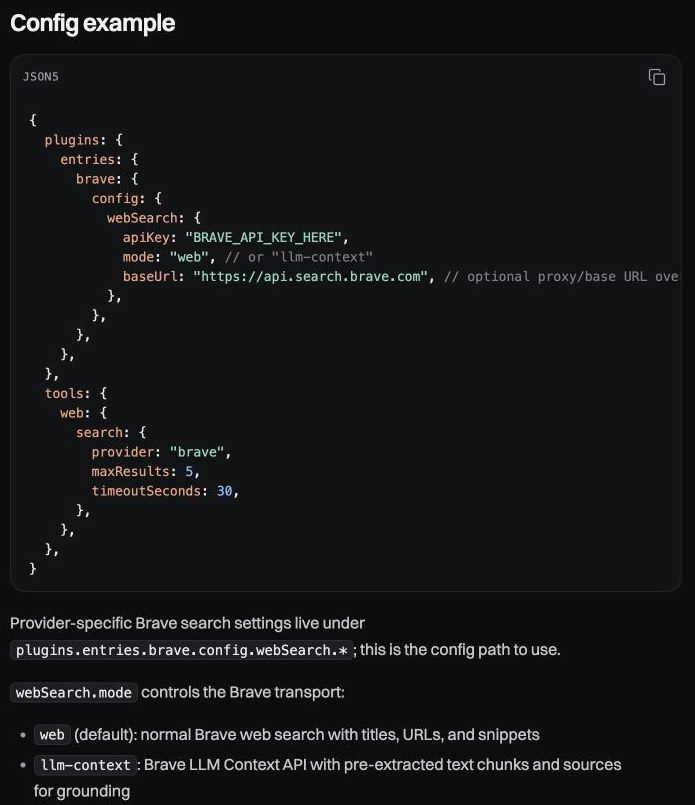
That is not a complete credential configuration. Current Brave-specific settings belong under plugins.entries.brave.config.webSearch; copying an old shared Brave-key path may not configure the current plugin. Check the installed version against the provider documentation before changing it. Current Brave configuration.
Native, managed or fetch: what’s the difference? #
An eligible direct-OpenAI route can use native search when the provider is unpinned. An explicit managed provider overrides that selection, and an explicitly chosen provider does not automatically fail over to another one. Routing rules.
Credential auto-detection looks for ready providers, but key-free routes such as DuckDuckGo, Parallel-free, Ollama or Codex require explicit opt-in. I would document the selected route instead of treating the presence of a key as proof of which backend answered. Provider detection.
web_fetch is a separate operation with its own network guards. It is not browser automation or a way to complete a login or execute a page’s JavaScript; a successful search does not establish that an arbitrary result page is fetchable. Fetch guide.
What do Perplexity and Exa return in OpenClaw? #
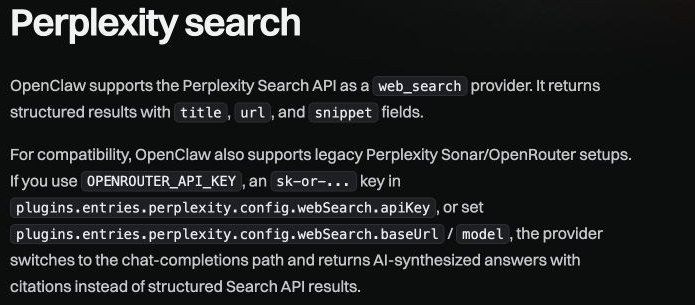
Direct Perplexity Search returns structured results. The documented OpenRouter or explicit baseUrl/model route instead selects a legacy synthesized-answer compatibility path; changing that configuration can change what your application receives. OpenClaw Perplexity.
Perplexity’s own Sonar support ended September 27, 2026, with gradual synchronous/streaming reformulation and a required migration for unsupported async usage. I would check both the OpenClaw wrapper and the current provider API rather than assume an older Sonar example describes raw Search. Migration, Search quickstart.
Exa’s plugin exposes six search types and content controls; omitted content settings default to highlights. Tavily’s generic provider has narrower query/count controls than its dedicated tools. I would choose the tool surface that matches the output contract rather than infer that all search plugins expose the complete upstream API. Exa, Tavily.
What will each provider cost? #
The table below uses USD public inputs verified 2026-11-09. It compares billing units, not equivalent answer quality, and excludes taxes and downstream model costs.
| Backend | Published input | Budget condition |
|---|---|---|
| Brave Search | $5 per 1,000 requests; $5 monthly credit | Card/account eligibility and output rights still apply |
| Exa | Lite $4; Auto $7 per 1,000 calls, up to ten results (legacy Instant/Fast keep the same prices) | Extra results and separate operations can add charges |
| Perplexity raw Search | Standard $5; Fast $1 per 1,000 successful requests | Rate limits count query units separately |
| Tavily Search | PAYG $0.008/credit; basic one, advanced two | Do not assume paid/free allowance stacking |
| SearXNG | Operator-managed infrastructure | Upstream access and hosting still cost resources |
Worked budgets for two of these live in my Brave Search API pricing and Perplexity Search API pricing guides.
Sources: Brave pricing, Exa pricing, Perplexity pricing, rate units, Tavily credits, SearXNG.
Exa’s first-team grant and purchase-conditioned throughput are account-specific checks, not a universal anonymous MCP allowance. Parallel’s anonymous MCP and authenticated API paths also differ; I would not treat a working anonymous tool catalog as unlimited paid capacity. Exa billing, Parallel MCP, Parallel pricing.
When would I use SearXNG? #
I would inspect SearXNG when an operator can maintain a private service and choose upstream engines deliberately. OpenClaw documents a self-hosted private-network allowance for this provider; that does not authorize arbitrary private destinations through other tools. Provider guide.
JSON must be enabled on the instance, and the installed host version must satisfy the provider guide. A public instance can disable JSON or restrict traffic; self-hosting also does not stop search terms reaching configured external engines. SearXNG API, server settings.
Can SerpentAPI or MCP replace a native provider? #
SerpentAPI at apiserpent.com is worth considering when Google organic/SERP fields are the requirement. It isn’t one of OpenClaw’s listed providers, and replacing a Brave base URL does not create a compatible adapter. Its docs now describe an official hosted MCP server at https://api.apiserpent.com/mcp that takes the API key in an X-API-Key or bearer header, with web, news, image, Maps and other search tools. SerpentAPI docs, OpenClaw provider guide.
Web pricing is $0.60/$0.30/$0.10/$0.05/$0.03 per 1,000 across Default/Growth/Scale/Enterprise/Enterprise Plus; the paid tiers need a single $100/$500/$1,000/$1,250 deposit. Quick bills per call, Deep bills requested pages, and credit you already hold keeps its purchase price. MCP tool calls bill as the matching REST call.
Purchased credit does not expire, while promotional credit expires after 30 days; check customer obligations and the absence of a verified public SLA/indemnity. Pricing, FAQ, Terms.
For MCP, OpenClaw documents stdio, SSE and Streamable HTTP plus tool filters and headers, so an HTTP server such as apiserpent.com’s is the documented route; I did not connect it. SerpApi also has an official MCP, but it is a separate vendor from SerpentAPI. Review tool discovery, authentication and output before treating a server as a substitute for the native managed-search contract. OpenClaw MCP, SerpApi repository, MCP authorization.
What should work before you rely on it? #
I would require the selected route, a successful authorized request, expected output shape, a bounded fetch if needed and visible failure behavior. Those runtime checks remain unperformed here. Brave storage/evaluation rights and Tavily publication restrictions also remain provider-specific boundaries; Parallel’s current terms no longer show the benchmark-consent clause I read in October. Brave terms, Tavily terms, Parallel terms, MCP security.
Continue with the search API pillar, local-model search guide and search MCP servers.
FAQ #
Which OpenClaw search provider would you start with? #
I would start with an explicit Brave provider for its documented general-search setup, then choose another supported provider when its output better fits the task. This is not a relevance ranking. OpenClaw Brave provider.
Does OpenClaw fall back if a provider fails? #
An explicitly selected managed provider does not automatically fail over. Handle errors deliberately rather than assuming another key will be used. OpenClaw web tools.
I added a key. Why does search still fail? #
Provider selection, plugin configuration and account authorization are separate checks. Key presence alone is not a successful connection test. OpenClaw web tools.
Is web_fetch the same as browser automation? #
No. Fetch has its own network guards and does not replace browser login or JavaScript execution. OpenClaw web fetch.
Does Perplexity always return an answer? #
No. Direct Search returns result rows; the documented OpenRouter or explicit baseUrl/model compatibility path returns a synthesized answer instead. OpenClaw Perplexity provider.
Is SerpentAPI a native OpenClaw provider? #
No. It isn’t among OpenClaw’s listed providers. Its docs now describe a hosted HTTP MCP server that takes the API key in a header, and OpenClaw’s MCP settings support HTTP servers with headers; I did not connect the two. SerpentAPI API documentation.
Sources
30 sources, accessed .
Official pricing, docs, changelogs and status pages 29
- OpenClaw web tools
- OpenClaw Brave provider
- OpenClaw Perplexity provider
- OpenClaw Exa provider
- OpenClaw Tavily plugin
- OpenClaw SearXNG provider
- OpenClaw web fetch
- OpenClaw MCP setup
- SearXNG Search API
- SearXNG server settings
- MCP authorization specification
- MCP security guidance
- Perplexity pricing
- Perplexity Search quickstart
- Perplexity Sonar migration
- Perplexity rate limits
- SerpentAPI pricing
- SerpentAPI FAQ
- SerpentAPI API documentation
- SerpentAPI terms
- Tavily credit documentation
- Tavily terms
- Exa pricing
- Exa billing
- Brave API pricing
- Brave API terms
- Parallel pricing
- Parallel customer terms
- Parallel Search MCP


