How to choose
Want Local LLM Web Search? Your Host App Does the Work
How to add web search to Ollama, Open WebUI or LM Studio, why your queries still leave the machine, and what private SearXNG does and doesn't fix.

I would start with the search route your local-model client already supports: Open WebUI for a configurable chat interface, Ollama tools for application code, or an official MCP server in LM Studio. Loading model weights alone does not connect them to live sources; the host must execute a search or fetch tool. Ollama tools, Open WebUI, LM Studio.
Short on time?
Here's my take
- Chat interface
- Open WebUI
- Start with one supported provider and distinguish snippets from fetched citation context.
- Application code
- Ollama tool loop
- Keep tool execution, credentials and loop limits in your application.
Prices verified . Sponsors cannot buy a verdict or a position.
Which local LLM search route fits your setup? #
Choose by the host you use and the output you need. These are recommendations about documented integration paths, not measured model quality, speed or search relevance.
| Your starting point | Route I would inspect | Important boundary |
|---|---|---|
| Open WebUI chat | Supported global provider plus native search tools | Search snippets and fetched citation context are separate |
| Ollama application | Host-managed search/fetch tool loop | The application executes network calls |
| LM Studio desktop | Official local or remote MCP server | Tool permissions and external recipients need review |
| Self-hosted retrieval | Private SearXNG with JSON enabled | Upstream engines still receive searches |
Sources: Open WebUI search, Ollama tools, LM Studio MCP, SearXNG API. Specifications verified 2026-11-09.
The useful path to draw is: local model → host tool dispatcher → search provider → optional permitted page fetch → bounded source context → local model answer. The model can run locally while search queries and fetched URLs cross a network boundary. Ollama web search, tool calling, LM Studio offline operation.
How do I add web search in Open WebUI? #
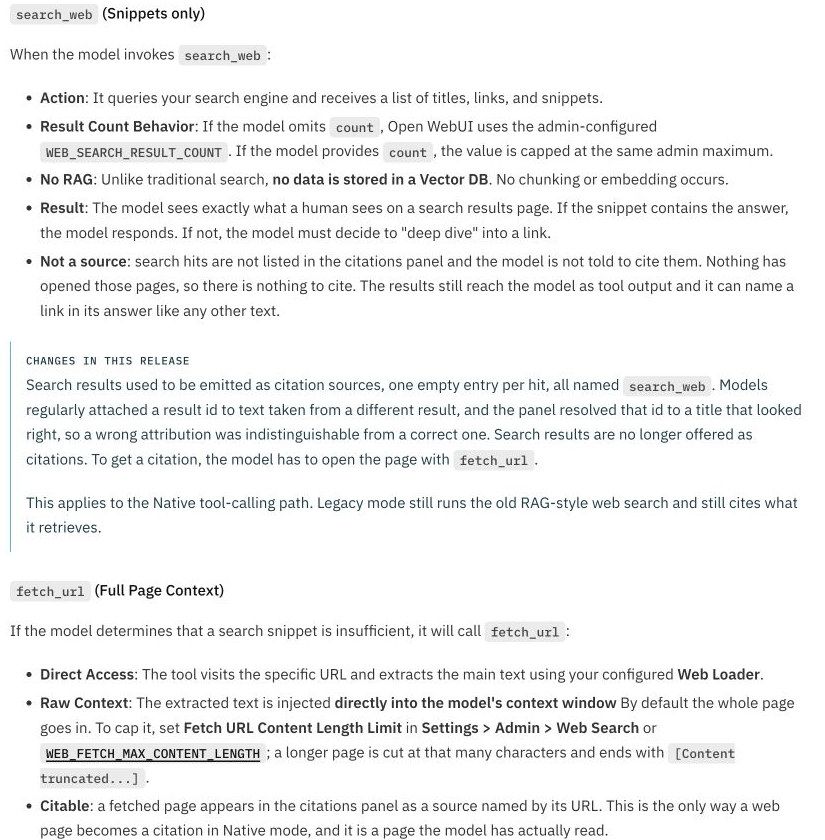
For an existing Open WebUI installation, I would configure one supported provider, enable the model’s Web Search capability/default feature and check native function calling. The current documentation says Native is the default tool-calling mode; instructions for an older installation may describe another retrieval path. Agentic search, troubleshooting.
My proposed setup order is:
- Record the installed version and select one supported provider.
- Enter credentials through the installation’s private settings or environment, never in a chat prompt.
- Enable the model’s relevant built-in capability and default feature.
- Set search concurrency explicitly; I would begin at one, then raise it only after checking provider limits.
- Check search results and permitted page-fetch results separately before relying on citations.
This is a reference checklist, not a setup I executed. Open WebUI documents a zero/unlimited search-concurrency default and distinguishes it from page-loader concurrency; persisted settings can also override a changed environment value. Environment reference, troubleshooting.
Native search returns snippets; fetching a URL supplies the page context used by the citation panel. A useful snippet is therefore not proof that the full page was fetched or that a displayed citation resolves to the expected passage. Native mode also differs from the older vector-RAG/chunking path. Search behavior.
Two September GitHub reports illustrate configuration and citation confusion, but both are closed. One concerned development-build citation mapping; the other closed after the author enabled the relevant built-in/default-feature settings. I would use them as historical troubleshooting context, not evidence of a current universal defect. Citation issue, feature-setting issue.
How does web search work in an Ollama app? #
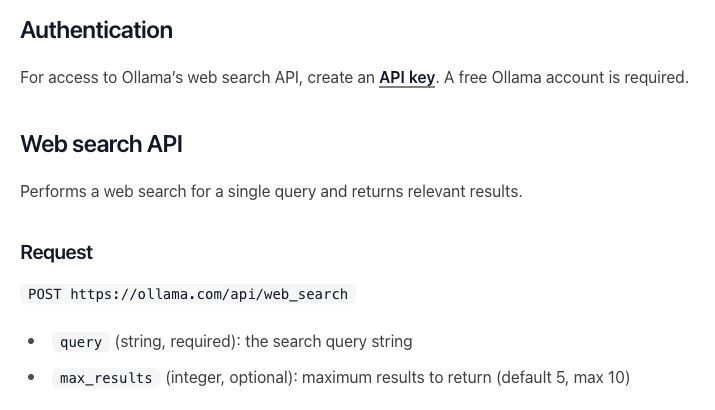
In an Ollama application, define search/fetch tools, let a tool-capable model request them, execute the permitted calls in host code and append the tool results before the next model turn. The model’s tool request is an instruction for the application to handle, not permission to open arbitrary network destinations. Tool-calling guide.
Ollama’s hosted search needs an account and API key. Its guide documents a default of five results and a maximum of ten; keep the key server-side and bound the number of search/fetch iterations your application permits. The guide’s context-capacity advice is vendor guidance, not a hardware benchmark from this research. Hosted search.
Ollama defaults to a loopback server, and disabling its cloud features also disables hosted web search. A local inference server address should not be interpreted as a promise that every tool stays local. Ollama FAQ.
How do I connect LM Studio to a search MCP server? #
Connect an official search MCP server through LM Studio’s desktop configuration or its separate API integration. The app supports local and remote MCP servers; the API documentation requires version 0.4.0 or later and relevant settings for ephemeral MCP integrations, with an allowed_tools control. App setup, API setup.
I would start with an official remote server whose narrow search/fetch tools meet the task, then review the data recipient and authentication. A local stdio server can execute code on your machine, so “local” does not make an unreviewed package trustworthy. LM Studio security guidance, MCP security.
Exa and Perplexity both document official MCP routes, but their tools buy different outputs. Exa exposes search/fetch defaults, while Perplexity separates raw Search from Agent-backed answer tools; inspect the actual tool list and provider bill. Exa server, Perplexity server.
Is self-hosted SearXNG more private? #
A private SearXNG installation gives you control over its configuration and ingress; its queries still go to configured external engines. Enable JSON explicitly, keep the endpoint authenticated or private, and select upstreams deliberately. JSON-disabled instances return 403, and a public instance is not a dependable private backend. Search API, server settings.
The Open WebUI SearXNG tutorial and environment reference differ on the URL placeholder format. I would follow the current UI guidance for the installed version and avoid copying permissive filesystem or public-bind shortcuts from a community-contributed tutorial. SearXNG tutorial, environment reference.
SearXNG or a hosted API like Tavily? #
Pick SearXNG if you want no per-search bill and can run a server; pick Tavily if you want page content back in one call and would rather pay per search. SearXNG is a metasearch engine: it collects result lists from the upstream engines you configure, so fetching and cleaning the pages is a separate step in your tool. SearXNG docs, Search API.
Tavily is a hosted search API whose search endpoint can return page content and a short answer along with the results. Its free plan lists 1,000 credits a month; a basic search uses one credit and an advanced search two, and pay-as-you-go is $0.008 per credit, so 1,000 basic searches cost $8 once the free credits are gone. Tavily credits, Search endpoint.
Neither keeps your queries on your machine: SearXNG forwards them to its upstream engines, and Tavily receives them as a third party under its own terms. The Tavily pricing guide has the monthly plans, and Tavily alternatives compares other hosted options.
What goes into the search budget? #
Keep search, optional extraction, local inference compute and hosting separate; LLM web search versus a search API covers when a built-in search tool is enough. Exa, Brave and a Google-SERP backend such as SerpentAPI are not identical sources of page context. Exa pricing, Brave pricing, apiserpent.com documentation.
For Google results, apiserpent.com’s Web rates are $0.60/$0.30/$0.10/$0.05/$0.03 per 1,000 at Default/Growth/Scale/Enterprise/Enterprise Plus. The paid tiers need a qualifying deposit of $100/$500/$1,000/$1,250; Quick bills per call, Deep counts requested pages, and credit you already hold keeps its purchase price. Pricing, FAQ.
Its docs now describe a hosted MCP server at https://api.apiserpent.com/mcp that takes the API key in a header, with a Cursor-style mcp.json example; LM Studio’s app uses the same notation. In an Ollama app you would call its REST API from your own tool code instead. I did not connect either route, so compatibility is documented, not verified. API and MCP docs, LM Studio MCP.
Brave’s storage/evaluation conditions and provider-specific data terms still apply when the model is local. A separate retrieval adapter does not itself grant redistribution or training rights. Brave terms, SerpentAPI terms, MCP authorization.
I would first prove one small, authorized search and permitted fetch in an isolated setup, with explicit time, byte and call limits. That proof is still pending here; this article compares documentation, not working installations.
Use the search API pillar for provider context, free search API guide for allowance limits, search MCP comparison for server choices, and OpenClaw guide for that host.
FAQ #
Can a local LLM search the web? #
Yes, when its host executes a supported search tool and supplies the results. Downloading model weights alone does not provide live retrieval. Ollama tool calling.
If the model runs locally, are my searches private? #
Not automatically. Hosted search, remote MCP and SearXNG upstream engines can receive queries even when model inference stays local. Ollama web search.
Why does SearXNG return 403? #
One documented cause is a disabled output format, including JSON. Check the private instance configuration and version-specific client setup. SearXNG Search API.
Why does Open WebUI show snippets but no page context? #
Open WebUI distinguishes native search snippets from fetched page context. Inspect the fetch step as well as the search response. Open WebUI agentic search.
Is SearXNG free to run? #
This research establishes no per-request software-license bill, but hosting, compute and upstream availability still need a budget. SearXNG server settings.
Did you set these up yourself? #
No. These are documentation-based routes and proposed checks; no model downloads, MCP sessions, API calls or account configurations were performed. Ollama web search.
Sources
31 sources, accessed to .
Official pricing, docs, changelogs and status pages 28
- Ollama web search
- Ollama tool calling
- Ollama FAQ
- Open WebUI agentic search
- Open WebUI environment reference
- Open WebUI SearXNG guide
- Open WebUI search troubleshooting
- LM Studio app MCP
- LM Studio API MCP
- LM Studio offline operation
- SearXNG Search API
- SearXNG server settings
- MCP authorization specification
- MCP tools specification
- MCP security guidance
- Perplexity API MCP
- OpenAI function calling
- SerpentAPI pricing
- SerpentAPI FAQ
- SerpentAPI API documentation
- SerpentAPI terms
- Exa pricing
- Exa billing
- Brave API pricing
- Brave API terms
- SearXNG documentation
- Tavily credits and pricing
- Tavily Search endpoint


