Pricing
Confused by Apify Pricing? Start With the Actor You'll Run
Apify's $19 Starter fee is $19 of prepaid usage, not a charge on top. See how compute units, proxies, storage and Actor fees add up in three budgets.

Apify pricing is a platform resource budget plus the selected Actor’s charging model, not a universal price per scraped page. The $19 Starter fee includes $19 of usage; extra enabled usage can increase the bill, while Free provides a $5 monthly allowance that stops at depletion. Pricing, subscriptions.
I would choose a plan after estimating allocated memory and runtime, proxy/transfer/storage usage and any creator-defined events. A low compute figure is not enough when the Actor bills results, needs residential traffic or retains a large dataset. Usage accounting, Store charging.
Short on time?
Here's my take
- For a small resource budget
- Free within its documented $5 allowance
- The allowance is dollars of usage, not a guaranteed number of pages or results.
- For a growing platform job
- Compare plan floors, rates and ceilings
- Lower CU rates help only when the workload and account limits justify the larger commitment.
- Before running a Store Actor
- Read its events and permissions
- Creator prices and access scope can matter more than the generic compute rate.
Prices verified . Sponsors cannot buy a verdict or a position.
Is the plan fee on top of usage? #
The paid monthly fee is prepaid usage, not a second charge added to the same resources. Ordinary unused balance expires at renewal; paid usage beyond the allowance can be charged when optional overage is enabled. Prices and specifications verified: 2026-11-09. Pricing, subscriptions, billing.
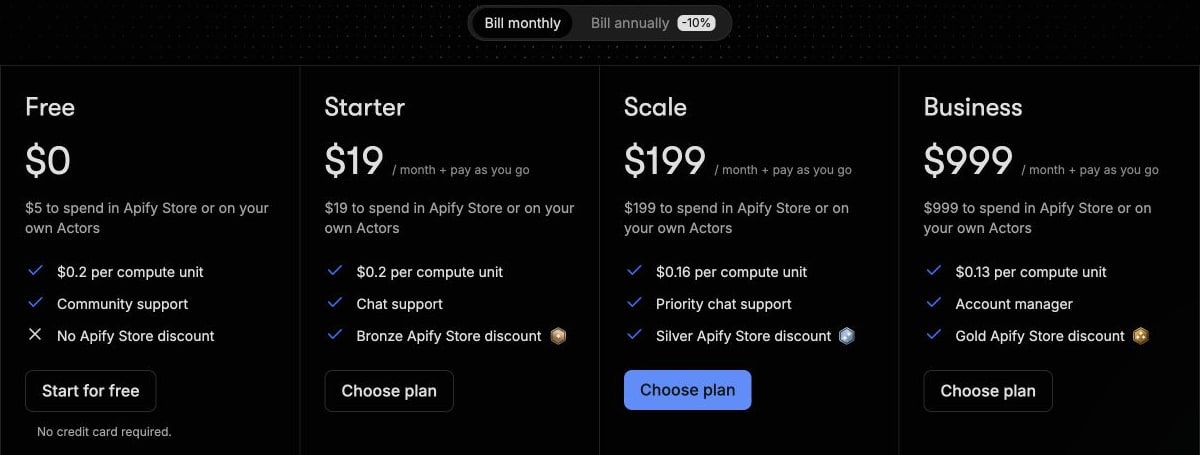
| Plan | Monthly fee / included usage | CU rate | Residential proxy / GB | Combined RAM | Concurrent runs |
|---|---|---|---|---|---|
| Free | $0 / $5 | $0.20 | $8 | 16 GB | 5 |
| Starter | $19 / $19 | $0.20 | $8 | 64 GB | 32 |
| Scale | $199 / $199 | $0.16 | $7.50 | 256 GB | 128 |
| Business | $999 / $999 | $0.13 | $7 | 512 GB | 256 |
| Enterprise | Custom | Quote | Quote | Quote | Quote |
Free allows five concurrent runs. The limits documentation said 25 when I read it in October; it now matches the pricing page’s five. Neither source proves what an uninspected account permits. Pricing, limits.
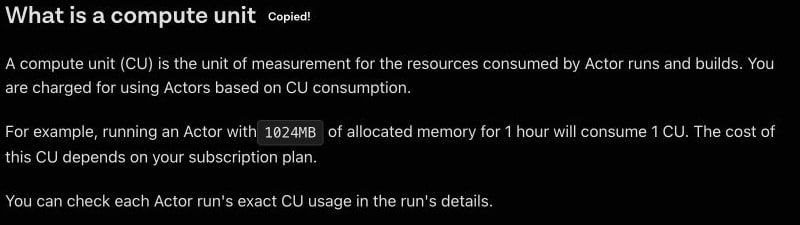
A compute unit is allocated 1024 MB × runtime hours, with one-second minimum time granularity; runs and builds use compute. That is allocated memory, not a discount for having a low observed peak, and it does not determine pages per second. It also differs from the per-request credits scraping APIs sell. Usage and resources.
So what would your compute bill be? #
These three hypothetical budgets are compute-only examples, not request-volume or speed estimates. Assume no creator/PPE fee, proxy, transfer, storage, tax, promotion, annual discount or model charge; paid candidates require any needed overage/limit change to be enabled. Pricing, subscriptions, compute definition.
| Monthly resource budget | Usage debit at candidate rate | Listed monthly candidate | Why |
|---|---|---|---|
| 3 CU, for example 1 GB × 3 hours | $0.60 | Free, $0 | Within the $5 allowance |
| 30 CU, for example 1 GB × 30 hours | $6 | Starter, $19 | Free insufficient; paid fee is the floor |
| 300 CU, for example 1 GB × 300 hours | $60 | Starter, $60 total | $19 prepaid plus $41 overage; within its $100 ceiling |
I use the greater of the plan fee and the resource charge, subject to eligibility and ceiling, for these paid examples. The subscriptions page describes usage ceilings of $100 Starter, $1,000 Scale and $5,000 Business, with defaults at the prepaid allowance; I would not assume extra usage is automatically unlimited. Subscriptions.
The third example is not $19 plus $60. Starter’s $19 has already paid part of the $60 usage, leaving $41 of overage; those resources do not become cheaper simply because the fee is displayed separately.
For a larger hypothetical 3,000-CU budget, Starter’s $600 exceeds its documented $100 ceiling. Scale’s $480 usage at $0.16/CU fits its $1,000 ceiling and is below Business’s $999 floor, assuming the appropriate usage limit is enabled. Rates, ceilings.
This is resource planning, not a promise that 3,000 CUs deliver a particular crawl. I would establish the selected Actor’s memory/runtime and validated results before converting any plan into an operational capacity figure.
What else shows up on the bill? #
Residential traffic, which sits outside compute units, can outweigh compute in a small job. At Free/Starter’s documented $8/GB, hypothetical 3 CUs plus two GB of residential proxy traffic total $0.60 + $16 = $16.60, before network/storage/creator costs; that fits Starter’s $19 prepaid amount under those assumptions. Pricing, residential proxy.
Do not add that proxy estimate again if a selected pay-per-event Actor already includes the platform/proxy charge in its event price. I would read the Actor’s own cost definition before combining generic resource lines. Store pricing models.
| Separate resource category | Free / Starter | Scale | Business |
|---|---|---|---|
| External transfer / GB | $0.20 | $0.19 | $0.18 |
| Internal transfer / GB | $0.05 | $0.045 | $0.04 |
| SERP proxy / 1,000 requests | $2.50 | $2 | $1.70 |
These are published category rates, not an assumption that all apply to every run. All three rows verified 2026-11-09. Pricing.
Storage remains part of the workflow after the Actor finishes. At Starter’s listed rates, dataset storage is $1 per 1,000 GB-hours, with dataset reads $0.0004 and writes $0.005 per 1,000 operations; key-value reads/writes are $0.005/$0.05 and queue reads/writes $0.004/$0.01 per 1,000. Pricing, storage overview, datasets, request queues.
I would budget retention, exports and subsequent reads alongside collection. A stored dataset is not free forever simply because the run ended; check the selected Actor’s included costs and the platform storage operations. Store docs, storage.
What does the Actor itself charge? #
Pay-per-event charges creator-defined events such as results, starts or other operations; most Actors include platform usage in that price, while some add it separately. Pay-per-usage means no creator surcharge, while compute, proxy, transfer and storage still apply; optional creator discounts are not a universal rate. Store billing, pricing, standard Actor contract.
A max-charge guard can prevent billing events above the chosen event limit, but it does not establish that every separate platform charge is included. I would inspect the event names, the run-start component and any extra platform usage before giving a recurring job a cost ceiling. Store charging.
Permissions are a second decision. Apify and Actor terms distinguish maintained and community Actors, and creators can access inputs/output; a full-permission Actor can have access to broader account resources and invoke other Actors. Approval is normally required in Console for full scope. Platform terms, Actor terms, permissions.
I would minimize secrets in input, approve only the needed scope and preserve the review for each selected Actor. The acceptable-use rules and standard Actor contract still apply; an open-source client does not grant a licence to proprietary Actor code or permission to retrieve arbitrary target data. Acceptable use, Actor contract, JS client.
Are Actor rentals really gone? #
The documentation says yes. The pricing page and the Store documentation now describe only pay-per-event and pay-per-usage, with no rental instructions. An August 25 migration post set September 30 as the deadline, after which unmigrated rental Actors switch to pay-per-usage automatically. I did not verify the completed catalogue/account migration. Pricing, Store docs, migration post.
I would still inspect the actual selected Actor’s current billing mode rather than assume every Actor has finished switching. Older rental estimates are not a current invoice.
You’re also paying for a workflow platform #
Tasks save Actor input, schedules execute Actors/tasks, and integrations support surrounding automation. Datasets and request queues supply storage and work state; these are reasons to compare Apify as a workflow platform rather than only a one-page API. Tasks, schedules, integrations, datasets, queues.
Hosted MCP supports OAuth and inferred output schemas for Actor results; the local stdio server does not support that schema feature. I would preserve the required authentication and output handling, and I did not connect either path or verify a production integration. MCP documentation.
The Website Content Crawler offers Markdown/text/HTML and crawler modes, but its page retains a $0.25/CU basis for vendor cost estimates while current Free/Starter pricing is $0.20. Optional summarization also starts additional OpenRouter Actor runs; I have not repeated its old per-page estimate as a current measured bill. Crawler product, current pricing.
The official Apache-2.0 JS client supplies retry/pagination interfaces; that client licence is separate from the platform and individual Actors. My research confirms documentation/code availability, not a successfully connected workflow. Client repository, Actor terms.
Which plan would I choose? #
I would use Free for an eligible, small resource budget and Starter when ordinary usage exceeds $5 but remains within its feature/ceiling needs. I would compare Scale or Business only when their lower unit rates and higher eligible limits justify the monthly floor, including all selected Actor events and external costs. If you already have Scrapy code, Apify vs Scrapy weighs paying for Apify against running the spider yourself.
Immediate overage invoicing thresholds are documented as $20 for Starter and $200 for higher plans; upgrades are prorated and downgrade balance treatment differs from ordinary expiration. Historical run-dollar displays may also recompute at current rates, so actual invoices are the better source for past bills. Subscriptions, billing, usage display.
For context, use the scraping API pillar. The Apify alternatives guide compares platform replacement with narrower endpoints, and ScraperAPI pricing, Zyte API pricing and ZenRows pricing use their own billing units rather than an invented normalized page winner.
FAQ #
What does Apify’s $19 Starter plan include? #
The $19 monthly fee includes $19 of prepaid usage. Enabled overage charges above that allowance, and ordinary unused balance expires; it is not the fee plus the same first $19 of resources again. Pricing, subscriptions.
Is an Apify compute unit the same as one page? #
No. It is allocated 1024 MB of RAM for an hour, with runtime and builds/runs affecting usage. Throughput needs separate measurement. Resource accounting.
Do Actor result fees come on top of platform usage? #
No single rule covers every Actor: most PPE Actors include platform usage, while some add it. PPU still bills resources without a creator surcharge. Store docs.
How many runs can the Free plan do at once? #
Five. The pricing page and the limits docs now agree on that figure; I did not inspect an account entitlement. Pricing, limits.
Has Apify finished retiring Actor rentals? #
The pricing page and Store docs now describe only pay-per-event and pay-per-usage, and the migration post moved unmigrated rentals to pay-per-usage after September 30. I did not verify every Actor, so inspect the selected Actor’s current mode. Store docs, migration post.
Sources
22 sources, accessed .


