Pricing
ScraperAPI Pricing: How Far Does $49 Really Go?
ScraperAPI starts at $49 for 100K credits, but each JavaScript page uses ten. What that buys at three volumes, plus the free tier and fine print.

ScraperAPI pricing starts at $49 monthly for 100,000 credits, but generic JavaScript requests cost ten credits each. I would pick a plan from the actual request mix and geography requirements, rather than read the allowance as a page count. Plans, JS costs.
For hypothetical successful generic requests, 30,000 plain pages fit Hobby, 30,000 JS pages require Startup’s capacity, and 300,000 JS pages fit Business. These are documented-rate calculations, not observed bills, and they leave out private PAYG rates and target-specific adjustments. Pricing, credit table.
Short on time?
Here's my take
- For small generic jobs
- Hobby, after checking geography
- $49 includes 100K credits, but rendered requests and country needs can move you up.
- For a rendered workload
- Budget ten credits per ordinary JS request
- Use combined totals when premium or ultra features are required.
- Before a commitment
- Obtain the written commercial terms
- Full contract and growth PAYG rates were not available in this research.
Prices verified . Sponsors cannot buy a verdict or a position.
The seven plans, and why geography matters #
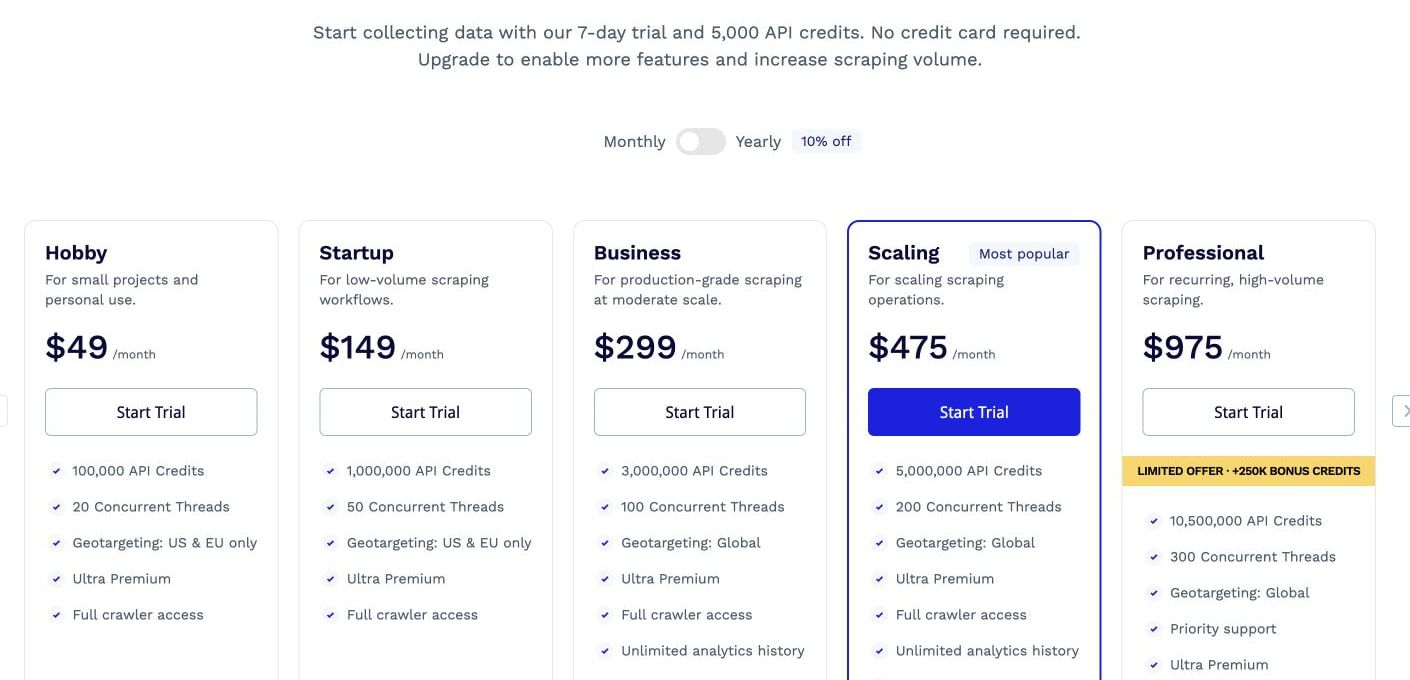
The current seven-rung ladder below uses monthly billing and excludes temporary bonus credits. The May 2026 growth-plan announcement supports the expanded ladder, but I use the current pricing page for the numerical comparison. Prices and specifications verified: 2026-11-09. Pricing, growth-plan update.
| Plan | Monthly price | Credits | Concurrent threads |
|---|---|---|---|
| Hobby | $49 | 100,000 | 20 |
| Startup | $149 | 1,000,000 | 50 |
| Business | $299 | 3,000,000 | 100 |
| Scaling | $475 | 5,000,000 | 200 |
| Professional | $975 | 10,500,000 | 300 |
| Advanced | $1,975 | 21,500,000 | 500 |
| Enterprise | Custom | 22,000,000+ | 500+ |
The pricing page advertises a 10% annual discount, which means making a longer commitment rather than paying the monthly figures shown here. I would compare billing periods explicitly and ignore promotional extra credits when estimating durable capacity. Pricing.
Geography can decide the tier before volume does. Hobby and Startup offer standard US/EU regional targeting, while Business and above support country targeting; premium-pool behavior is documented separately. Standard geography, premium geography, premium pools.
That makes Hobby a sensible capacity candidate for a small ordinary job, not my universal recommendation. If the authorized target needs country-level selection or a more expensive configuration, check entitlement and total cost before buying it.
Why 100K credits isn’t 100K pages #
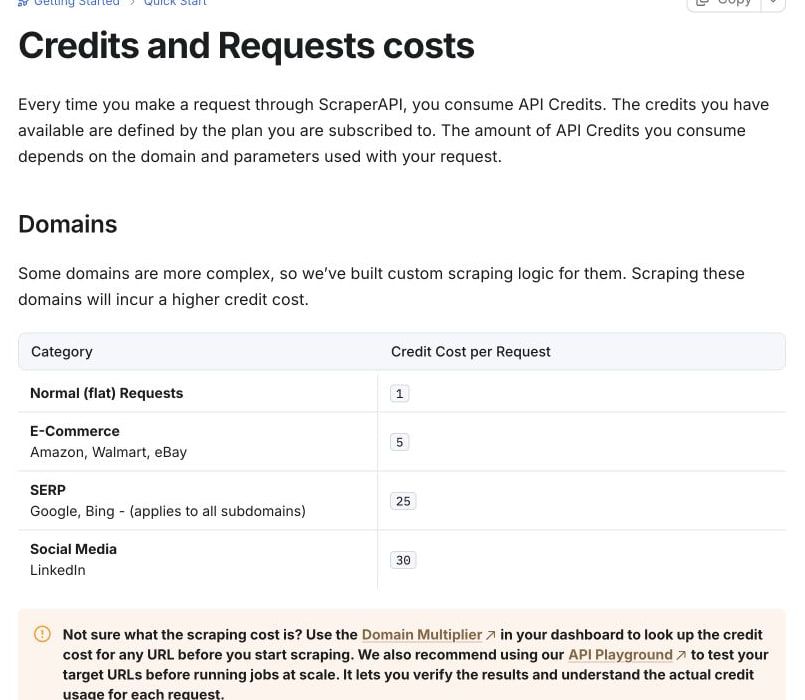
A successful generic plain request costs one credit, but JS costs ten, premium costs ten, premium-plus-JS costs 25, ultra costs 30 and ultra-plus-JS costs 75. The combination totals are not numbers I would add together myself. Specifications verified: 2026-11-09. Credit costs, JS FAQ.
| Standard API request category | Documented credits | Budget implication |
|---|---|---|
| Generic plain | 1 | 100K credits can cover 100K such billable requests |
| Generic JS | 10 | 100K covers at most 10K such requests |
| Premium + JS | 25 | 100K covers at most 4K such requests |
| Ultra + JS | 75 | 100K covers at most 1,333 whole such requests |
| E-commerce | 5 | Look up the selected domain/configuration |
| Google / Bing | 25 | Do not apply generic one-credit math |
| 30 | Target-specific cost and permission checks remain separate |
The last three rows are target costs, not an instruction to scrape those services or a stacking formula. Protected-domain and optional-parameter combinations need an explicit lookup; this research does not establish how every adjustment combines. Credit table, supported parameters.
Screenshot capture enables rendering, so I would not treat it as a plain-request add-on with no JS consequence. Likewise, rendering instructions and Markdown/text output change how you obtain content, but a formatted response is not proof that your required fields are correct. Screenshots, rendering instructions, output formats.
What would 3K, 30K or 300K requests cost? #
These hypothetical examples assume every request returns a successful generic standard-API page. They exclude special domains, premium/ultra features, AI, paid geography, tax, free grants, promotions, rollover, private rates and client retries; I choose the lowest listed monthly plan with enough credits. Plans, request costs.
| Monthly requests | Plain: requests × 1 | Listed plain candidate | JS: requests × 10 | Listed JS candidate |
|---|---|---|---|---|
| 3,000 | 3,000 credits | Hobby, $49 | 30,000 credits | Hobby, $49 |
| 30,000 | 30,000 credits | Hobby, $49 | 300,000 credits | Startup, $149 |
| 300,000 | 300,000 credits | Startup, $149 | 3,000,000 credits | Business, $299 |
The first case makes the subscription minimum visible: buying Hobby for 3,000 ordinary requests leaves most of its capacity unused. The second shows the rendering effect: the same 30,000 URLs require a larger listed plan when every request needs JS.
At 300,000 JS requests, the three-million-credit estimate exactly matches Business’s allowance, leaving no reserve under these assumptions. I would budget room for billable missing pages and additional client attempts rather than rely on that equality as a production guarantee. Billing outcomes.
For a mixed job of 10,000 plain, 2,000 JS and 1,000 premium-plus-JS requests, the arithmetic is 55,000 credits, within Hobby’s listed capacity. That is a hypothetical total of 10,000 + 20,000 + 25,000, with the same target and success assumptions. Credit table, pricing.
What about the free tier, retries and async jobs? #
ScraperAPI documents a seven-day, 5,000-credit trial without a card, then a limited 1,000-credit monthly allowance with five concurrency. I did not acquire either phase or confirm every free-feature entitlement, so I would use them to plan an evaluation, not promise a particular rendered workflow. The free web scraping API guide compares other free tiers. Pricing, plans and billing, general FAQ.
The standard billing rules include 200 and 404 responses, and client cancellation before 70 seconds. ScraperAPI says its retries can continue for 60 seconds; a shorter client wait can therefore consume money without giving your application usable output. Credit costs, general FAQ.
Asynchronous work has a different lifetime: the docs describe up to 24 hours of processing, 50,000 URLs per batch, and results retained up to 72 hours with 24 hours guaranteed. I would retrieve and validate results on a bounded schedule rather than assume submission itself delivered data. Async overview.
sa-credit-cost reports a request’s credit cost, and max_cost rejects over-limit work with HTTP 403. My recommendation is to use these alongside an application ledger and bounded retries; a request ceiling does not decide monthly renewal or establish a global invoice cap. Cost control, credit-cost header.
Does DataPipeline cost the same? #
Not reliably. ScraperAPI’s own docs conflict, so I would keep DataPipeline out of standard-request quotations until its selected configuration is confirmed. The July release note says the former five-times uplift was removed and describes parity with the standard API. July update.
The current DataPipeline generic premium-plus-JS table nevertheless lists 20 credits, while the standard table lists 25, even though the pipeline page itself says its costs now match standard rates. Those are two distinct published figures, so I have not silently substituted one or described every DataPipeline request as identical in price. Pipeline credit table, standard credit table.
This matters if a procurement estimate depends on a pipeline rather than the standard endpoint. Obtain the applicable written cost for that exact request path; this article’s examples intentionally cover ordinary standard-API requests only.
Read the billing terms, then pick a plan #
Ordinary credits do not roll over. The billing FAQ advertises a seven-day refund and capped PAYG on Scaling, Professional, Advanced and Enterprise, but this research did not obtain the full commercial contract or exact applicable PAYG rates; I would not turn a short FAQ into a blanket refund or cheapest-invoice promise. Pricing FAQ, plans and billing.
Before committing, get the applicable commercial terms in writing, including target authorization, renewal, refund conditions and any PAYG overage rates. This is a real missing procurement input, and a vendor subscription does not establish permission to retrieve arbitrary data.
For price context, ScrapingBee’s current ladder starts at $19 with 75,000 credits and ZenRows Build starts at $19 with 45,000; their ordinary JS weights are five rather than ScraperAPI’s ten. That does not establish matched-target quality or a global cheapest provider. ScrapingBee plans, Bee credit guide, ZenRows pricing.
I would choose Hobby for a qualifying small generic job, move up for demonstrated capacity or geography needs, and request a written quote for uncertain pipeline/protected-target costs. I have no independent output-quality or support sample that would justify a broader performance ranking.
Use the scraping API pillar for context and the guide to scraping API credits for how weights work across vendors. ScraperAPI versus ScrapingBee prices the same JavaScript workload on both, and build versus buy is the guide to read when you already own the fetch and render pipeline.
FAQ #
What is the cheapest paid ScraperAPI plan? #
Hobby is $49 monthly for 100,000 credits and 20 concurrent threads. Whether it fits depends on the request mix and required features, not only URLs per month. Pricing.
Does ScraperAPI have a free plan? #
The docs describe 1,000 monthly credits and five concurrency after a seven-day 5,000-credit trial. I did not verify account eligibility or every free-feature right. Billing FAQ, general FAQ.
How many credits does a JavaScript request use? #
Ordinary JS-only requests cost ten credits; premium-plus-JS costs 25 and ultra-plus-JS costs 75. Target and endpoint adjustments require their own check. Credit table, JS FAQ.
Do you pay for requests you cancel? #
The documented policy includes charging client cancellations before 70 seconds. I would use cost controls and a bounded work policy rather than assume cancellation is free. Request costs, cost controls.
Does DataPipeline cost the same as the standard API? #
The reviewed sources conflict for generic premium-plus-JS: 20 in the pipeline table versus 25 standard, despite the July parity description. I would obtain the applicable path’s written figure before quoting it. Pipeline table, standard costs, July update.
Sources
20 sources, accessed .
Official pricing, docs, changelogs and status pages 20
- ScraperAPI plans
- Request credit costs
- Plans and billing
- JS rendering FAQ
- Supported parameters
- Cost control
- DataPipeline credit table
- Async API
- General FAQ
- Premium proxy pools
- Standard geo
- Premium geo
- Screenshots
- Output formats
- July 2026 DataPipeline billing change
- May 2026 growth plans
- Rendering instructions
- ScrapingBee plans
- Credit system
- Zenrows monthly pricing


