Comparison
Browserbase vs Steel Is Really Three Choices, Not Two
Browserbase plans, Steel's no-base Launch tier and Steel's Apache core are three different buys. Compare fees, credits, proxy rates and session limits.

I would shortlist Browserbase for its documented managed state and plan-allocation fit; I would consider Steel Launch for cloud use without a monthly base, and Steel’s Apache core when running the infrastructure is part of the goal. Those are three distinct purchases or operating choices, not a single free-versus-paid comparison.
Steel Scale adds a $250 monthly base with only $100 usage credit. I would keep that fact beside its lower usage rates before calling an upgrade cheaper, then confirm the session and proxy workload. Steel pricing, Browserbase pricing, checked 11 November 2026.
Short on time?
Here's my take
- Managed state and allocations
- Browserbase
- Price its browser/proxy bundle and verify state, lifetime and the required organization limits.
- No cloud base subscription
- Steel Launch
- Its published usage rates sit beside ten concurrency and a 15-minute maximum.
- Own the local stack
- Steel Apache core
- Inspect missing cloud APIs, local limits, authentication and the actual pinned build.
Prices verified . Docs and pricing checked 11 November 2026. There is no deployed-stack result, measured capacity or universal cost winner.
How do the plans line up? #
| Input | Browserbase Developer / Startup | Steel Launch / Scale | Steel local core |
|---|---|---|---|
| Monthly base | $20 / $99 | $0 / $250, plus usage | Your infrastructure/operating budget |
| Included usage | 100/500 hours; 1/5 proxy GB | Launch one-time $30 credits; Scale $100 monthly usage credit | No assumed cloud usage allowance |
| Browser rate after allocation | $0.12 / $0.10 per hour | $0.10 / $0.08 per hour | Workload and host costs unmeasured |
| Managed proxy rate | $12 / $10 per GB after 1/5 GB | $10 / $6 per GB | BYO proxy |
| Concurrency | 25 / 100, organization-wide | 10 / 100 on named current plans | Local/cloud table lists 1 |
| Maximum session | Paid configured timeout, up to 21,600 seconds | 15 minutes / 1 hour | Verify actual build/configuration |
| Core/cloud distinction | Verify selected managed product | Named hosted entitlements | Apache core; missing cloud APIs |
Sources: Browserbase pricing, plans, Steel pricing and local/cloud comparison, checked 11 November 2026.
Where Browserbase fits #
Browserbase fits my shortlist when contexts and a managed-session workflow matter. Its contexts persist browser state, while session and keep-alive documentation define the lifecycle you need to manage. I would establish which state and credentials are required before enabling persistence. Contexts, session management.
Developer’s $20 base includes 100 browser hours and one managed-proxy GB; Startup’s $99 includes 500 hours and five GB. Overage time and proxy rates differ, so the exact workload can reverse which plan costs less. Pricing, checked 11 November 2026.
Its concurrency is organization-wide and session creation has a separate rate limit. I would size peaks and bursts alongside monthly totals rather than infer capacity from an included-hours number. Concurrency docs.
Use Browserbase pricing for the three explicit workload calculations. Those examples show documented arithmetic, not measured task capacity or a spending cutoff.
Which Steel Cloud plan fits? #
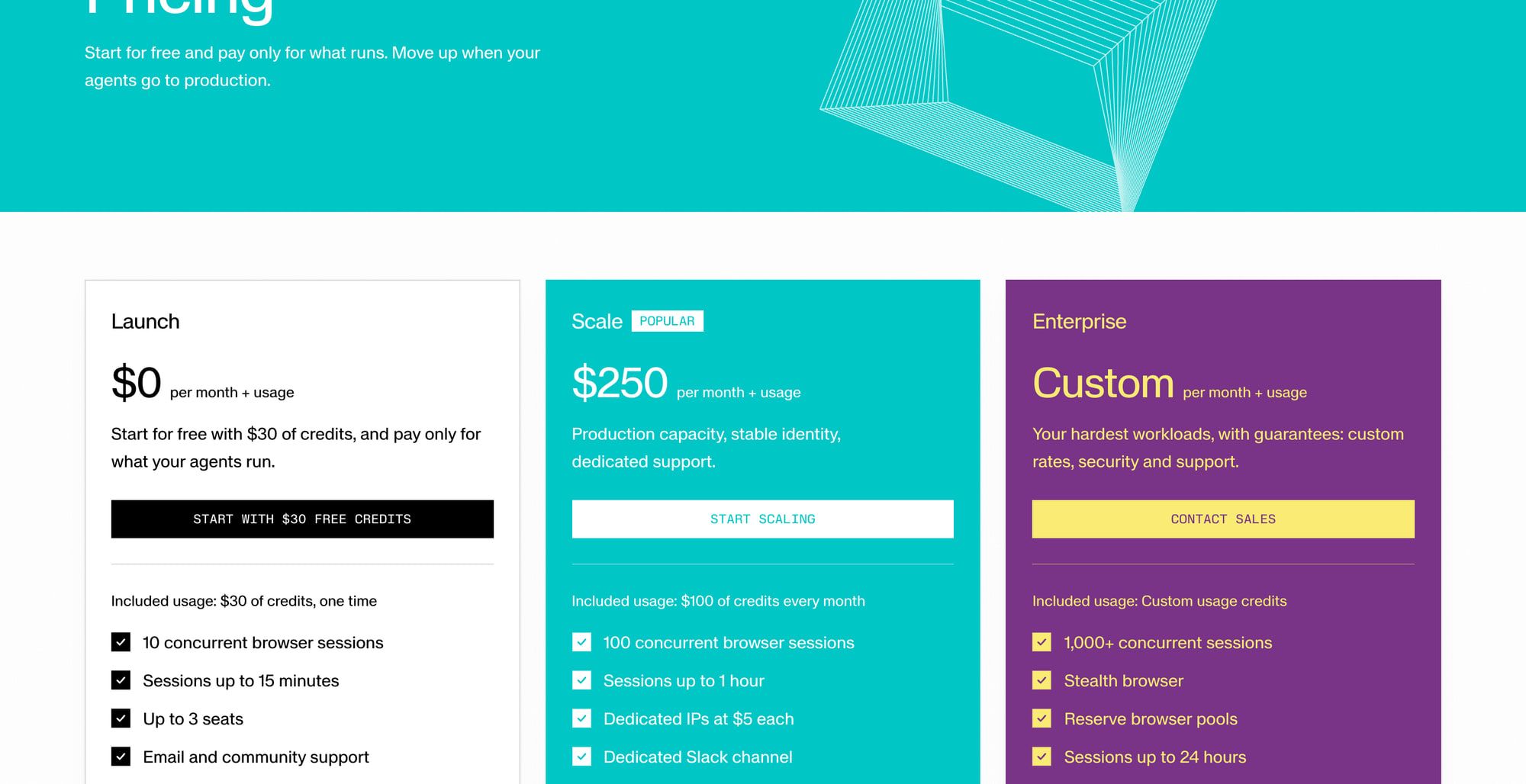
Launch’s no-base-subscription structure is the first Steel Cloud offer I would inspect for a small workflow. It lists ten concurrent sessions, a 15-minute cap and one-time $30 credits, with browser time at $0.10/hour and managed proxy traffic at $10/GB. Current pricing, checked 11 November 2026.
Scale is $250 monthly plus usage, with $100 monthly usage credit, 100 concurrent sessions and a one-hour cap. Browser time is $0.08/hour and proxy traffic $6/GB. I would not treat the whole $250 base as prepaid usage or compare the lower rates without the base commitment.
CAPTCHA solves are separate: Launch lists $3/1K and Scale $1/1K. The /scrape product is $5/1K on both; Scale dedicated IPs list $5/IP. Those are different billable products, not automatically included browser actions. Pricing.
Enterprise’s advertised 1,000+ concurrency and 24-hour sessions are custom scope. I give the named Launch/Scale cards priority over a generic cloud row so those larger figures do not become entry-plan promises.
What does the Steel Apache core give you? #
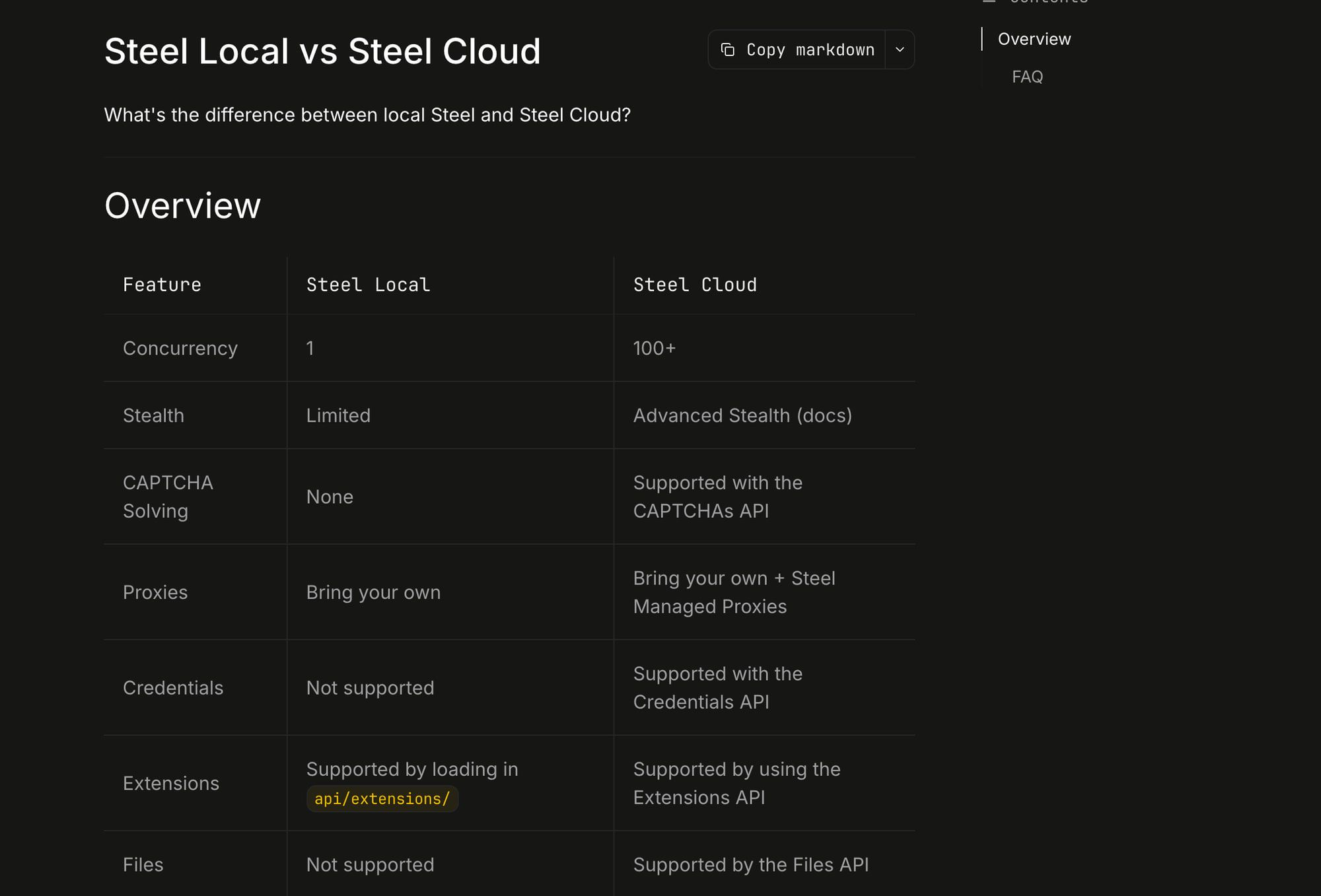
Steel’s core is Apache-2.0, with a documented local feature boundary. The local/cloud table lists local concurrency one, BYO proxy, limited stealth and no CAPTCHA/Credentials/Files API. I would select that core for what it supplies, not advertise cloud parity from the license name. Repository, license, local/cloud docs.
The Docker guide asks for 4 GB RAM and 10 GB disk and exposes API, CDP and viewer ports. Those are setup requirements, not a complete monthly operating cost or a measured production host size. I would configure private access and authentication before exposing any of those surfaces. Docker guide.
The latest OSS release is v0.5.5-beta, published 31 October 2026. The cloud changelog separately records optional recordings/billing notices on 2 October 2026 and billing/payment fixes on 25 September. I would pin and inspect the actual deployment rather than transfer a cloud changelog to an installed local binary. Releases, cloud changelog.
What happens when a session sits idle? #
It can keep billing on both, so each needs an explicit end-of-session policy. Browserbase keep-alive bills until release or timeout. Steel documents minute metering, a default five-minute lifetime and timeout/inactivity values in milliseconds; inactivity shutdown is opt-in, so idle time can remain billed. Browserbase keep-alive, Steel lifecycle, configuration.
I would explicitly release sessions the application owns and verify their end state. That is an acceptance recommendation, not a lifecycle check performed for this article.
A GitHub timeout report says self-hosted Steel ignores the session timeout field; it is still open and its linked fix PR is unmerged. A separate Figma WebGL report on a pinned build was closed on 27 October 2026 with a partial fix, and the maintainer noted sessions with ad blocking or bandwidth optimisation may still be affected. Neither establishes a general Steel Cloud failure rate.
What about data retention and terms? #
Browserbase Developer retention differs between pricing and plan docs, so I do not promise a 30-day or seven-day contract. Its ZDR guidance also distinguishes enterprise arrangements from per-session switches and other artifact/provider data. Pricing, plans, ZDR docs.
I would inspect its terms and the applicable order form before sending sensitive data. Steel’s legal index points to externally hosted terms, whose full contents were not evaluated in this research, so I cannot award a contract or privacy winner.
I would also identify where stored browser state and entered secrets may be visible. A license or a log switch does not settle every browser, recording, file and model-provider data path.
Which route makes sense for you? #
Shortlist Browserbase when its managed state/session approach and included usage suit the workload. Shortlist Steel Launch when a no-base cloud purchase with its stated limits fits, then price the actual time, traffic and other products.
Choose Steel core when the Apache local scope is enough and you can own maintenance, ports, proxy setup and missing APIs. I would only compare Scale after its $250 base and $100 usage credit are both in the budget.
Use Browserbase alternatives and Browserbase versus Browserless for additional billing/deployment choices. The Browser Use versus Stagehand comparison separates the agent/toolkit decision, and the agent browser hub connects the browser routes.
FAQ #
Does Steel Scale’s $250 count as usage credit? #
No. The documented plan is $250 monthly plus usage, with $100 monthly usage credit. Pricing.
Does the Apache core include Steel’s cloud features? #
No. Review the actual local/cloud feature table; the license does not supply managed APIs or infrastructure.
Do idle sessions still get billed? #
The docs describe lifetime-based billing and opt-in inactivity shutdown on Steel. I would explicitly release owned sessions and verify the selected configuration. Steel lifecycle, Browserbase keep-alive.
Which one has better uptime? #
No measured comparison here establishes that. A public status-page snapshot or a specific local issue is not a complete uptime record.
Sources
23 sources, accessed .
Official pricing, docs, changelogs and status pages 18
- Browserbase: pricing
- Browserbase: account/billing/plans
- Browserbase: platform/browser/long sessions/timeouts
- Browserbase: platform/browser/long sessions/keep alive
- Browserbase: platform/identity/proxies
- Browserbase: optimizations/concurrency/overview
- Browserbase: platform/browser/getting started/manage browser session
- Browserbase: platform/browser/core features/contexts
- Browserbase: account/enterprise/zero data retention
- Browserbase: terms of service
- Steel: pricing
- Steel: changelog
- Steel: status
- Steel: overview/self hosting/steel local vs steel cloud
- Steel: overview/self hosting/docker
- Steel: overview/sessions api/session lifecycle
- Steel: overview/sessions api/configuration
- Steel: overview/legal
Last updated: 13 October 2026. Researched and drafted with AI tools; human editorial review and publication approval are pending.


