How to choose
Picking a Cloud Browser for AI Agents? Decide This First
Not every AI agent needs a cloud browser. When yours does, compare who picks the actions, where it runs, and how hours, proxy GB and models are billed.

I would choose a cloud browser for an AI agent only after deciding that the job needs interaction or session state. Then I would separate three decisions: who chooses the actions, where the browser runs, and how its lifetime is billed.
Browserbase, Browserless, Steel, Browser Use and Cloudflare offer different hosting or automation paths; Stagehand supplies application-controlled AI operations. The table below helps you choose a layer, not a winner on task success. I compared their retained public documentation on October 16, 2026, re-checked it on November 11, 2026, and did not use their accounts or APIs. The agent browsers hub links the related browser guides.
Short on time?
First, decide what the job really needs
- Known URLs, no interaction
- Start with fetch
- I would avoid maintaining a browser session when the workflow only needs permitted page content. Start with the output you require.
- Your application controls the steps
- Managed browser infrastructure
- Compare Browserbase, Browserless, Steel or Cloudflare against your exact control path, session limits and usage budget.
- A few AI-assisted operations
- Stagehand v4
- Consider explicit act, observe and extract operations alongside deterministic browser steps. Browser and model costs are separate decisions.
- Delegate the interaction loop
- Browser Use
- Consider its agent layer when the model must choose the next action. Keep approval and cost limits in your application.
Prices verified . These are research-based workflow recommendations. No measured compatibility, task-quality or cheapest-provider ranking is asserted.
Which browser layer should you buy? #
I would start with a written output contract: discover sources, read known pages, or act inside an interactive session. My search, fetch and browser decision guide separates those workflows; the hosting bill comes after that choice.
The next distinction is between a browser host and the code deciding what happens inside it. Stagehand v4 exposes explicit AI operations and deterministic page operations, while Browser Use separates its library, CLI, browser and cloud agent offerings. Buying one layer does not establish the cost of every other layer.
| Option and layer | Published price and unit | Allowance, cash and capacity caveat | When I would investigate it |
|---|---|---|---|
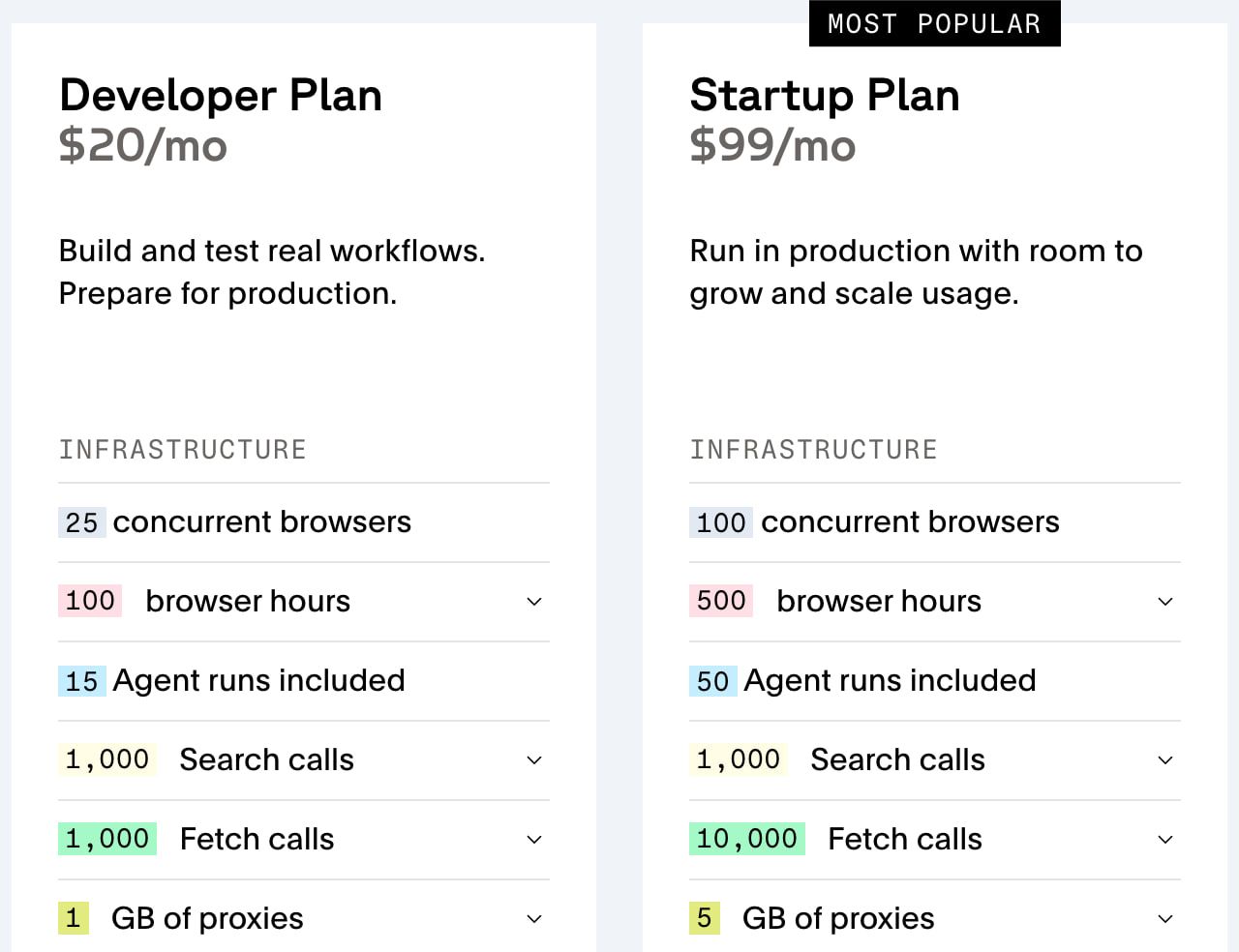
| Browserbase: managed browser infrastructure | Developer $20/month includes 100 browser-hours and 1 GB; overage $0.12/hour and $12/GB. Startup $99 includes 500 hours and 5 GB, then $0.10/hour and $10/GB. Pricing | Free lists 1 browser-hour. Each session has a one-minute/one-MB minimum; paid allocation is not a spending cutoff. Developer allows 25 organization sessions and 25 starts/minute, versus Startup 100 and 50; paid sessions have a six-hour maximum. Billing, limits | Your application already owns the browser workflow and needs a managed host. Confirm the selected project’s state, retention and capacity requirements. |
| Browserless: managed connections or licensed private deployment | One unit per connection block of up to 30 seconds; reconnecting starts a new charge. Residential traffic adds 6 units/MB, datacenter 2 and successful CAPTCHA solving 10. Pricing | Free lists 1K units/month, 2 concurrent sessions and a two-minute session limit. The displayed $25/month for 20K units is an annual-billing card, not a verified flexible monthly quote. Pricing | Connection-unit budgeting fits your workload, or you can review its SSPL/commercial licensing before self-hosting. License |
| Steel Cloud: managed sessions | Launch has no monthly base, then $0.10/browser-hour and $10/proxy GB. Scale has a $250 monthly base, $100 usage credit, then $0.08/hour and $6/GB. Pricing | Launch advertises $30 credit once, 10 concurrent sessions and 15-minute sessions; Scale lists 100 concurrent and one-hour sessions. These are not equal to free production capacity. Pricing | You want a no-base-fee entry option and can explicitly manage session release, usage and timeouts. |
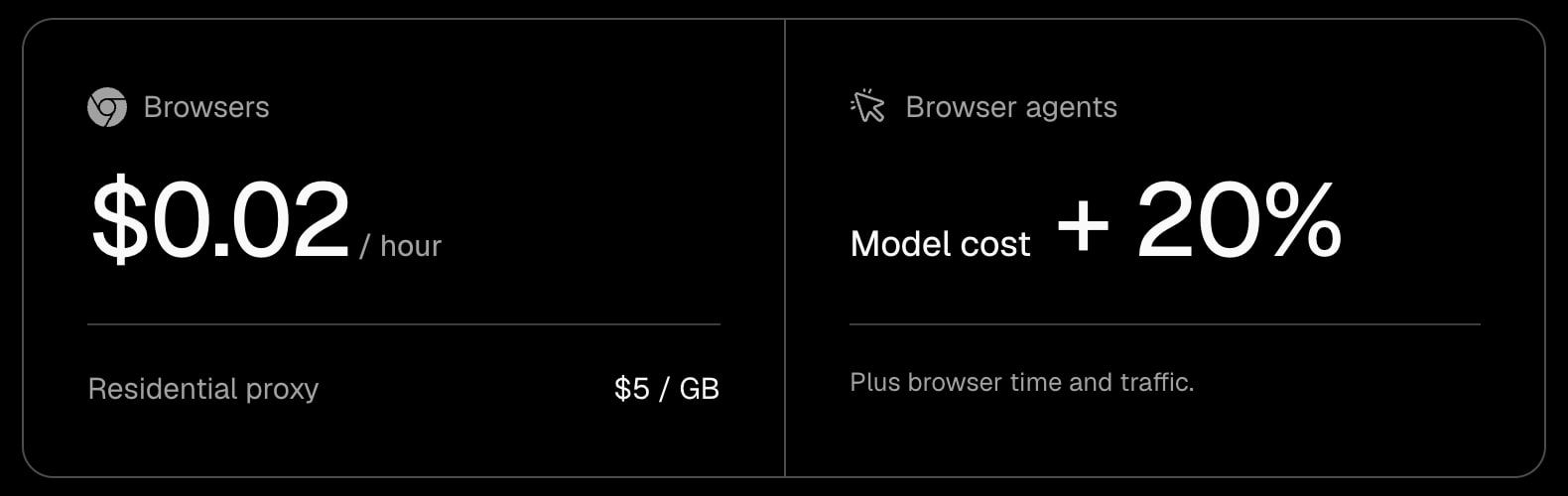
| Browser Use: cloud browser and optional delegated agent | Browser time $0.02/hour, billed by the minute with a one-minute minimum; default residential proxy $5/GB, versus $0.20/GB for direct or bring-your-own-proxy traffic, plus any fee from your proxy provider. Agent runs bill model tokens at its published per-million-token rates; with your own model key it lists “provider cost + 0.2x”. Pricing | Minimum top-up $5; purchased credits do not expire. Pricing and the repository both list a one-time $1 signup credit. Initial capacity is 10 concurrent browsers; it unlocks 50 at $100 total paid, 250 at $1,000, 500 at $5,000 and 1,000 at $25,000. Legacy V2/V3 agent APIs keep separate rates. Pricing, repository, legacy rates | An agent loop fits the task, or you specifically select its browser service for your own loop. The $0.02 figure is not a completed-task price. |
| Cloudflare Browser Run: Workers Quick Actions or Browser Sessions | Paid plans include 10 browser-hours/month, then $0.09/hour; Sessions also include 10 monthly averaged peak concurrent browsers, then $2 per additional browser. The Workers Paid base ($5/month minimum) costs extra; monthly runtime billing rounds to the nearest whole hour. Pricing, Workers pricing | Free has 10 minutes/day, 3 concurrent browsers and one new browser per 20 seconds. Paid default capacity is 200 concurrent, not 200 included at no cost. Start-rate limits also apply. Limits | You already operate on Workers and the supported control path fits. Quick Actions and Browser Sessions have different concurrency billing. Overview |
| Stagehand v4: application-controlled operations | The introduction documents act, observe, extract and deterministic operations, not an all-in hosted tariff. Introduction |
Framework availability does not include browser or model capacity. The documented version is not proof of your installed version, license selection or runtime compatibility. Introduction | You want the application to decide when to use AI and when to run a defined browser step. |
Prices are USD before tax, verified November 11, 2026. Different layers and units make a single price ranking misleading; use the focused pricing and comparison guides below for a defined configuration.
Browserbase’s separate Search prices also need care: its pricing page lists $1/$5/$7/$12 per 1K for Parallel Fast, Parallel Advanced, Exa Fast and Exa Deep after 1,000 included calls, while its billing-plan docs show a single $7/1K overage. I would confirm the selected provider and account tariff rather than treat those statements as consistent. This guide’s browser example below excludes Search. Pricing, billing plans.
Who chooses the next action? #
I would keep a deterministic script when the sequence is known and use explicit AI operations where the task needs interpretation. Stagehand’s documented act, observe and extract primitives make that application-controlled approach concrete; Browser Use also offers a delegated agent layer. These are operating choices, not evidence that one framework completes more tasks. Stagehand v4, Browser Use repository.
The Browser Use versus Stagehand comparison goes further on that boundary. If your application connects tools through MCP, use the browser MCP servers guide to separate the connection interface from the browser runtime and the application’s permission decisions.
I would give an agent narrow targets, an isolated browser profile and approval before consequential writes. Web pages can contain indirect prompt injection; OWASP recommends controls including least privilege and human approval for high-risk actions. A connected browser or an MCP server does not prove those controls exist in your deployment: Microsoft’s Playwright MCP README says it is not a security boundary, and the MCP security guidance covers SSRF, token passthrough and sandboxing local servers. OWASP guidance, Playwright MCP, MCP security.
What does Playwright support actually mean? #
I would verify the exact protocol and SDK version rather than accept a generic compatibility badge. Playwright documents connectOverCDP as Chromium-only and lower fidelity than its native protocol connection. That is a specific limitation, not a conclusion that every hosted browser is incompatible. Playwright BrowserType reference.
Browserless provides another useful example: its Standard Sessions reconnect pattern uses Puppeteer disconnect, and its docs call that pattern unreliable with Playwright, directing Playwright users toward Persisting State, whose processKeepAlive option is itself Puppeteer-only. Check the particular lifecycle path you need, not just whether the provider mentions Playwright. Standard Sessions, Persisting State.
For a future acceptance check, I would record browser/SDK version, protocol, session isolation, persistence, proxy configuration, locale, rendering, downloads/uploads, traces, release behavior, start throttles and secret/egress controls. That is my proposed twelve-check checklist; it has not been executed here. Start with Browserbase versus Browserless or Browserbase versus Steel for the documented differences.
What goes into the browser bill? #
I would budget the base plan, billed session lifetime, proxy traffic, model charges and any separately selected services. A browser-hour is a duration, not a successful page, a correct answer or a completed agent task.
The short-job traps differ. Browserbase has one-minute and one-MB session minima without a verified rounding direction; Browserless charges connection blocks and reconnects; Browser Use bills by the minute with a one-minute minimum and adds model/service and selected traffic costs. I would not turn those into a common per-task price without a defined workload. Browserbase billing, Browserless pricing, Browser Use pricing.
For example, Browserbase Developer’s published $20 base includes 100 browser-hours and 1 GB. Under the stated rates, 120 billed hours and 2 billed GB cost $20 + 20 × $0.12 + 1 × $12 = $34.40, before tax or separately selected services. This is hypothetical rate arithmetic, not an invoice, a promise of usable capacity or a comparison at equal task quality. Pricing.
Read Browserbase’s full cost examples, Cloudflare Browser Run pricing and Bright Data Browser API pricing for their respective units. Do not substitute a proxy tariff or framework price for the selected browser product’s bill. If the agent brings its own proxy instead, proxies for AI agents covers that transport choice and its separate GB or IP bill.
Which session limits should you check one by one? #
I would record simultaneous sessions, new-session rate, inactivity timeout and hard lifetime separately. Browserbase Developer’s 25 organization sessions and 25 starts per minute illustrate why a capacity figure and a start rate are different constraints; the Browserbase concurrency and session-start guide expands that distinction. Concurrency documentation.
Steel documents minute metering and a default five-minute hard timeout; inactivity release is optional and off by default. I would explicitly release only the sessions my application owns and verify their end state, rather than assume that a disconnected client stopped billing. Session lifecycle.
Cloudflare’s default 60 seconds is an inactivity timeout, with keep_alive up to 20 minutes, not a universal 60-second maximum session lifetime. Paid default concurrency is 200 and start rate three new browsers/second, while paid Browser Sessions charge separately for monthly averaged daily peak capacity above the included amount. Limits, pricing.
Should you just run the browsers yourself? #
I would consider self-hosting when control over runtime, isolation and operations matters enough to own those responsibilities. Review the selected version’s actual license first: Browserless offers SSPL or commercial terms, and its public license addresses closed-source commercial applications and CI. “Source available” does not settle your deployment rights. Browserless license.
The self-hosted versus managed browsers guide frames that ownership decision. If a managed service is the better fit, compare Browserbase alternatives or Browserless alternatives against your required control path rather than a headline allowance.
Permission remains a separate gate. RFC 9309 says robots rules are not access authorization, so I would check the target’s rules, access terms and intended data use before running the workflow. RFC 9309. Is robots.txt legally binding? goes further on what those rules do and don’t settle.
Which route would I take? #
- Read known public pages: start with the search/fetch/browser workflow and add browser state only when the task needs it.
- Run a defined application workflow: compare host control paths, lifecycle behavior and the complete bill before choosing Browserbase, Browserless, Steel or Cloudflare.
- Use a few model-assisted steps: investigate Stagehand’s explicit operations, keeping validation and approvals in the application.
- Delegate the loop: investigate Browser Use, with a separate model budget and scoped write permissions.
- Own the runtime: check licensing and operational requirements before selecting self-hosting.
Those are my research-based recommendations, not measured completion-rate rankings. I would make the final choice only after a permitted check on the actual workflow and a review of the selected account’s contract and limits.
FAQ
Do I need a browser for every AI research task?
No. I would use search to discover sources, fetch to read known pages and a browser when interaction or session state is required. That is a workflow recommendation, not a measured comparison of coverage.
Is CDP the same as native Playwright?
No. Playwright documents connectOverCDP as Chromium-only and lower fidelity than its native protocol connection. Check the selected host, SDK version and control path rather than assume complete feature parity.
Why can a short browser job cost more than you'd think?
Session floors, connection blocks, reconnects, proxy traffic and model fees can all matter. Browserbase has session minima, Browserless charges 30-second connection blocks and Browser Use adds selected traffic and model/service fees. None is a common price per completed task.
Does concurrency come with free browser hours?
No. Simultaneous capacity, session-start rate and usage allowance are separate. Cloudflare Browser Sessions also bill monthly averaged daily peak concurrency above the included amount; a default capacity limit is not a free allowance.
Do open-source frameworks come with hosted browsers?
No. Browser Use separates its local library and cloud offerings, while Stagehand provides browser operations. The selected browser host and model still need their own budget, configuration and license review.
Is it safe to give an agent full browser credentials?
I would use an isolated runtime with narrowly scoped credentials and require approval before consequential writes. OWASP documents indirect prompt injection and recommends least privilege and approval for high-risk actions. A connected browser does not prove those controls are present.
The FAQ summarizes the documented distinctions above. Primary references: Stagehand, Playwright, Browserbase billing, Browserless pricing, Browser Use pricing, Cloudflare pricing and OWASP.
Sources
22 sources, accessed .
Official pricing, docs, changelogs and status pages 19
- Managed browser hours, proxy GB, monthly base and compatibility
- Session minimums, duration, allocations and single $7/1K Search overage
- Organization concurrency versus session-start rate and minimum lifetime
- 30-second connection units, proxy MB, annual cards and capacity
- Puppeteer reconnect workflow; Standard Sessions not Playwright
- Launch/Scale base, credits, hourly/GB costs and caps
- Minute metering, five-minute hard timeout and optional inactivity release
- Explicit AI primitives plus deterministic operations; current v4 scope
- Cloud time, traffic, model fee, minimum top-up and paid concurrency thresholds
- Browser-hours plus monthly-average daily-peak concurrency billing
- Free/Paid default capacity, creation rate and inactivity timeout
- connectOverCDP Chromium-only and lower fidelity than native Playwright protocol
- Robots protocol is not access authorization
- Untrusted website content, privilege controls and human approval for high-risk actions
- Legacy V3 token-priced and V2 step-priced agent API rates
- Quick Actions versus Browser Sessions and supported control paths
- Workers Paid minimum charge of $5 a month
- Persisting State sessions; processKeepAlive is Puppeteer-only
- MCP security guidance on SSRF, token passthrough and local server sandboxing


