Pricing
Kernel pricing is $0.06 an hour headless, $0.48 headful
Kernel bills $0.06 an hour headless and $0.48 headful at the same GB-second rate. I priced the plans, proxy GB and 100 to 10,000 hours of use.

Kernel’s cloud browser costs about $0.06 an hour headless and about $0.48 an hour headful, and both rows bill the same $0.0000166667 per GB-second. The 8 to 1 gap is default memory, 8 GiB against 1 GiB, not a surcharge for the mode. Kernel pricing docs and concurrency docs, verified 24 Nov 2026; the hourly figures are my arithmetic, and the memory match is my reading of the docs.
You are probably deciding whether to run Kernel headless or headful, which plan you will land on, and whether it beats Browser Use, Anchor, Browserbase, Hyperbrowser or Steel at 100, 1,000 or 10,000 browser hours a month. Below I price both modes at those volumes, check what “idle time is free” and “proxies included” really require, and list what Kernel does not publish. I opened no account and started no session, so every bill here is list-price arithmetic. It sits in my agent browser guides.
Short on time?
Short on time? Here's my pick by reader
- Short or bursty headless sessions, 100 to 1,000 hours, a small proxy need
- Kernel Hobbyist: $30 a month, $10 credit, 5 GB proxy
- $0.06 an hour headless with no creation fee, so a 5-minute session is $0.005. List price only; I compared no speed or stealth.
- Lowest list bill with no proxy at 1,000 hours or more
- Browser Use ($0.06 an hour), or Anchor Starter on hour-long sessions
- Both come to $60 at 1,000 hours against Kernel's $80, and $600 against $750 at 10,000, because Kernel's plan fees are $30 and $200.
- Targets that need live view, replays or a non-headless browser
- Kernel headful at $0.48 an hour, only on those targets
- Kernel browsers default to headful, so set headless: true and keep headful for the pages that need it. All-headful at 1,000 hours is $500 on Hobbyist.
- 150 concurrent browsers, an EU region, your own proxy or pools
- Kernel Start-up: $200 a month, $50 credit, 20 GB proxy
- It is the plan that lists eu-west, bring-your-own proxy, pools and GPU. Anchor's docs put bring-your-own proxy and EU regions on its $2,000 plan.
- Proxy-heavy work above 20 GB a month
- Not Kernel on public numbers; Browser Use at $5 per GB
- Kernel publishes no price past its 5 GB and 20 GB bundles. Ask for the order-form price in writing before you commit.
- Just trying it
- Kernel Free: $5 a month, 5 concurrent browsers
- About 83 headless hours or 10 headful hours at the table rates. What happens after the $5 is not stated.
Prices verified . USD list-price arithmetic from pages read on 24 Nov 2026. I did not open an account or start a session.
What does Kernel cost each month? #
Kernel sells a $0 plan, a $30 Hobbyist plan and a $200 Start-up plan, each with a monthly credit, plus a custom Enterprise tier. Every plan also pays per second of browser time on top. The pricing page and the docs pricing page agree on the numbers below, verified 24 Nov 2026. They disagree on one name: the marketing page calls the first plan Free and the docs call it Developer.
| Plan | Monthly fee | Usage credit | Concurrent browsers | Proxy GB bundled | Replays kept | Support |
|---|---|---|---|---|---|---|
| Free (docs: Developer) | $0 + usage | $5 | 5 | Not stated | 1 day | Discord |
| Hobbyist | $30 + usage | $10 | 10 | 5 GB | 7 days | |
| Start-up | $200 + usage | $50 | 150 | 20 GB | 30 days | |
| Enterprise | Not published | Custom | Custom | Set by order form | Custom | Shared Slack |
Sources: pricing page for fees, credits and concurrency; docs pricing for replays and support; pricing FAQ for proxy GB. The marketing page words support differently (basic email on Free and Hobbyist, priority email on Start-up, a dedicated Slack channel on Enterprise); the Support column follows the docs. The Start-up button reads “start free trial”, and I found no page that says what the trial includes.
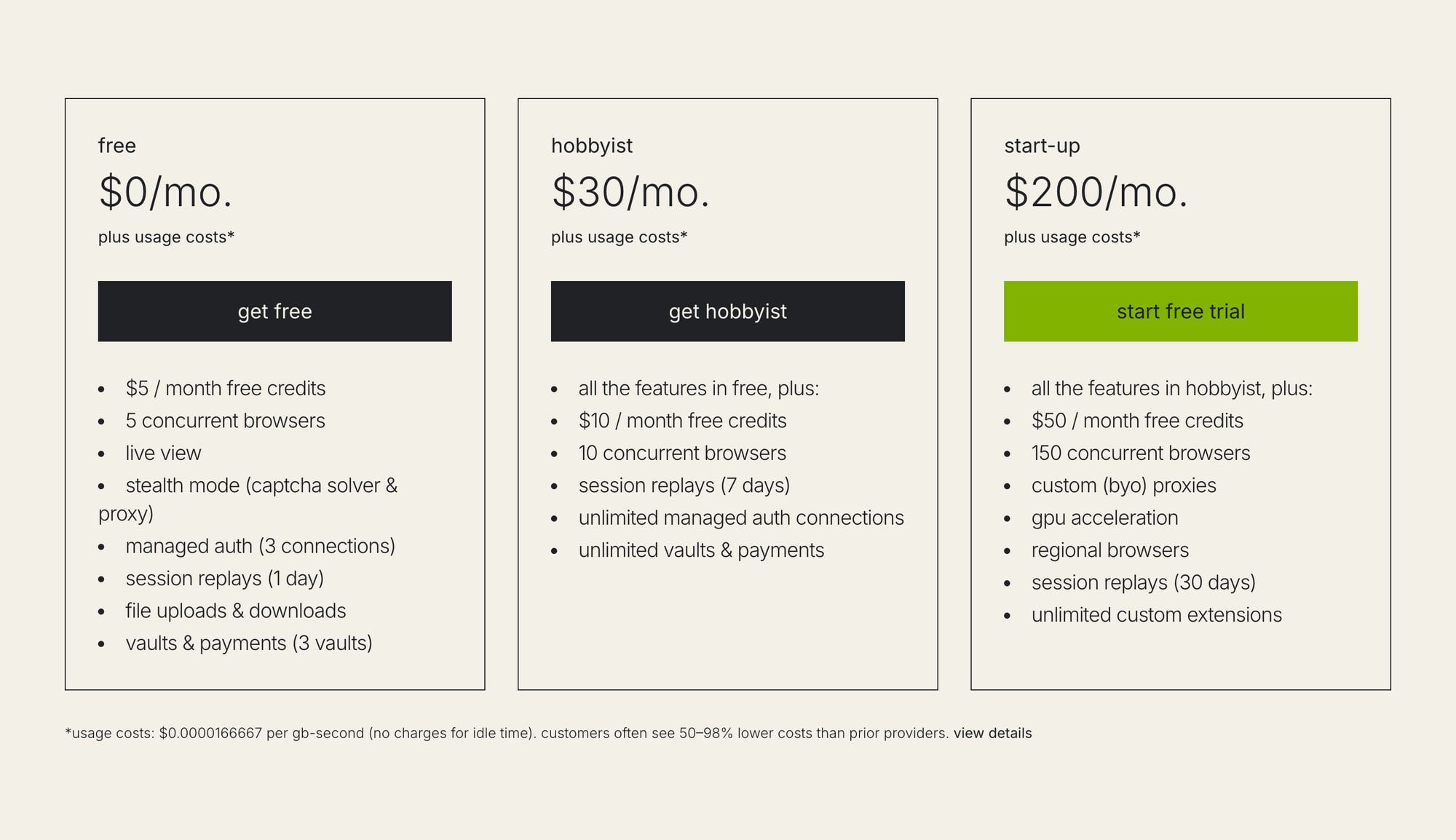
The credit is not a discount on the plan fee. The docs say “Included monthly credits apply to usage costs only”, so the monthly bill is the fee plus whatever usage is left after the credit. In formula form: fee + max(0, usage − credit). That is my arithmetic, and it assumes monthly billing and no carry-over, which Kernel does not state. Docs pricing.
On features, the docs list live view, extended timeouts, viewports, managed stealth, the computer-controls API and SOC2 on every plan. The same docs also list browser pools among the all-plan features, but the pools docs and the changelog limit pools to Start-up and Enterprise, so I follow the pools docs. Configurable proxies start at Hobbyist. Bring-your-own proxies, GPU, regional browsers and audit-log search start at Start-up, and the HIPAA BAA is Enterprise only. Docs pricing.
Three smaller charges are worth a line each, all from the same docs page.
- Managed auth: no per-connection fee, and the sessions count as ordinary browser usage. The docs estimate that monitoring 100 auth connections typically costs less than $5 a month in browser usage. How managed auth handles passwords and 2FA is in my guide to browser agent logins.
- App invocations: billed on active compute time, and failed or cancelled runs are still billed. I price them in the rate table below.
- Spending caps: an organisation cap counts usage “after monthly credits”. At 100% new sessions return 403 and running work continues.
Why is headful exactly 8x headless? #
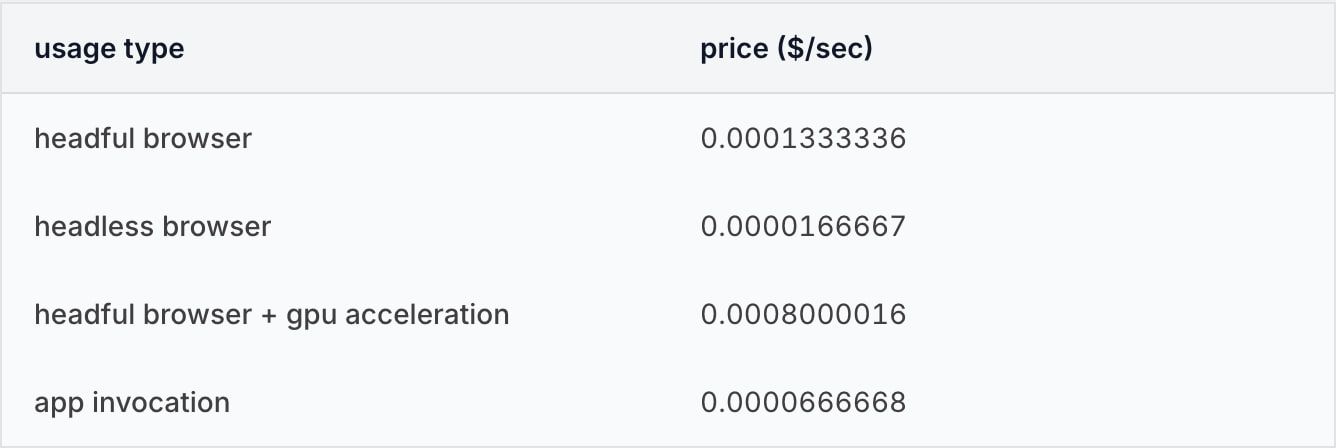
Both rows bill $0.0000166667 per GB-second, and headful defaults to 8 GiB while headless defaults to 1 GiB, so the same rate gives $0.48 against $0.06 an hour. The docs rate table lists only per-second prices and has no memory column and no footnote. The memory match is my reading of three pages, not a Kernel statement. Rate table, concurrency docs, headless docs, verified 24 Nov 2026.
| Row | Docs rate per second | Default memory (docs) | Per hour (my arithmetic) | Against headless |
|---|---|---|---|---|
| Headless | $0.0000166667 | 1 GiB | $0.06 | 1x |
| Headful | $0.0001333336 | 8 GiB | $0.48 | 8x |
| Headful + GPU | $0.0008000016 | Separate GPU pricing | $2.88 | 48x |
| App invocation | $0.0000666668 | 4 GB | $0.24 | 4x |
Three details make me trust the reading. The pricing page’s footnote says “$0.0000166667 per GB-second (no charges for idle time)”, which is exactly the headless row’s rate. The docs describe an app invocation as a “4 GB memory allocation at $0.0000166667 per GB-second”, and four times that rate is the $0.0000666668 in the table. And the headful row divided by the headless row is exactly 8.0000.
So the 8x is not a headful tax. Kernel browsers default to headful, which means the 8 GiB default is what you pay for unless you ask for headless. The pool example in the scale docs carries the hint too: “headless: true for cost savings if no live view needed”. Scale docs.
The GPU row is 6 times headful and 48 times headless. GPU browsers are headful only, have no standby, are not supported in pools, and need Start-up or Enterprise. The Large GPU option “bills at twice the standard GPU rate”, which would be about $5.76 an hour by my arithmetic; the docs give no hourly figure. GPU docs.
One framing I would avoid is “headless costs 8x less”. Nothing on Kernel’s pages says the mode earns a discount. The cheaper row is cheaper because it gets a smaller machine.
Can I give a headless browser more memory? #
Yes, but Kernel publishes no price for it. Headless browsers can take 1, 2 or 4 GB, with 1 GiB the default, and headful browsers 8 or 16 GB, with 8 GiB the default. Memory is set when the browser is created and cannot change on a running one. Concurrency docs, headless docs.
The changelog dates the 2 GiB and 4 GiB headless options to 16 Oct and the 16 GiB headful option to 21 Aug. The page prints no years, so I read both as 2026. The pricing docs, the pricing page and the rate table have no row for any of them, and I could not find a statement on how they bill.
If the per-GB-second logic carries over, the numbers would look like this. They are my arithmetic, not Kernel prices, and I could not verify them.
| Option | Default? | Published hourly rate | My arithmetic at $0.0000166667 per GB-second |
|---|---|---|---|
| Headless 1 GiB | Yes | About $0.06 | n/a |
| Headless 2 GiB | No | None | $0.12 |
| Headless 4 GiB | No | None | $0.24 |
| Headful 8 GiB | Yes | About $0.48 | n/a |
| Headful 16 GiB | No | None | $0.96 |
Why it matters: Kernel’s own headless page says a heavy page can exhaust the 1 GB default. Headless docs. Gologin, which sells a rival cloud browser, reports that its 1 GB headless tab stopped responding on a heavy Zillow page in 3 of 3 runs. That is one rival’s test, run from a home connection in India and from Kernel’s app platform in us-east, with no test date I could find, so I treat it as a warning to check your own pages rather than a measurement. Gologin review.
If your targets need 4 GiB headless, the table says 1,000 hours would be $240 of usage and $260 on Hobbyist ($30 + $240 − $10), by the same unverified arithmetic. Ask Kernel for the real rate before you plan around it.
Is idle time really free? #
Only once a browser reaches standby, which takes ten seconds with no activity and no connected client. The pricing page footnote says “no charges for idle time”, and the standby docs say Kernel browsers “automatically start entering standby after ten seconds with no activity”. Verified 24 Nov 2026.
What counts as activity is broader than a page load. The docs list a connected CDP client (Playwright, Puppeteer or raw CDP), a connected WebDriver or BiDi client, a Live View client, a telemetry stream and an in-flight computer-controls request. “Any of the above resets the standby idle timer”. In standby the browser “incurs zero usage costs”.
Four conditions sit around that promise.
- The transition is billed. “Usage is billed until the transition completes, which may take several more seconds.”
- The slot stays taken. “Standby stops usage charges, not the concurrency slot”, per the concurrency docs. Pool capacity counts against the limit “whether or not its browsers are acquired”, per the pools docs.
- GPU has no standby. Headless is the open question: no page I read says whether headless browsers use standby. GPU docs.
- Pools are different. The pools docs say “Idle browsers in a pool aren’t billed”, and the changelog records that idle disk charges for pools on the Start-up tier were removed (10 Apr; year inferred).
My reading, which Kernel does not spell out: an agent that keeps a Playwright connection open while it waits for a model reply is a connected client, so that wait is billed as active time. If it disconnects between steps, the browser can drop into standby after ten seconds, though the reconnect costs time I cannot price.
Here is why I care. A 10-minute run with the client connected the whole time is $0.01 headless or $0.08 headful at the rates above (my arithmetic), model-wait time included.
Two third-party claims differ from the docs. Ecorpit and Bright Data both say standby starts after “5 seconds”, while the docs say ten. The docs are undated, so they may have changed. Ecorpit, Bright Data, standby docs.
Bright Data, which sells a rival, also says Browserbase “bills those idle minutes” and gives no source. The Browserbase docs I read are silent on idle time. Browserbase docs. So I would not score idle billing as a Kernel win until someone shows both sides.
How far do the credits go? #
The $5, $10 and $50 credits cover about 83, 167 and 833 headless hours a month, or about 10, 21 and 104 headful hours. That is credit divided by the hourly rate, so it is my arithmetic on the rate table, verified 24 Nov 2026.
| Plan | Credit | Headless hours | Headful hours |
|---|---|---|---|
| Free | $5 | 83.3 | 10.4 |
| Hobbyist | $10 | 166.7 | 20.8 |
| Start-up | $50 | 833.3 | 104.2 |
Because the credit applies to usage only, the plan fee is a commitment, not a prepayment. On Hobbyist you pay $30 whether you run nothing or $10 of usage. On Start-up you pay $200 and the first $50 of usage costs nothing extra (my reading of the credit wording).
What the credit does after it runs out on Free is the question every page I read avoids. The pricing page, the docs and the FAQ do not say whether Free stops, asks for a card or bills overage. They also say nothing about rollover or expiry. Pricing page, docs pricing.
Spending caps are the one protection I can point to. At 100% of an organisation cap, new sessions return 403 while running work continues. Spending caps docs. Set one before the first real run.
Against other free offers on their own pages: Anchor gives $5 a month, Hyperbrowser $5 (50 hours at $0.10, one concurrent browser), Browserbase one hour, Steel a one-time $30 and Browser Use a one-time $1. Kernel’s $5 and Anchor’s $5 both buy about 83 hours at $0.06, while Hyperbrowser’s buys 50. Anchor, Hyperbrowser, Browserbase, Steel, Browser Use.
Are proxies really included? #
Kernel includes 5 GB of proxy on Hobbyist and 20 GB on Start-up, calls it “metered and limited”, and publishes no price beyond that. Treat any page that says “free”, “not billed” or “unlimited” as shorthand for the bundle, not a promise. Verified 24 Nov 2026.
The sources disagree in wording, so here is each one.
- The pricing FAQ: “Our hobbyist plan includes 5GB of free proxies and our start-up plans include 20GB of free proxies”. On enterprise plans, “your order form sets proxy pricing”.
- The proxies overview: “Kernel-provided proxies are metered and limited to 5GB on Hobbyist plans and 20GB on Start-Up plans.” It adds that on every plan proxy use is subject to the fair use rules and restricted destinations in Kernel’s Acceptable Use Policy.
- Gologin says Kernel proxy traffic is “not billed”, andrew.ooo lists proxies as “Unlimited on Hobbyist+”, and Ecorpit says they are not billed, subject to a fair-use policy. Gologin, andrew.ooo, Ecorpit.
I trust Kernel’s own pages, because they are the ones that name a cap. What none of them gives is a price per GB, an overage rule, whether the 5 GB and 20 GB reset monthly, or a statement that proxy cost sits inside the usage rates.
To see what the bundle might be worth, I priced it at the rivals’ list rates. That is a value for scale, not a Kernel price.
| Rival rate per GB | Rival | 5 GB (Hobbyist bundle) | 20 GB (Start-up bundle) |
|---|---|---|---|
| $5 | Browser Use | $25 | $100 |
| $6 | Steel Scale | $30 | $120 |
| $8 | Anchor Proxy | $40 | $160 |
| $10 | Steel Launch, Hyperbrowser, Browserbase Startup | $50 | $200 |
| $12 | Browserbase Developer | $60 | $240 |
Rates from Browser Use, Steel, Anchor, Hyperbrowser and Browserbase, read 24 Nov 2026; the multiples are my arithmetic. My own Anchor breakdown has the same proxy ladder in context: Anchor Browser pricing.
At 0.1 GB per browser hour, an illustration and not a typical value, 100 hours needs 10 GB. That is over Hobbyist’s 5 GB and inside Start-up’s 20 GB. At 1,000 hours the same assumption needs 100 GB, which is 80 GB past the Start-up bundle, and Kernel has published no price for those 80 GB. For scale only, 80 GB at the rivals’ $5 to $12 would be $400 to $960.
Stealth adds more questions. The stealth docs say enabling it attaches an ISP proxy from a shared Kernel pool with a static exit IP, plus a CAPTCHA solver covering hCaptcha, reCAPTCHA and Cloudflare challenges. Both are opt-out, not restricted by plan, and neither has a cost statement. Whether stealth works in headless mode is not stated.
The pricing FAQ says Free’s stealth attaches a “residential” proxy. The stealth docs and the changelog (28 May; year inferred) say the default is ISP, not residential, so I follow the docs. Bring-your-own proxies start at Start-up and the custom proxy docs name no fee.
What does a single session cost? #
A 5-minute headless session is $0.005 on Kernel, because it bills per GB-second with no creation fee. That is my arithmetic on the rate table, and the table below puts it beside two rivals.
| Session length | Kernel headless | Kernel headful | Browser Use | Anchor |
|---|---|---|---|---|
| 1 minute | $0.0010 | $0.0080 | $0.0010 | $0.0108 |
| 5 minutes | $0.0050 | $0.0400 | $0.0050 | $0.0142 |
| 60 minutes | $0.0600 | $0.4800 | $0.0600 | $0.0600 |
Kernel’s rows are the rate table times the seconds. Browser Use is $0.06 an hour billed by the minute with a one-minute minimum, and Anchor adds $0.01 per browser created to $0.05 an hour (Browser Use, Anchor docs, my arithmetic).
Kernel does not state a rounding rule or a minimum charge. Notte says per minute with a one-minute minimum, though its own blog also says per-second billing; Bright Data says per second of active time; the docs say per GB-second. Notte, Bright Data. I would assume nothing below a minute until a bill shows it.
My read: this is Kernel’s real edge on list price, not the hourly rate. Per hour it only matches Browser Use (see Browser Use pricing), but for short sessions it is far cheaper than Anchor, whose creation fee fades as sessions lengthen (see my Anchor pricing post).
What will 100, 1,000 or 10,000 hours cost? #
On Hobbyist, 100 headless hours cost $30, 1,000 cost $80, and 10,000 need Start-up at $750; the same hours headful cost $68, $500 and $4,950. These are list-price bills for a single browser with no proxy, no GPU, monthly billing, before tax, using the formula fee + max(0, usage − credit). Verified 24 Nov 2026 against the docs rate table and plan page.
| Browser hours | Headless usage | Headless bill | Headful usage | Headful bill | Bill ratio |
|---|---|---|---|---|---|
| 100 | $6 | $30 on Hobbyist ($6 sits inside the $10 credit) | $48 | $68 on Hobbyist ($30 + $48 − $10) | 2.3x |
| 1,000 | $60 | $80 on Hobbyist ($30 + $60 − $10); $210 on Start-up | $480 | $500 on Hobbyist | 6.3x |
| 10,000 | $600 | $750 on Start-up ($200 + $600 − $50) | $4,800 | $4,950 on Start-up | 6.6x |
Usage alone is 8x, as the rate table says (the same table appears as raw MDX in Kernel’s docs repository, part of the kernel/docs project on GitHub). The bill ratio is lower because the plan fee and credit are the same in both columns, which is why the headful bill is 2.3x the headless bill at 100 hours, not 8x.
Hobbyist cannot carry 10,000 hours. It allows 10 concurrent browsers, and 10 browsers running for a 730-hour month is at most 7,300 browser hours. Ten thousand hours averages about 13.7 browsers around the clock, so it needs Start-up’s 150.
Free covers 83 headless hours of the 100, and Kernel does not say what the other 17 cost, so I show Hobbyist. Gologin’s three worked bills, $68, $260 and $1,460 at 100, 500 and 3,000 hours, reproduce exactly with this method, which is the one outside check I have on it. Gologin review.
A mixed example shows the pick. If 800 of your 1,000 hours run headless and 200 run headful, usage is $48 + $96 = $144, and Hobbyist comes to $164 ($30 + $144 − $10), against $80 all headless and $500 all headful. That mix is my illustration, not a typical split.
How does that compare with other cloud browsers? #
At list price Kernel headless is level with Browser Use and Anchor per hour, but $20 more at 1,000 hours and $150 more at 10,000, because of its plan fees. It is below Browserbase, Hyperbrowser and Steel at 1,000 and 10,000 hours. These are 60-minute sessions, one browser, no proxy, monthly billing, from pages read 24 Nov 2026.
| Browser hours | Kernel headless | Browser Use | Anchor | Browserbase | Hyperbrowser | Steel (Launch / Scale) |
|---|---|---|---|---|---|---|
| 100 | $30 | $6 | $50 (Starter minimum; usage $6) | $20 | $30 (usage $10) | $10 / $250 |
| 1,000 | $80 | $60 | $60 | $128 (Developer; $149 on Startup) | $100 | $100 / $250 |
| 10,000 | $750 | $600 | $600 | $1,049 (Startup) | $1,000 | not usable on Launch / $950 |
Sources: Browser Use, Anchor docs, Browserbase pricing and billing docs, Hyperbrowser and Steel. The arithmetic is mine: Browser Use is $0.06 times hours; Anchor is $0.05 plus $0.01 per browser, with its $50 Starter fee treated as $50 of usage credit, because Anchor’s pricing page lists 50 credits a month on Starter and $1.00 per extra credit (my reading, page read 24 Nov 2026); Browserbase Developer is $20 + (1,000 − 100) × $0.12 and Startup is $99 + (10,000 − 500) × $0.10; Hyperbrowser is $0.10 times hours; Steel Scale is $250 + max(0, $0.08 × hours − $100).
How I read it:
- At 100 hours, Kernel’s $30 is level with Hyperbrowser Startup, above Browser Use ($6), Browserbase ($20) and Steel Launch ($10), and below Anchor Starter’s $50 minimum.
- At 1,000 hours, Kernel’s $80 sits $20 above Browser Use and Anchor, which is the $30 fee less the $10 credit, and below Browserbase ($128), Hyperbrowser ($100) and Steel ($100 on Launch, $250 on Scale).
- At 10,000 hours, Kernel’s $750 is $150 above Browser Use and Anchor, which is the $200 fee less the $50 credit, and below Steel Scale ($950), Hyperbrowser ($1,000) and Browserbase ($1,049).
So Kernel is not the cheapest cloud browser at these volumes on list price. Its case rests on per-second billing, no creation fee, a timeout you can set up to 72 hours and the bundled proxy GB, not the hourly rate. For how that timeout compares with other cloud browsers’ session limits, see my cloud browser session limits comparison.
Footnotes that change the reading:
- Plan fees are treated as usage credit where the vendor says so; credits are assumed not to carry over, which Kernel does not state. One-time credits (Steel’s $30, Browser Use’s $1) are not netted out.
- Steel Launch caps sessions at 15 minutes and 10 concurrent browsers, and Browserbase Free caps them at 15 minutes, so 60-minute sessions need Steel Scale or a paid Browserbase plan. Steel pricing, Browserbase docs.
- Kernel headless is the 1 GiB default. A heavy page may need 2 or 4 GiB, which has no published rate.
- The rivals publish one hourly rate with no memory size, so nothing here says their browsers match Kernel’s.
- Hyperbrowser extra credits are assumed at $1 per 1,000. Browserless is left out because it bills in 30-second units (its pricing page); see my Browserless pricing breakdown, and for Browserbase’s own plan ladder my Browserbase pricing breakdown.
- Task fees, AI steps, CAPTCHA fees and model tokens are excluded for every vendor, and I compared no vendor’s quality, success rate or speed.
If you are still choosing, my best cloud browsers for AI agents guide covers the wider list and Browserbase alternatives the move away from a single vendor; if you are leaving Hyperbrowser, see Hyperbrowser alternatives.
How long can a session run, and what are the limits? #
A Kernel browser’s timeout defaults to 60 seconds and can be set up to 72 hours, and a CDP connection typically stays active for up to 1 hour. The docs give timeout_seconds a default of 60 seconds and a maximum of 72 hours (259,200 seconds), say the timeout countdown begins once the browser enters standby, and say the browser keeps running after a connection ends. So this is a delete-after-standby timer, and I found no separate cap on total session length. Termination docs, standby docs, FAQ, verified 24 Nov 2026.
| Limit | Free (Developer) | Hobbyist | Start-up | Enterprise |
|---|---|---|---|---|
| Concurrent browsers | 5 | 10 | 150 | Custom |
| Concurrent app invocations | 5 | 10 | 50 | Custom |
| Managed-auth health check minimum interval | 6 h | 1 h | 20 min | Custom |
| Replays kept | 1 day | 7 days | 30 days | Custom |
| Browser pools | No | No | Yes | Yes |
| Regional browsers | No | No | Yes | Yes |
| GPU browsers | No | No | Yes | Yes |
| Bring-your-own proxy | No | No | Yes | Yes |
Sources: concurrency docs, docs pricing, pools and regions. The “No” cells mean the docs say a feature starts at a higher plan.
A few details sit around the table.
- Regions:
us-east,eu-westandap-southeast, at the same rates as the US, on Start-up and Enterprise only. Regions docs. - Pools: a pool of 40 uses 40 concurrency slots, and the default fill rate is 25% (changelog, 17 Jul; year inferred). Pools docs.
- Create rate: the docs give no number. A request over the limit returns 429 with
X-RateLimit-*headers, the SDK retries twice, and Kernel can raise the limit on request. Concurrency docs. - Profiles: they keep cookies, local storage, tabs and preferences, and save only when you set
save_changesas the browser is deleted. The docs give no retention period, size limit, plan or price. Profiles docs.
Compared with others: Browserbase caps sessions at 15 minutes on Free and 6 hours on Developer and Startup, and Steel at 15 minutes on Launch, 1 hour on Scale and up to 24 hours on Enterprise. Browserbase docs, Steel. Kernel’s 72 hours is a different kind of number, a timeout that starts counting at standby (the changelog entry for 5 Dec, year inferred, describes the raise from 24 hours as “72 hours of no CDP activity”), so I would not set it against those session caps one for one. Anchor’s docs name no upper limit; see my Anchor pricing post.
When do I actually need headful? #
You need headful when a page needs live view or replays, or when a bot detector flags headless mode. The headless docs say “Live View and Replays are not available in headless mode.” and “Some bot detectors may detect headless mode.” Browserbase’s own Kernel comparison, a rival page, describes Kernel replays as “Opt-in, headful browsers only”. Browserbase vs Kernel.
The same docs say headless browsers “generally run faster” and suit “short-lived or highly concurrent automations”. I would take both as the vendor’s description, not a measured result.
My rule: decide per target. Set headless: true on scraping-style runs, and turn headful on for pages you need to watch or that fail headless. If that is 20% of your hours, the mixed example above puts the bill at $164 for 1,000 hours, not $500.
One more headful route is worth pricing. Kernel’s MPP page says “the mpp price is $0.50 for one stealth, headful browser for 30 minutes”, with no account needed. By the rate table, 30 minutes of headful usage is $0.24 (1,800 seconds at $0.0001333336, my arithmetic), so $0.50 is about 2.1 times that. The page does not explain the difference, and it offers no headless option or proxy detail.
What did Kernel say about the 4 November incident? #
Kernel published a notice dated 4 November 2026 saying it detected a security incident on 2 November and that about 0.28% of its customers were affected. I read it through a summary, and it is the vendor’s own account, so read the notice itself before you rely on my paraphrase.
As I read it, the attacker accessed four GPU-enabled servers, three of which ran Kernel browser sessions and one of which held no customer data. They also downloaded data from a logging provider that included “a small number of kernel API keys and app deployments’ third-party secrets”. Kernel says it revoked the compromised credentials, rotated the credentials those servers could reach, and is increasing adoption of scoped API keys across its customers. The notice does not mention billing data, as far as I can see, and I add no cause or scope beyond it.
The Hacker News thread (also in this HN search) had 13 points and 6 comments. The ones I could see asked how the keys leaked and criticised the tone of the notice, and none was about pricing.
For a buyer, I would treat it as one more line in the due-diligence list. If you do sign up, I would create scoped API keys, which Kernel says it is pushing customers toward after the incident, and set a spending cap.
What do people say? #
Very little, and most of it comes from people with a stake. Reddit returned no result, and G2, Capterra and GetApp returned 403 when I opened them, so I have no review-site text. On GitHub, kernel-images had 3 open issues, none about billing, and the organisation page shows 1,147 stars on kernel-images, with the ten repos listed all updated on 23 Nov. That says the project is active, not that the product is good.
What exists, and who wrote it:
- Gologin (sells a rival cloud browser; updated Oct 23, 2026) says the tab stopped responding on a heavy page in 3 of 3 headless runs, and that headless and bot-detection startup was “within 0.15 s of headful”. Its sessions ran from a home connection in India and from Kernel’s app platform in us-east, with at least 5 runs a test and no test date I could find. Gologin.
- Browserbase (a direct rival; last updated Nov 6, 2026) lists “Your sessions run longer than 6 hours or sit idle a lot” under “Choose Kernel if”, and shows Q3 2026 observed uptime of 98.96% for Kernel against 100% for itself in its table (99.99% elsewhere on the page), citing each company’s public status page. I did not check the status pages. Browserbase vs Kernel.
- Kernel itself claims browser creation of P50 30 ms and P99 105 ms (last reported April 24, 2026), and its benchmark page claims “5.8x faster cold starts” against Browserbase and “50+% lower costs” with no stated basis. It names an open-source third-party tool but gives no test date, run count, timed operation or cost method. Performance docs, benchmarks.
- Carly, ColdIQ and Ecorpit sell an AI assistant, sales services and agent development; andrew.ooo is an AI-run publication; AgentDeals is a tracker. Their pricing pages mostly repeat Kernel’s plans. Carly, ColdIQ, AgentDeals, AIIDE List.
None of that is a third-party test of speed, success or stealth, so I would treat every performance number as the vendor’s or a rival’s.
Which prices online are out of date? #
Several pages show numbers that Kernel’s own pages contradict, or that miss a plan. I checked each against the pricing page and docs on 24 Nov 2026.
Corrections, checked on 24 Nov 2026
- “Proxies are not billed”, “unlimited” or “free”: Gologin, andrew.ooo and Ecorpit say this. Kernel’s docs say 5 GB on Hobbyist and 20 GB on Start-up, “metered and limited”, with no overage price. Proxies overview
- Standby after “5 seconds”: Ecorpit and Bright Data. The standby docs say ten seconds, though they are undated. Standby docs
- “~$0.50/hr per-second metering”: Notte’s answer page (22 May 2026) lists this for Kernel, close to the headful rate. Headless is $0.06 an hour at the docs rate. Notte answer page
- Headful-only worked bills: Gologin’s three bills match my arithmetic at headful rates, and none of them prices headless. Gologin
- No Start-up plan: AgentDeals (last read Nov 12) lists Free, Hobbyist and the credit but not the $200 Start-up plan. AgentDeals
- “Residential” proxy with Free stealth: the pricing FAQ says residential; the stealth docs and the changelog say ISP. Stealth docs
- An idle pool disk charge of $0.001 per GB-hour: it showed up in a search summary I did not open. The pools docs say idle pool browsers aren’t billed and the changelog records the idle disk charge as removed (10 Apr; year inferred).
- Free versus Developer: the first plan has two names, one on each Kernel page. Docs pricing
Notte’s blog also contradicts itself, saying “per-second billing” in one place and “Per minute, 1-min minimum” in another. I did not use its figures.
What does Kernel not publish? #
Several numbers that decide a real bill are not on any page I read. Each one is also in the research box above.
- A rate for 2 GiB and 4 GiB headless or 16 GiB headful browsers, and whether the dashboard bills them at 2x, 4x and 2x of the table rows.
- Proxy overage, the exact fair-use cap, and whether the 5 GB and 20 GB reset each month. Also what stealth’s proxy and CAPTCHA solver cost.
- What Free does when its $5 is gone, credit rollover or expiry, refunds, annual billing, and what the Start-up trial includes.
- Whether time is rounded or has a minimum charge, and whether headless browsers use standby.
- Replay, profile and extension storage costs, Enterprise prices, and what the pricing calculator outputs. The page references one; I could not see its result.
I would put the first four in an email to Kernel before committing to a plan. A written answer on proxy overage matters most if you cross 20 GB.
So which one should you pick? #
Pick by session length and proxy need first, then decide which targets deserve headful. These are my picks on list prices and docs; I compared no speed, success rate or stealth.
Short or bursty headless sessions, 100 to 1,000 hours, a small proxy need: Kernel Hobbyist. It is $30 a month with a $10 credit and 5 GB of proxy, and a 5-minute headless session is $0.005 with no creation fee. At 1,000 hours it is $80.
The lowest list bill with no proxy at 1,000 hours or more: Browser Use at $0.06 an hour with no plan fee, or Anchor Starter if your sessions run an hour or longer. Both are $20 below Kernel at 1,000 hours and $150 below at 10,000.
Targets that need live view, replays or a non-headless browser: Kernel headful, only on those targets, at $0.48 an hour. Kernel browsers default to headful, so set headless: true everywhere else. I cannot price rivals like for like, because they publish one rate and no memory size.
150 concurrent browsers, an EU region, your own proxy or pools: Kernel Start-up at $200. It is the plan that lists eu-west, bring-your-own proxy, pools and 20 GB of proxy. My Anchor post shows where the same features sit on its ladder.
Proxy-heavy work above 20 GB a month: I would not pick Kernel on public numbers, because overage is unpublished. Browser Use has the lowest list rate in my table at $5 per GB; ask Kernel for the order-form price before you compare.
Just trying it: Kernel Free, with a spending cap set. The $5 monthly credit is about 83 headless hours, with stealth included, and you can read the real bill after a day of traffic.
Before paying, I would decide headless or headful per target and set headless: true explicitly. If most runs are short, start on Free and watch the dashboard’s usage figure after a day of real traffic; move to Hobbyist when the $5 runs out. If you hold a connection open while waiting for a model, expect to pay for that time. If you need more than 5 GB of proxy or more than 10 concurrent browsers, price Start-up or get the proxy overage price in writing. I did not run any of this; it is a method, not a result.
For the bigger decision, self-hosted vs managed browsers covers running your own fleet, and the agent browser hub lists the rest.
FAQ
How much is Kernel per hour?
The docs rate table lists $0.0000166667 a second for a headless browser and $0.0001333336 for a headful one. That is about $0.06 and about $0.48 an hour (my arithmetic, verified 24 Nov 2026). Both rows bill the same $0.0000166667 per GB-second; the rows differ in default memory.
Why is headful 8x headless on Kernel?
By my reading of the docs, a headful browser defaults to 8 GiB of memory and a headless one to 1 GiB, and both bill $0.0000166667 per GB-second. That makes 8 to 1 a memory ratio, not a charge for the mode. The rate table has no memory column, so the match is my inference.
Does Kernel have a free plan?
Yes. The pricing page lists Free at $0 plus usage, with a $5 monthly credit and 5 concurrent browsers (the docs call the plan Developer). At the table rates $5 covers about 83 headless hours or 10 headful hours. Kernel does not say what happens after the $5 is gone.
Does idle time cost anything on Kernel?
Not once a browser is in standby. Standby starts after ten seconds with no activity, and a connected CDP, WebDriver or Live View client counts as activity. Usage is billed until the move to standby finishes, and a standby browser still holds a concurrency slot.
Are proxies included in Kernel's price?
Partly. Hobbyist includes 5 GB and Start-up 20 GB of Kernel-provided proxy, which the docs call metered and limited. Kernel publishes no price per GB and no overage rule, so I cannot price proxy use beyond the bundle.
How long can a Kernel session run?
The default browser timeout is 60 seconds and the maximum is 259,200 seconds (72 hours); the docs say the countdown begins once the browser enters standby, and I found no separate cap on total session length. The docs say a CDP connection typically stays active for up to 1 hour while the browser keeps running, so a long session may need a reconnect.
Is Kernel cheaper than Browserbase?
At 1,000 headless hours of 60-minute sessions, $80 on Kernel Hobbyist against $128 on Browserbase Developer, by my arithmetic on list prices. Browserbase includes 100 hours in its $20 fee. Neither number covers speed, stealth or memory per browser.
Is Kernel cheaper than Browser Use?
Not at list price. Both come to $0.06 an hour headless, but at 1,000 headless hours Kernel Hobbyist is $80 against $60 on Browser Use, and at 10,000 hours Kernel Start-up is $750 against $600, by my arithmetic on list prices. The gap is Kernel's plan fee less its credit. Neither number covers speed, stealth or memory per browser.
Did Kernel have a security incident?
Kernel published a notice dated 4 Nov 2026. It says the company detected the incident on 2 Nov, that about 0.28% of customers were affected, and that a small number of API keys and third-party secrets were exposed. Read the notice itself; I add no detail beyond it.
Sources
46 sources, accessed .
Official pricing, docs, changelogs and status pages 30
- Kernel: pricing page
- Kernel docs: pricing and usage rates
- Kernel docs: concurrency and limits
- Kernel docs: headless mode
- Kernel docs: standby
- Kernel docs: GPU acceleration
- Kernel docs: proxies overview
- Kernel docs: bring your own proxy
- Kernel docs: stealth mode
- Kernel docs: browser pools
- Kernel docs: scale
- Kernel docs: profiles
- Kernel docs: pay-per-use browsers without an account (MPP)
- Kernel docs: spending caps
- Kernel docs: regional browsers
- Kernel docs: browsers FAQ
- Kernel docs: termination and timeouts
- Kernel docs: performance (vendor figures)
- Kernel docs: changelog
- Kernel: benchmarks page (vendor claims)
- Kernel blog: public notice of security incident, Nov 4, 2026
- Browser Use: pricing
- Anchor Browser docs: pricing
- Anchor Browser: pricing plans
- Browserbase: pricing
- Browserbase docs: plans and billing
- Steel: pricing
- Hyperbrowser: pricing
- Browserless: pricing.md
- Browserbase: Browserbase vs Kernel (rival vendor page, last updated Nov 6, 2026)
GitHub code, issues and releases 4
Review platforms 3
Community discussions 2
Other blogs 7
- Gologin: Kernel.sh review (rival vendor, updated Oct 23, 2026)
- Ecorpit: cloud browsers for AI agents roundup (Oct 22, 2026)
- Carly: Kernel browser explainer (Nov 2, 2026)
- andrew.ooo: best cloud browser infrastructure for AI agents (Nov 1, 2026)
- Notte: Notte vs Kernel (rival vendor blog, May 2026)
- Notte: Anchor Browser vs Kernel answer page (rival vendor)
- Bright Data: Browserbase alternatives (rival vendor, Nov 19, 2026)
Last updated: 24 November 2026. Researched and drafted with AI tools; human editorial review and publication approval are pending.


