How to choose
Self-Host Headless Browsers or Go Managed? Count the Work
A free Docker image isn't a free browser fleet. Compare managed and self-hosted headless browsers by license, security, upkeep and a sample budget.

I would start with managed headless browsers for a small team without browser-operations expertise, and self-host when control or customization justifies that operating work. The useful comparison is total responsibility and cost, not a free Docker image against a paid subscription.
A browser service still needs a lifecycle, target scope and data decision. A local stack adds responsibility for resources, isolation, patching, queues and recovery; this research has not measured either route’s capacity or task success.
Short on time?
Here's my take
- Small team, limited operating time
- Managed hosting first
- Shortlist the documented service that meets the workflow, then check complete usage and contract scope.
- Control/customization requirement
- Self-host with explicit operations
- Budget isolation, versions, queues, proxies and recovery before calling the local route cheaper.
- Cost checkpoint
- Full TCO worksheet
- A VM price and an assumed labor value illustrate the omitted work; they do not establish a break-even workload.
Prices verified . Documentation and illustrative prices checked 11 November 2026. No stack was deployed or benchmarked.
Who handles what? #
| Responsibility | Managed browser | Self-hosted browser |
|---|---|---|
| Runtime/updates | Confirm selected service’s scope and lifecycle | Pin and patch browser, package and container versions |
| Queue/concurrency | Fit documented limits and control task bursts | Implement queues, resource limits and crash recovery |
| Proxy/egress | Price included allocations and separate usage | Supply and price required traffic/proxy services |
| State/replay | Verify data contract and enabled features | Design state isolation, retention and sanitized observations |
| Secrets/access | Scope credentials, targets and consequential tools | Also protect browser/CDP/viewer ports and local storage |
| Availability/recovery | Inspect the actual commitment and export path | Operate restart, backups, restores and incident response |
| License | Confirm service/contract rights | Review the actual core/commercial terms |
This is my proposed responsibility worksheet, informed by Playwright Docker, Browserless configuration, Steel local/cloud scope and MCP security guidance. It does not assert that every service supplies the same managed controls.
When should you just pay for managed? #
Managed hosting is my default shortlist when the team cannot justify operating a browser fleet. I would choose the documented workflow first, then verify billing, timeout, data handling and the exact capabilities required.
Browserbase plan/proxy/ZDR docs, Steel’s named pricing and Cloudflare’s time/concurrency pricing supply different inputs. I would not turn their rates into one cost-per-task table without a matched workload. Browserbase plans, proxies, ZDR, Steel, Cloudflare. My Browserbase pricing breakdown turns one of those plan sets into monthly examples.
Read Browserless alternatives and Browserbase alternatives for the vendor routes. The recommendation is an operating preference, not a claim that one service has independently proven better uptime.
When self-hosting makes sense #
I would self-host when a concrete control/customization requirement outweighs the additional work. Examples in my decision framework include owning the runtime configuration, state boundary and resource policy; I would verify the selected build against the actual task before accepting it.
The license differs by project. Playwright and Steel core use Apache-2.0, while Browserless core uses SSPL-1.0 or a commercial license. Source availability does not establish the same deployment rights or managed capability set. Playwright license, Steel license, Browserless license.
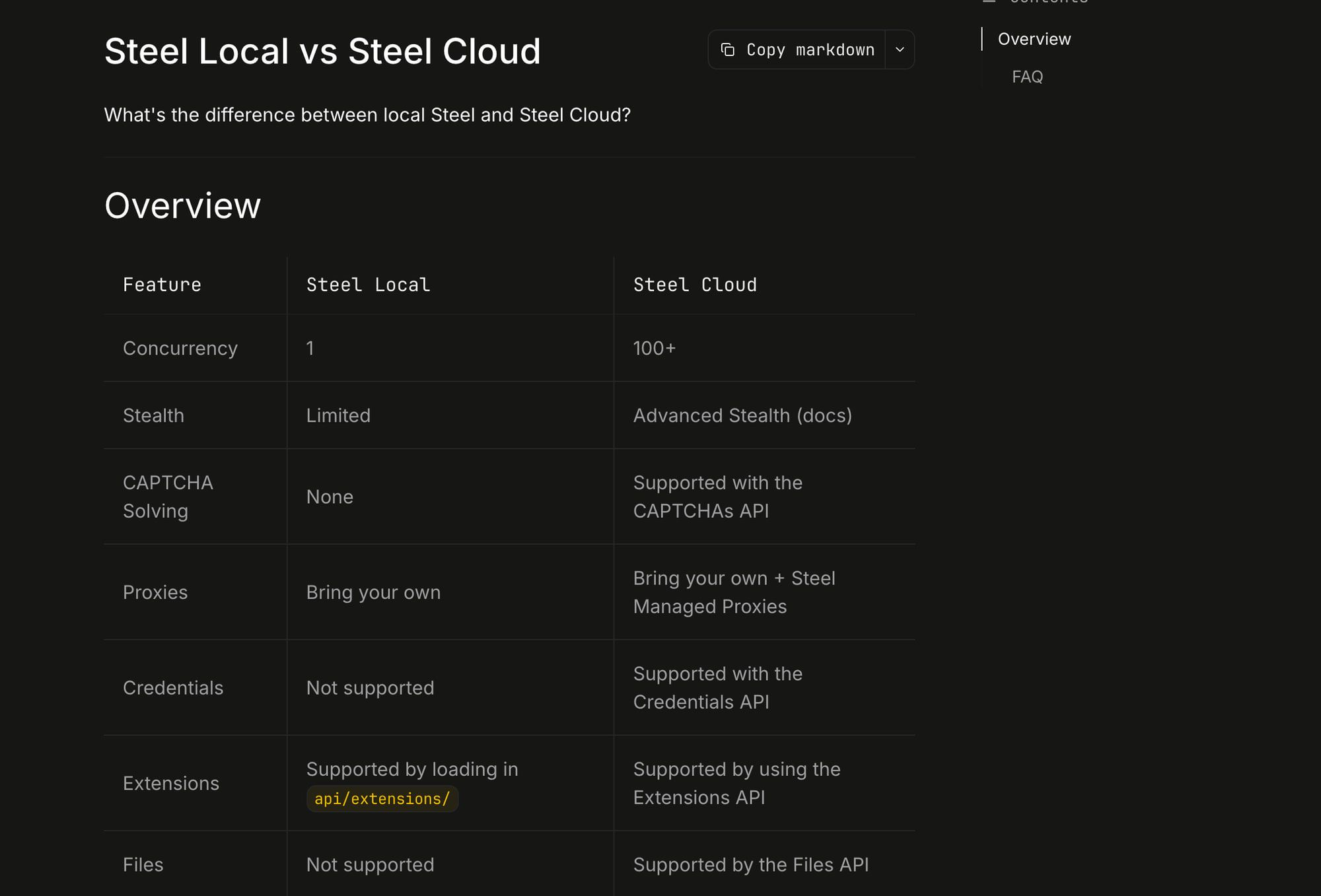
Steel’s local/cloud table lists explicit local limits and missing cloud APIs. A permissive license is valuable for source control, but it does not add managed services to that core. Scope comparison.
What does self-hosting really cost? #
My illustrative TCO formula is compute + storage/egress + proxies + models + applicable commercial license + operator hours × hourly value + recovery provision. I would attach the workload and availability requirement rather than assume one VM equals a managed concurrency tier.
Lightsail’s public-IPv4 Linux general-purpose 4 GB/2 vCPU/80 GB SSD offer lists $24 monthly with advertised 4 TB transfer, while Mumbai and several regions get half that transfer allowance. This is a price anchor, not a recommended host or measured browser capacity. Pricing, checked 11 November 2026.
| Hypothetical inputs | Illustrative subtotal | Still excluded |
|---|---|---|
| $24 VM + 3 operator hours at an assumed $30/hour | $114/month | Every other TCO term and unmeasured capacity |
| $24 VM + 10 operator hours at the same assumed value | $324/month | Every other TCO term and unmeasured capacity |
The $30/hour is a scenario assumption, not a market wage, owner rate or measured time saving. Changing operator effort changes the subtotal; neither row proves a cheaper equivalent to 25 or 100 managed slots (Browserbase Developer/Startup).
I would measure the actual workload and operating effort before calculating a break-even point. For other pricing units, use Cloudflare Browser Run pricing and Bright Data Browser API pricing. If you are deciding the same question for a whole scraping stack rather than browsers alone, see web scraping API vs building your own.
Is a Docker image production-ready? #
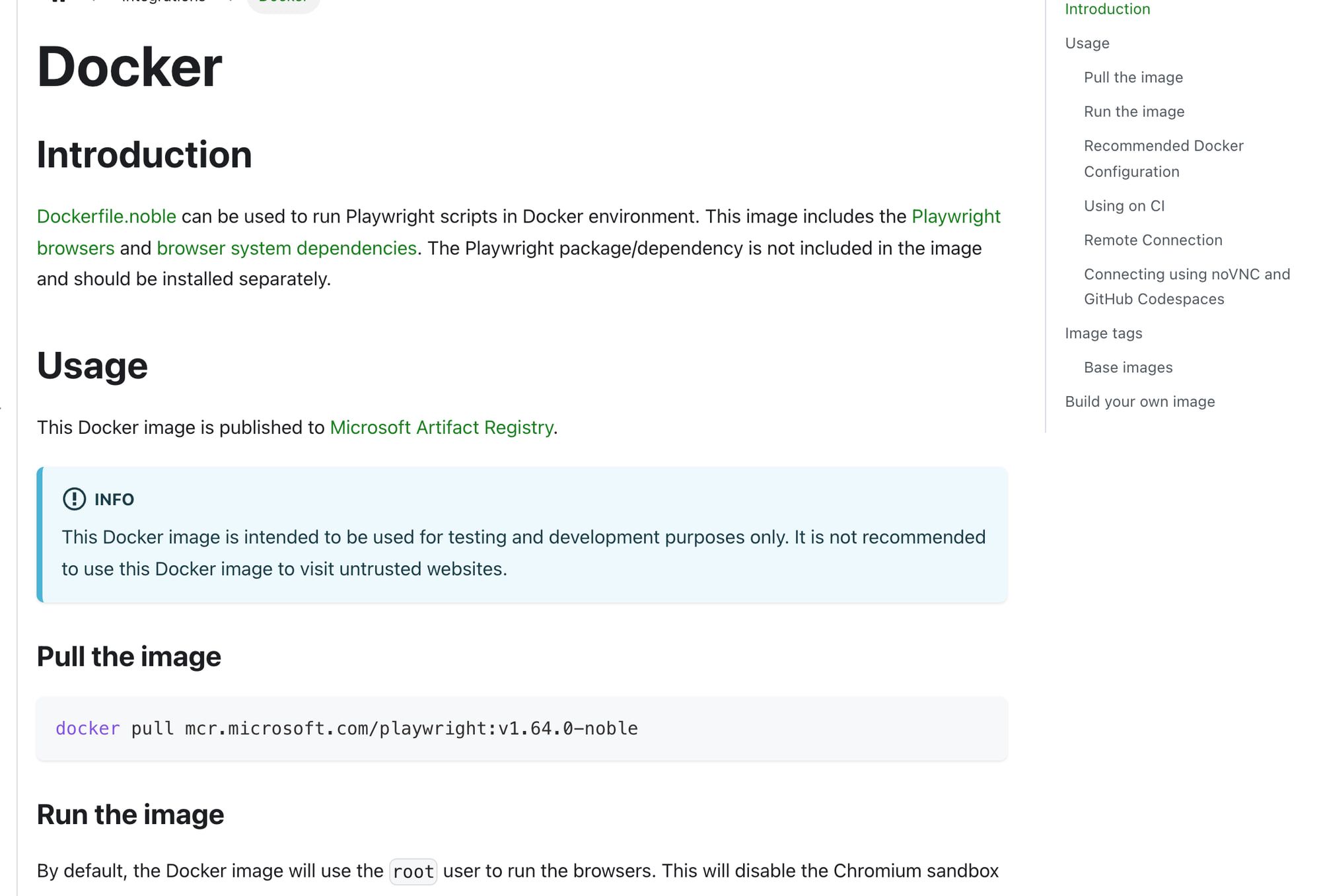
Not as shipped: Playwright’s image includes browsers/system dependencies, not the Playwright package itself. Its Docker docs frame testing/development use, warn about untrusted sites and explain that root disables Chromium sandboxing; the scraping guidance uses a separate user/seccomp approach. Browser versions must match the installed package. Docker guide, browsers.
Puppeteer’s Docker guide has its own sandbox privilege requirements. I would review the actual runtime isolation instead of call a copied image command production-safe. Puppeteer Docker.
Browser contexts isolate cookies/storage within a browser; they do not establish an operating-system boundary against hostile tenants. I would design tenant/profile/process isolation for the actual input and access model. Context docs.
What about access and recovery? #
Browserless’s Docker configuration and Steel’s Docker guide explain exposed runtime surfaces and configuration. I would isolate/authenticate CDP, API and viewer access, restrict outbound targets and protect secrets rather than assume a local process is private enough by default. Browserless config, Steel Docker.
My proposed operating check also includes timeouts, explicit release, queues, memory limits, crash restart and sanitized recordings/logs. Steel’s lifecycle guidance is a product-specific input, not proof an arbitrary self-hosted build has identical behavior. Lifecycle.
For untrusted browser/tool content, review the MCP security guidance and Playwright MCP boundary statement. I would test isolation and recovery on permitted fixtures before accepting a production design; this article has not performed those checks. If an assistant will drive the browser, my roundup of browser automation MCP servers covers that connection layer.
Does a feature mean you’re allowed to use it? #
No. Bright Data’s AUP prohibits nonpublic/behind-login collection, and its MSA incorporates that policy. I would review the allowed target/workflow before using advertised interactive features. AUP, MSA.
The same buying distinction applies to a separate agent/model product. Browser Use’s pricing and billing describe different purchase paths and charges; a source license does not pay those hosted or inference costs. Pricing, billing. The framework choice itself is in Browser Use vs Stagehand.
I would therefore write the allowed workflow, data boundary and complete product path into the requirement sheet. No free credit, source repository or browser feature in this research grants a run or publication permission.
Which way would I go? #
Choose managed as the starting shortlist when a small team lacks the operating capacity and the documented product fits. Choose self-hosted when the control value is concrete and the team can verify capacity, security, lifecycle and recovery.
I would reject a cost comparison that omits models, traffic, maintenance or required licensing. I would also reject cloud-parity assumptions unless the exact local build supplies the required feature.
Use Browserbase versus Steel for a named cloud/core comparison and Browserbase versus Browserless for the session/unit/license distinction. The agent browser hub connects the hosting decisions.
FAQ #
Is a Docker image all you need to self-host? #
No. I would separately define isolation, auth, versions, queues, targets, secrets, lifecycle and recovery. The image documentation is a starting input, not a verified production design.
Do browser contexts isolate untrusted users? #
They isolate cookies/storage within the browser. I would not treat that as an OS-level boundary. Playwright contexts.
Does the $114 example prove self-hosting saves money? #
No. It is a hypothetical VM-plus-labor calculation excluding other TCO terms, with no measured managed-equivalent capacity.
Does an open-source license get you the cloud features? #
No. Compare the exact local/cloud feature scope and the applicable deployment rights separately. Steel scope.
Sources
29 sources, accessed .
Official pricing, docs, changelogs and status pages 23
- playwright.dev: docs/docker
- playwright.dev: docs/browsers
- playwright.dev: docs/browser contexts
- pptr.dev: guides/docker
- aws.amazon.com: lightsail/pricing
- docs.browserless.io: enterprise/docker/config
- docs.steel.dev: overview/self hosting/steel local vs steel cloud
- docs.steel.dev: overview/self hosting/docker
- docs.steel.dev: overview/sessions api/session lifecycle
- docs.browserbase.com: account/billing/plans
- docs.browserbase.com: platform/identity/proxies
- docs.browserbase.com: account/enterprise/zero data retention
- steel.dev: pricing
- docs.browser-use.com: cloud/guides/billing
- developers.cloudflare.com: browser run/pricing
- developers.cloudflare.com: browser run/limits
- developers.cloudflare.com: workers/platform/pricing
- developers.cloudflare.com: browser run/features/guardrails
- brightdata.com: products/scraping browser
- docs.brightdata.com: general/policy/acceptable use policy
- brightdata.com: license
- modelcontextprotocol.io: docs/2026 07 28/tutorials/security/security_best_practices
- browser-use.com: pricing
Last updated: 13 October 2026. Researched and drafted with AI tools; human editorial review and publication approval are pending.


