Alternatives
Hyperbrowser alternatives, by the part you'd replace
Hyperbrowser bills $0.10 an hour and Browser Use lists $0.06. Which part are you replacing: hours, stealth, agents, sandboxes or self-host?


Hyperbrowser’s $0.10 an hour is level with Steel Launch and Browserbase Startup, and $0.04 above Browser Use, Anchor on hour-long sessions and Kernel headless. Moving to Browser Use saves $40 at 1,000 browser hours and $400 at 10,000 on a no-proxy bill; Kernel’s plan fees (Hobbyist $30, Start-up $200) trim the saving on Kernel to $20 and $250. Hyperbrowser pricing, Browser Use pricing and Kernel pricing docs, verified 24 November 2026; the savings are my arithmetic.
The rate is one of five things Hyperbrowser bundles: browser hours, a stealth, CAPTCHA and proxy setup, an agent layer, sandboxes with saved logins, and a cloud-only deployment. So I split this page by the part you want out, priced each lane from today’s pages, and named one pick per lane.
I read 49 pages for this, so every bill is list-price arithmetic and nothing here ranks speed, stealth or task success. My agent browser guides cover the wider field, and picking a cloud browser for AI agents is the place to start if you have not chosen a vendor yet.
Short on time?
Short on time? Here's my pick by lane
- Cheaper browser hours, no plan fee
- Browser Use
- $0.06 an hour, billed by the minute, against Hyperbrowser's $0.10. Not Steel: Launch is $0.10 and Scale's $0.08 needs a $250 base. Anchor and Kernel match $0.06 only with a monthly fee.
- Sessions of an hour or more
- Anchor Starter ($50 a month minimum)
- $0.06 an hour all-in at 60-minute sessions, but $0.17 an hour at 5 minutes because each browser costs $0.01 to create.
- Many short headless runs
- Kernel Hobbyist ($30 a month)
- Headless is billed per second at about $0.06 an hour: 100,000 sessions of 20 seconds is about $33 in usage, against $100 on Browser Use's one-minute minimum.
- Replace the stealth, CAPTCHA and proxy bundle
- Browserbase Developer ($20)
- Lists automatic CAPTCHA solving, Basic stealth and 1 GB of residential proxy for $20, against $30 on Hyperbrowser Startup. For the hardest sites, test Bright Data's Browser API ($8 per GB); I found no third-party success data for any vendor.
- Replace the agent layer
- Browser Use
- MIT-licensed with no per-step fee. Set the model yourself: version 1.0.6 made BU 4.0 the default, 15 times the per-token price of bu-fast. Choose Stagehand on Browserbase if you want explicit steps in code.
- Replace sandboxes and saved logins
- E2B for sandboxes, Browserbase Contexts for logins
- E2B publishes 1-hour and 24-hour session caps; Hyperbrowser is 7 to 11 percent cheaper per unit at list but publishes none. Contexts 'live indefinitely' until you delete them.
- Self-host
- Steel
- Apache-2.0 with 8.0k GitHub stars. The case is the licence, not the price. The local build has narrower stealth and no CAPTCHA, credentials or files APIs.
- Under about 300 hours, using the whole bundle
- Stay on Hyperbrowser
- Startup's $30 is prepaid credit worth 300 browser hours, with proxy, CAPTCHA, fetch, search and sandboxes on one bill. Free's 5,000 credits cover 50 hours with no proxy, and its page does not say whether they renew.
Prices verified . USD list prices verified 24 November 2026; savings and bills are my arithmetic. This is a desk read of list prices, so no speed, stealth or success rate is ranked.
What does Hyperbrowser charge today? #
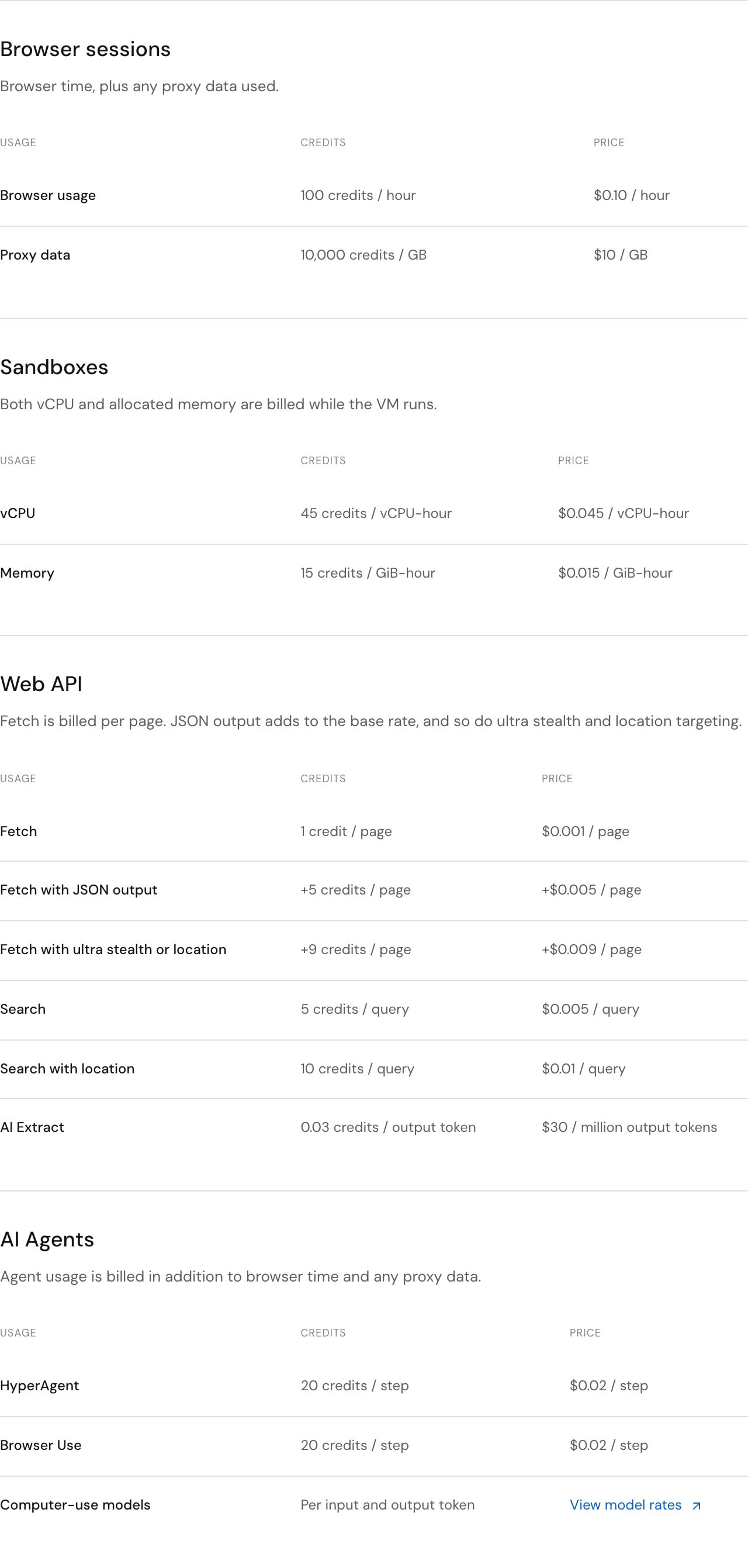
Free, then $30 Startup and $100 Scale, with a flat $0.10 an hour, $10 a GB and $0.02 an agent step; the plan fee is prepaid credit. Source: Hyperbrowser pricing and its docs pricing page, USD only, verified 24 November 2026.
| Plan | Fee | Credits | Concurrent browsers | Data retention | What it adds |
|---|---|---|---|---|---|
| Free | $0 | 5,000 | 1 | 7 days | No proxies or CAPTCHA solving; the docs say both need a paid plan |
| Startup | $30 | 30,000 | 25 | 30 days | Automatic CAPTCHA solving, Basic stealth, residential proxies |
| Scale | $100 | 100,000 | 100 | 30 days | Premium residential proxies |
| Enterprise | Custom | Custom | 1,000+ | 180+ days | Ultra stealth and a custom proxy server |
One thousand credits is $1, and the same usage rates apply on Free, Startup and Scale. Here is what the credits buy, from the same two pages.
| What you buy | Price | Credits |
|---|---|---|
| Browser time | $0.10 per hour | 100 per hour |
| Proxy traffic | $10 per GB | 10,000 per GB |
| Fetch a page | $0.001; $0.01 with a proxy, ultra stealth or a location; JSON output adds $0.005 | 1, or 10 |
| Search | $0.005; $0.01 with a location | 5, or 10 |
| Agent step (HyperAgent or Browser Use) | $0.02, on top of browser time and proxy | 20 |
| AI extract | $30 per million output tokens | 0.03 per token |
| Sandbox | $0.045 per vCPU-hour plus $0.015 per GiB-hour, while running | 45 and 15 |
| GPU sandbox add-on | From $0.7992 an hour (L4) up to $6.2496 (B200), per second | Per GPU-second |
Plan credits reset at renewal with no carry-over, and credits you buy, one-time or by auto-reload, expire after 12 months. Upgrades are prorated at once, downgrades wait for the cycle end, and a Free account that runs out has to upgrade. Pricing page.
Three things I could not find are how browser time is metered (per second or per minute), whether a session has a minimum charge, and how long a session can run. The timeoutMinutes setting overrides a team default with no minimum, maximum or default stated, and the lifecycle page warns that a session you do not stop can cause unexpected charges. Session parameters, lifecycle.
The ladder looks stable. A directory snapshot dated 30 August 2026 lists the same plans and rates, and my earlier read for Browserbase vs Hyperbrowser on 16 November matched. aiidelist. I cannot date any change more precisely, because Hyperbrowser’s docs index has no changelog page. Docs index.
Why do people leave it? #
Mostly the hourly rate at volume, the fee floor, and what the bundle leaves out. These are the reasons I could source, each pointing to the lane that answers it:
- The rate. $0.10 an hour against $0.06 on Browser Use. See browser hours.
- The fee floor. Startup’s $30 is prepaid credit, so a 100-hour month costs $30 for $10 of usage (my arithmetic).
- Steps on top of everything else. HyperAgent and Browser Use agents cost $0.02 a step plus browser time and proxy. See the agent layer.
- Gated stealth. Ultra stealth and a custom proxy server are Enterprise only, per the session docs. See stealth.
- No documented self-host. The docs index has no section for it. See self-hosting.
- Unpublished limits. No maximum session length or metering rule appears on the pages I read.
Sentiment is thin, and I would rather say so than invent a trend. A Hacker News story search returns only 8 stories that mention Hyperbrowser, two of them its own launch posts, the newest is from September 2025, and I found no Reddit result. HN stories.
The December 2024 launch thread has two commenters calling the pricing confusing, and the founder apologised for it; another commenter said a use case was blocked by Cloudflare straight away. That was an older pricing era, and today’s flat credit rates are simpler. Launch thread, as summarised by my fetch tool.
On GitHub, HyperAgent has 15 open issues and an empty Releases section, including an open bug about missing session video recordings (#88, May 2026) and another about Gemini models (#14, April 2025). The node-sdk issues page showed none open. HyperAgent, issues, node-sdk.
Rivals write about Hyperbrowser too, and each sells something. Browserless, Skyvern and TestMu AI all have pages on leaving it, so I label their claims as theirs.
Which part are you replacing? #
Pick the lane that matches what costs you money or blocks you, then read only that section. Each pick is a list-price call; none rests on speed or stealth.
| Lane | What you would replace | My pick | Runner-up | Why, in one line |
|---|---|---|---|---|
| Browser hours | The $0.10 rate and $30 floor | Browser Use | Anchor Starter for hour-long sessions; Kernel Hobbyist for short runs | $0.06 an hour with no plan fee |
| Stealth, CAPTCHA, proxy | Startup’s bundle | Browserbase Developer | Bright Data Browser API | Same trio on paper for $20 instead of $30 |
| Agent layer | HyperAgent and $0.02 steps | Browser Use | Stagehand on Browserbase | MIT licence, no per-step fee |
| Sandboxes and logins | Sandboxes and profiles | E2B; Browserbase Contexts | Daytona | Published session caps; documented persistence |
| Self-host | A cloud-only product | Steel | Kernel’s kernel-images | Apache-2.0 code you can run |
| Stay | Nothing | Hyperbrowser | None | Under about 300 hours with the full bundle |
Which alternative is cheaper per browser hour? #
Browser Use, at $0.06 an hour with no plan fee (the proxy and token lines are in my Browser Use pricing breakdown). Anchor and Kernel headless reach the same rate only on long sessions or with a monthly fee, and Steel Launch is $0.10, level with Hyperbrowser.
Here is every rate I found, lowest first. All are USD list prices verified 24 November 2026.
| Vendor | What you pay to get this rate | Browser hour | The catch |
|---|---|---|---|
| Browser Use | No plan fee; $1 one-time signup credit | $0.06, billed by the minute | One-minute minimum; starts at 10 concurrent browsers |
| Anchor | Starter, $50 a month | $0.05 plus $0.01 per browser created: $0.06 on 60-minute sessions | $0.17 an hour at 5 minutes; a $500 Team plan is on the marketing page only |
| Kernel headless | Hobbyist, $30 a month with a $10 credit | About $0.06 (per second); headful is about $0.48 | Credits apply to usage only; rate is for the default headless browser |
| Steel Scale | $250 a month with a $100 credit | $0.08 | 1-hour sessions |
| Cloudflare Browser Run | Workers Paid, $5 a month | $0.09 after 10 free hours | 10 concurrent browsers averaged, then $2 per extra |
| Hyperbrowser | Startup, $30 prepaid | $0.10 | Metering and session cap unpublished |
| Steel Launch | No plan fee; $30 one-time credit | $0.10, billed per second | 15-minute sessions, 10 concurrent |
| Browserbase Startup | $99 a month, 500 hours included | $0.10 after the included hours | Large and X-Large browsers are listed separately (below) |
| Browserbase Developer | $20 a month, 100 hours included | $0.12 after the included hours | Same |
| Browserless | $35 to $500 a month | Billed in 30-second units: 120 units an hour, so $0.18 to $0.24 at overage rates (my arithmetic) | Session caps of 15, 30 and 60 minutes by plan |
| Notte | Not ranked | Pricing page shows $0.01 an hour; a docs example, a search snippet and an August 2026 review show $0.05 | I could not settle the conflict |
Steel’s case is not price. Launch is level with Hyperbrowser, and Scale’s $0.08 comes with a $250 monthly base, so a shortcut like “Steel for the lowest rate” fails at list price. Steel pricing, billing docs.
Browserbase also sells bigger browsers. Its pricing page lists Large at $0.24 an hour and X-Large at $0.48 on Developer, and Large at $0.20 and X-Large at $0.40 on Startup, with Regular included on every plan. A 23 November 2026 changelog entry describes the new sizes but prints no price. Neither page says whether the larger-size rates replace or add to the base hour, so no bill here includes them. Pricing, changelog.
Browser Use has two billing quirks. Time rounds up to the minute (12 minutes 13 seconds bills as 13 minutes, $0.013), and a browser stays open about two minutes after its last activity, with disconnecting Playwright or CDP not counting as a stop. Billing docs.
What does a month cost? #
These are monthly bills for one browser at a time, in 60-minute sessions, with no proxy and no AI. Every cell is my arithmetic from list prices, with formulas below. The two-vendor version of this with proxy and CAPTCHA is in my Browserbase vs Hyperbrowser post.
| Browser hours a month | 100 | 1,000 | 10,000 |
|---|---|---|---|
| Hyperbrowser | $30 | $100 | $1,000 |
| Browser Use | $6 | $60 | $600 |
| Anchor | $50 (Starter floor) | $60 | $600 |
| Kernel headless | $30 | $80 | $750 |
| Browserbase | $20 (Developer) | $128 (Developer; $149 on Startup) | $1,049 (Startup) |
| Steel Launch | $10 (see note) | $100 (see note) | n/a (see note) |
| Steel Scale | $250 | $250 | $950 |
| Cloudflare | $13.10 | $94.10 | About $911 |
| Browserless | $35 | $200 | $1,550 |
Formulas, all from the pages linked in the rate table:
- Hyperbrowser: $0.10 times hours, with Startup’s $30 as the floor. Scale’s $100 credit covers 1,000 hours; extra credits cost $1 per 1,000.
- Browser Use: $0.06 times hours. It starts at 10 concurrent browsers until $100 has been paid, and 10,000 hours needs about 13.7 browsers on average in a 730-hour month.
- Anchor: ($0.05 plus $0.01 per browser) times hours; Starter’s $50 is a minimum.
- Kernel: plan fee plus usage above the credit (Hobbyist at 100 and 1,000 hours, Start-up at 10,000).
- Browserbase: Developer is $20 plus $0.12 times hours over 100; Startup is $99 plus $0.10 times hours over 500.
- Steel Scale: $250 plus usage above the $100 credit.
- Cloudflare: $5 plus $0.09 times hours over 10; at 10,000 hours about 3.7 extra average browsers at $2 each.
- Browserless: 120 units an hour at each plan’s quota; Scale at 10,000 hours is $500 plus 700,000 extra units at $0.0015.
Note on Steel Launch: it caps sessions at 15 minutes, so its figures show what the hours would cost, not a bill for 60-minute sessions, and 10,000 hours is beyond its 10 concurrent browsers. Browserless caps sessions at 15, 30 and 60 minutes by plan, and Hyperbrowser’s cap is unpublished. The table compares no quality or speed, and Notte is left out because of its rate conflict.
Read the table against the one number that matters: Hyperbrowser’s $0.10 is level with Steel Launch and Browserbase Startup, above Cloudflare’s $0.09, and $0.04 above Browser Use. Leaving saves $40 at 1,000 hours and $400 at 10,000.
Below about 300 hours the fee, not the rate, is the cost. Startup’s $30 buys $30 of credit, which is 300 hours, so a 100-hour month still costs $30. For vendor detail, see my Anchor Browser pricing and Kernel pricing posts, plus Browserbase pricing, Cloudflare Browser Run pricing and Browserless pricing.
What if your sessions are short? #
Short sessions flip the order, because per-session fees and minimums start to dominate. Take 100,000 sessions of 20 seconds, which is 555.6 hours of real time (my arithmetic).
| Vendor | Bill for 100,000 sessions of 20 seconds | Why |
|---|---|---|
| Kernel headless | $33.33 usage ($53.33 on Hobbyist with its $10 credit) | Per-second billing; rounding unstated |
| Cloudflare | About $54.14 | 556 hours plus the $5 Workers base |
| Hyperbrowser | $55.56 if metered per second, $166.67 if rounded to the minute | Metering is unpublished |
| Steel Launch | $55.56 usage | Billed per second, rounded up |
| Browser Use | $100 | One-minute minimum: 1,666.7 hours at $0.06 |
| Browserbase Startup | $215.67 | One-minute minimum per session, per its billing docs |
| Anchor | About $1,028 to $1,083 | $1,000 in creation fees plus $27.78 or $83.33 of time |
Sources: Kernel, Cloudflare, Steel billing, Browser Use billing, Browserbase plans and Anchor docs. Anchor’s range reflects that its docs say time is calculated to the nearest full minute without saying which way it rounds.
So for lots of short, headless jobs I would price Kernel first. For hour-long sessions, Anchor and Browser Use tie at $0.06, and Browser Use needs no monthly minimum.
What does proxy traffic cost per GB? #
Proxy price per GB spans $5 to $12 at list, and it can outweigh the hourly rate. Verified 24 November 2026.
| Vendor | Per GB | Note |
|---|---|---|
| Browser Use | $5 | Direct or own-proxy traffic is $0.20 per GB |
| Steel Scale | $6 | Launch is $10 |
| Anchor | $8 | Own proxy or proxyless egress $0.20 per GB |
| Bright Data | $8 | Pay as you go; unlocking included |
| Hyperbrowser, Steel Launch, Browserbase Startup | $10 | Hyperbrowser proxies need a paid plan |
| Browserbase Developer | $12 | 1 GB included |
| Browserless | $12.00 to $9.00 | 6 units per MB at overage rates, assuming 1 GB is 1,000 MB (my arithmetic) |
| Kernel | Bundled | 5 GB on Hobbyist and 20 GB on Start-up; overage price unpublished |
As an illustration only, take 100 hours with 10 GB of proxy at 0.1 GB an hour. The bills come to $56 on Browser Use, $86 on Anchor, $110 on Hyperbrowser and Steel Launch, $128 on Browserbase Developer and $200 on Kernel Start-up, whose bundle covers the 20 GB (my arithmetic). Sources: Browser Use, Steel, Anchor, Bright Data, Browserbase, Browserless.
What does the free tier give you in hours? #
Free tiers use different units, so I converted each to browser hours. Hyperbrowser’s 5,000 credits come to 50 hours, with one browser and no proxy or CAPTCHA.
| Vendor | Free allowance | Browser hours (my arithmetic) |
|---|---|---|
| Steel Launch | $30 once, ending after 90 days | 300 at $0.10, with 15-minute sessions |
| Kernel | $5 a month | About 83 headless |
| Anchor | $5 a month | About 83 at 60-minute sessions |
| Hyperbrowser Free | 5,000 credits, 1 concurrent | 50, no proxy or CAPTCHA |
| Browser Use | $1 once | About 16.7 |
| Browserbase Free | 1 hour, 3 concurrent | 1 |
| Cloudflare | 10 minutes a day | About 5 a month |
| Notte | $10 once | Depends on an unconfirmed rate: 1,000 hours at $0.01 or 200 at $0.05; not ranked |
Hyperbrowser’s 50 hours beats Browserbase, Cloudflare and Browser Use on this measure, and falls short of Steel, Kernel and Anchor. Sources: Steel, Kernel, Anchor, Hyperbrowser, Browser Use, Browserbase, Cloudflare.
My pick for this lane is Browser Use, with Anchor Starter for hour-long sessions and Kernel Hobbyist for short headless runs. Confidence is high on list price and nil on speed or stealth, because I have no data on either.
What about stealth, CAPTCHAs and proxies? #
Browserbase Developer is the cheapest listed entry to the same trio Hyperbrowser sells at $30: automatic CAPTCHA solving, Basic stealth and a residential proxy. I found no third-party success-rate data for any vendor below, so this ladder is by entry price, not by results.
| Vendor | Entry price | What the page lists | The catch |
|---|---|---|---|
| Kernel | Free | Stealth mode adds a proxy and a CAPTCHA solver by default; Kernel’s docs call the proxy an ISP proxy, its pricing page FAQ says residential | Cost not stated; configurable proxies start at Hobbyist; proxy bundles are metered and limited, overage unpublished |
| Steel Launch | $0 plus usage | CAPTCHA solves at $3 per 1,000 ($1 on Scale) | The Stealth browser option is Enterprise only |
| Browser Use | No plan fee | Stealth browsers, proxies and automatic CAPTCHA solving, which can be turned off | The README says no configuration guarantees every CAPTCHA is avoided or solved |
| Browserbase Developer | $20 | CAPTCHA auto, Basic stealth, 1 GB residential, 100 hours | Advanced stealth and Verified Agents plus CAPTCHA are on Scale (custom) |
| Skyvern Hobby | $29 | Basic CAPTCHA, datacenter proxy | Residential proxy and advanced CAPTCHA need Pro at $149; no free tier |
| Hyperbrowser Startup | $30 | Automatic CAPTCHA, Basic stealth, residential proxies | Per-solve cost and ultra stealth surcharge unpublished; ultra is Enterprise only |
| Browserless | $35 | CAPTCHA solving included on all plans | A successful solve costs 10 units; residential proxy is 6 units per MB |
| Anchor Starter | $50 | CAPTCHA bypass | Full stealth starts at Growth, $2,000; the marketing page puts own proxy and Cloudflare verified agents on the $500 Team plan, the docs at Growth |
| Bright Data Browser API | $8 per GB | Built-in proxies and unlocking included; automatic CAPTCHA | Separate CAPTCHA billing not stated; Scale is $499 with 71 GB, about $7.03 per GB (my arithmetic) |
Hyperbrowser’s Startup row shows a docs gap rather than a price: the docs say proxies and CAPTCHA solving require a paid plan, and the pricing table leaves them unlisted on Free. I trust the docs. Session parameters.
Browserbase Developer is also cheaper than Hyperbrowser for small proxied jobs, up to about 183 hours a month with 1 GB, per my bills in Browserbase vs Hyperbrowser. Past about 183 hours Hyperbrowser pulls ahead, so this swap helps only a small workload.
My pick is Browserbase Developer, and for the hardest targets I would test Bright Data’s Browser API, whose unlocking claim is the vendor’s own. The only comparative numbers I found are a rival’s benchmark with no method and a small third-party timing run, and neither measures stealth.
Whether you may solve a given site’s CAPTCHA is a terms and legal question this page does not answer. My guide to ethical web scraping is a starting point.
Do you want a different agent layer? #
Browser Use for most readers: it is MIT-licensed, charges no per-step fee, and its cloud prices browser time and its own models on one page. Hyperbrowser charges $0.02 a step on top.
| Product | Licence | Step fee | Model cost | 20-step task, fees only |
|---|---|---|---|---|
| Hyperbrowser (HyperAgent, or Browser Use on its cloud) | HyperAgent: AGPL-3.0 | $0.02 per step | Per token, in a long undated table | $0.40, plus browser time and proxy |
| Browser Use | MIT | None | Cloud: bu-4.0 $1.80 in and $9.00 out per million tokens; bu-4.0-mini $0.20 and $1.00; bu-4.0-pro $3.00 and $15.00 | $0 in step fees |
| Stagehand on Browserbase | MIT | None | Your model’s tokens; Browserbase lists 3, 15 and 50 included agent runs on Free, Developer and Startup | $0 in step fees |
| Anchor (agent.task) | Not assessed | $0.01, $0.05 or $0.10 per AI step by tier; $0.01 flat with your own key | Not itemised in my notes | $0.20, $1.00 or $2.00; $0.20 with your own key |
| Skyvern | AGPL-3.0 | Credits: Hobby $29 for 30,000, Pro $149 for 150,000 | The page does not say what a credit buys | Cannot be priced |
| Airtop | Not assessed | Credits: Starter $29 and up | Docs say no markup on LLM costs; credit value not stated | Cannot be priced |
Anchor’s saved Automation Task is $0.10 flat per run, though I could not confirm what creating one costs. Skyvern’s repo has 23.5k stars and 59 open issues. Skyvern on GitHub, Airtop AI costs.
The model line is where Browser Use needs care. Version 1.0.6, released 16 November 2026, made BU 4.0 the default model: $1.80 and $9.00 per million tokens, against $0.12 and $0.60 for bu-fast, which is 15 times more. Pass an explicit llm= (for example llm='bu-fast' keeps the old default). Release notes, and my BU 4.0 cost post.
The Browser Use repo is MIT with 121.9k stars and 177 open issues, and Browser() defaults to a cloud browser while Browser('chromium') runs locally. Repository.
HyperAgent and Skyvern are both AGPL-3.0, so read the licence before you build a hosted product on either; I am not giving legal advice. HyperAgent licence. HyperAgent has 1.6k stars, an empty Releases section and the two open bugs above, which I read as a small project, not a defective one.
My pick is Browser Use. Choose Stagehand on Browserbase if you want explicit steps in code instead of an autonomous agent, which my Browser Use vs Stagehand post lays out. I would pick Skyvern only if you want a vendor-run visual agent, and I could not price it.
What about sandboxes and saved logins? #
E2B for sandboxes with published limits, and Browserbase Contexts for saved logins. Hyperbrowser’s sandboxes are slightly cheaper at list but publish no session cap. Sandboxes are not browsers, and E2B and Daytona price sandbox compute, not browser sessions.
A sandbox bill for 2 vCPUs and 4 GiB of memory for one hour (my arithmetic from list rates):
| Provider | vCPU-hour | GiB-hour | 2 vCPU + 4 GiB, one hour | Published limits |
|---|---|---|---|---|
| Hyperbrowser | $0.045 | $0.015 | $0.15 | None; idle time while running is billed |
| E2B | $0.0504 | $0.0162 | $0.1656 | Hobby 1 hour, Pro 24 hours; no GPUs |
| Daytona | $0.0504 | $0.0162 | $0.1656 | None per tier; storage $0.000108 per GiB-hour after 5 GiB free |
Hyperbrowser is 10.7 percent cheaper per vCPU-hour and 7.4 percent per GiB-hour. It also lists GPU sandboxes by request (L4 from $0.7992 an hour) and macOS sandboxes in beta, which “can take several minutes to start”. Daytona lists GPU rates too (a preemptible H100 at $2.47 an hour), and E2B lists none. Sandbox docs.
The Hyperbrowser sandbox introduction does not say maximum duration, plan limits, regions or whether a browser runs inside, and snapshots have their own docs section that I did not read. E2B’s Pro plan is $150 a month plus usage, with 100 concurrent sandboxes. E2B pricing.
Saved logins are a different feature, and documented persistence differs a lot:
| Vendor | What persists | What the docs say about limits |
|---|---|---|
| Browserbase Contexts | Cookies, localStorage, IndexedDB; not sessionStorage or the HTTP cache | Needs persist: true; lives indefinitely until deleted; encrypted at rest; avoid concurrent use of one Context |
| Hyperbrowser profiles | Cookies, local and session storage, cache | persistChanges defaults to false; saving can take a few seconds after close; no storage limit, retention, plan gating or charge stated |
| Kernel profiles | Cookies and storage | No retention stated |
| Anchor | Data retention is 7 days on Free and Starter | I found no profile price |
Browserbase’s documented “live indefinitely” is the clearest answer I found to how long a login lasts. A saved session is as sensitive as a password, so read my guide to browser agent logins before you store one.
My pick is E2B for sandboxes and Browserbase Contexts for logins. If you need GPUs on the same bill as your browser, that is a reason to stay.
Can you self-host? #
Steel, if you want an Apache-2.0 browser you can run yourself. Hyperbrowser has no self-host section in its docs, and its cloud is not open source.
| Project | Licence | GitHub stars | What I found |
|---|---|---|---|
| steel-browser | Apache-2.0 | 8.0k | 45 open issues; sessions API, stealth plugins, fingerprint management and a proxy chain; CAPTCHA not mentioned; warns that ports 3000 and 9223 have no authentication |
| kernel-images | Apache-2.0 | 1.1k | 3 open issues; Docker and Unikraft steps; optional replay and live view; no releases listed |
| Browserless | SSPL-1.0 | n/a | Docker image free under SSPL; closed-source commercial use needs a licence |
| Browser Use library | MIT | 121.9k | 177 open issues; runs a local Chromium |
| Stagehand | MIT | n/a | Runs locally without a Browserbase account; the local SDK still needs a model key |
| HyperAgent | AGPL-3.0 | 1.6k | Agent code only; the licence is all I checked |
| Skyvern | AGPL-3.0 | 23.5k | 59 open issues |
The local Steel build is narrower than its cloud: my Browserbase alternatives read of Steel’s own comparison found local concurrency of one, bring-your-own proxy, limited stealth and no CAPTCHA, Credentials or Files APIs. Running your own fleet also brings the operating work, which my self-hosted vs managed browsers post counts.
On Hyperbrowser, my claim is limited to what I read: its docs index lists sandboxes, volumes, snapshots, secrets, profiles, extensions and SDKs but no self-host section, and Browserless, a rival, says Hyperbrowser “does not currently offer self-hosted deployment options”. Docs index, Browserless blog, January 2026.
My pick is Steel, because its case is the licence and not the price. If your reason for leaving is Browserless-style SSPL terms, my Browserless alternatives post covers that gap.
When should you stay on Hyperbrowser? #
Stay if you use under about 300 hours a month and want proxy, CAPTCHA, fetch, search and sandboxes on one bill. At that size switching to Browser Use saves $12 at 300 hours and $24 at 100 (my arithmetic), and one bill may be worth that.
Stay if you are already on HyperAgent, or need GPU or macOS sandboxes by request. If you need under 50 hours with no proxy, Free’s 5,000 credits cover it at $0, though its page does not say whether they renew each month.
I would not leave for speed on the evidence I found. A small third-party test from Tech Stackups (updated 31 May 2026; 10 measured sessions per provider from one server in Helsinki) had Hyperbrowser at 4,012 ms on average against 11,933 ms for Browserbase, and Browserless’s own benchmark, with no stated method or sample, has Hyperbrowser connecting faster (692.5 ms against 936.4 ms) and Browserless faster at page creation and navigation. Tech Stackups, Browserless. Neither is evidence about the other alternatives.
The product is also still shipping. A news feed I read lists new model additions on 17 and 10 November and 15 October (it prints no year, so I infer 2026), and Hyperbrowser’s docs pricing page carries no date. Distill Intelligence. Its Y Combinator page lists a team of four, which I cannot judge either way. Y Combinator.
What would change my answer: Hyperbrowser publishing its metering and session cap, Notte’s rate being confirmed, third-party stealth data for any vendor, or a price move. The ladder has not moved since at least 30 August 2026.
Which prices online are out of date? #
Claims I checked on 24 November 2026
- The shortcut “Steel for the lowest $/hr”, which my own planning notes started with. Steel Launch is $0.10, level with Hyperbrowser, and Scale’s $0.08 needs a $250 base. Steel pricing. Browser Use is the lowest rate with no fee at $0.06.
- Toolradar (a directory, updated 24 November 2026) lists NinjaOne, Expensify and Calendly as alternatives, an IT-management tool, an expense app and a scheduling app. Its Anchor block is written by the Anchor team and says Anchor has no concurrency limit, while Anchor’s docs list 5, 25, 200 and 500+ browsers by plan. Browserbase, Steel, Browser Use and Kernel never appear.
- CostBench (a pricing directory, “last verified” 28 October 2026) shows Hyperbrowser at a “typical” $65 a month on one unnamed source, leaves its “best for” fields blank, and gives Browser Use as $0 to $999 although Browser Use has no subscription.
- AgentDeals says it publishes no substitute list and labels Hyperbrowser pay-per-use. The plans are flat $30 and $100 prepaid credit, though usage inside them is metered by hour, GB and step.
- MacMyths (30 September 2026; affiliate links; promotes its own screenshot API) prints no browser-hour prices. Its connection times for Hyperbrowser and Browserless look reversed against the Browserless post. I read both through a summary tool, so treat that as a flag, not a finding.
- Skyvern’s post is published on a rival’s own blog, ranks Skyvern first and prints no dollar amount for any product.
- TestMu AI sells Browser Cloud, calls it the best Hyperbrowser alternative and prints no prices for either product.
- SourceForge sets Anchor’s “$0.05 per hour” beside Hyperbrowser’s “$30 per month”. Those are different units, and Anchor adds $0.01 per browser and a $50 plan floor.
Which one should you pick? #
One pick per lane, with the reason and what would change it.
Cheaper browser hours: Browser Use. It is $0.06 an hour with no plan fee, $40 under Hyperbrowser at 1,000 hours. Use Anchor Starter for sessions of an hour or more and Kernel Hobbyist for many short headless runs. Confidence is high on list price and none on speed or stealth.
Stealth, CAPTCHA and proxy: Browserbase Developer. It lists the same three items for $20 instead of $30, and is cheaper up to about 183 hours with 1 GB of proxy. For the hardest sites I would test Bright Data’s Browser API at $8 a GB, treating its unlocking claim as the vendor’s own.
Agent layer: Browser Use. MIT, no step fee, and set the model yourself. Stagehand on Browserbase suits code-controlled steps, and Skyvern only suits a vendor-run visual agent, with AGPL-3.0 and credits I could not price.
Sandboxes and saved logins: E2B and Browserbase Contexts. E2B publishes session caps that Hyperbrowser does not, and Contexts document how long a login lasts. If you need GPUs on your browser bill, stay.
Self-host: Steel. Apache-2.0 and 8.0k stars, with a local build narrower than its cloud.
Everything on one bill, under about 300 hours: stay on Hyperbrowser.
What I would do. Price your last month’s browser hours, proxy GB and agent steps with the tables above, then move only the lane that costs you money or blocks you. Read the usage page after a week, because that is where unpublished metering rules show up. I priced pages, so treat each pick as a shortlist, not a verdict on quality.
FAQ #
What is Hyperbrowser’s cheapest paid plan? #
Startup, at $30 a month, which is prepaid credit: 30,000 credits, 25 concurrent browsers and 30 days of retention. It is the first plan with automatic CAPTCHA solving, Basic stealth and residential proxies, which Free does not include. Verified 24 November 2026. Hyperbrowser pricing.
Is anything cheaper per browser hour than $0.10? #
Yes, at list price. Browser Use is $0.06 with no plan fee, Anchor is $0.06 on 60-minute sessions with a $50 monthly minimum, Kernel headless is about $0.06 with a $30 plan, Steel Scale is $0.08 with a $250 base and Cloudflare is $0.09 after 10 free hours. Steel Launch and Browserbase Startup are level at $0.10. Browser Use, Anchor, Kernel, Steel, Cloudflare.
Does Hyperbrowser charge for agent steps? #
Yes. HyperAgent and Browser Use agents run on Hyperbrowser cost $0.02 per step (20 credits), billed on top of browser time and proxy traffic, and model usage is priced per token in a separate table on the same page. A 20-step task is $0.40 in step fees alone. Docs pricing.
Can I self-host Hyperbrowser? #
I found no documented way to. Its docs index has no self-host section, and Browserless, a rival, says Hyperbrowser offers no self-hosted deployment. Steel’s Apache-2.0 browser is the closest open-source alternative, with a narrower local build than its cloud. Docs index, steel-browser.
Is HyperAgent open source? #
Yes, under the GNU AGPL v3, with 1.6k GitHub stars and 15 open issues on 24 November 2026. Read the licence before building a hosted product on it; this is not legal advice. HyperAgent.
Which alternative has the best free tier? #
It depends on the unit. Steel gives a one-time $30 credit, about 300 hours at $0.10 over 90 days; Kernel and Anchor give $5 a month, each about 83 hours at 60-minute sessions; Hyperbrowser Free gives 5,000 credits, about 50 hours with one browser and no proxy or CAPTCHA. For a recurring allowance I would start with Kernel or Anchor, and for a one-off trial with Steel. Steel, Kernel, Anchor.
Do Hyperbrowser credits expire? #
Plan credits reset at each renewal with no carry-over, and credits you buy, one-time or by auto-reload, expire after 12 months. Hyperbrowser pricing.
Which alternative includes CAPTCHA solving on its cheapest paid plan? #
Browserbase Developer ($20, automatic) and Anchor Starter ($50) list it, Skyvern Hobby ($29) lists basic CAPTCHA, and Browserless includes solving on all plans at 10 units per success. Steel sells solves at $3 per 1,000 on Launch. I found no third-party success-rate data for any of them. Browserbase, Anchor, Skyvern, Browserless.
Sources
54 sources, accessed .
Official pricing, docs, changelogs and status pages 28
- Hyperbrowser: pricing
- Hyperbrowser docs: pricing
- Hyperbrowser docs: session parameters
- Hyperbrowser docs: session lifecycle
- Hyperbrowser docs: profiles
- Hyperbrowser docs: sandboxes
- Hyperbrowser docs: index (llms.txt)
- Browserbase: pricing
- Browserbase: changelog
- Browserbase docs: Contexts
- Browserbase docs: plans and billing
- Steel: pricing
- Steel docs: platform pricing and billing
- Browser Use: pricing
- Browser Use docs: cloud billing
- Anchor Browser docs: pricing
- Anchor Browser: pricing page (marketing)
- Kernel docs: pricing
- Kernel: pricing
- Browserless: pricing
- Airtop: pricing
- Airtop docs: AI costs
- Cloudflare: Browser Run pricing
- Bright Data: Browser API
- Notte: pricing
- Skyvern: pricing
- E2B: pricing
- Daytona: pricing
GitHub code, issues and releases 10
- GitHub: hyperbrowserai/HyperAgent
- GitHub: HyperAgent LICENSE
- GitHub: HyperAgent issues
- GitHub: Hyperbrowser node-sdk issues
- GitHub: steel-dev/steel-browser
- GitHub: browser-use/browser-use
- GitHub: browser-use 1.0.6 release
- GitHub: kernel/kernel-images
- GitHub: Skyvern-AI/skyvern
- GitHub: browserbase/stagehand
Independent benchmarks and published studies 1
Review platforms 6
Community discussions 3
Other blogs 4
Last updated: 24 November 2026. Researched and drafted with AI tools; human editorial review and publication approval are pending.


