Pricing
Anchor Browser pricing: is it really $0.05 an hour?
Anchor Browser lists $0.05 an hour, but each browser adds $0.01 and Starter is a $50 minimum. Hourly cost by session length and bills against 5 rivals.


Anchor Browser lists $0.05 per browser hour, but every browser you create costs another $0.01, and the cheapest paid plan is a $50 monthly minimum. For one-hour sessions that comes to about $0.06 an hour; for 5-minute sessions it is $0.17. Anchor pricing docs, verified 24 Nov 2026; the per-hour figures are my arithmetic.
You are probably deciding whether Anchor is the cheapest cloud browser for an agent, and which plan you will really land on. Below I turn the unit prices into dollars per hour by session length, explain what a credit, a task run and an AI step add, and price the same 100, 1,000 and 10,000 hours against Browserbase, Hyperbrowser, Steel, Browserless and Browser Use. I made no account and ran nothing, so treat every bill as list-price arithmetic. It sits in my agent browser guides.
Short on time?
Short on time? Here's my pick by reader
- Sessions of an hour or more, no managed proxy
- Anchor Starter, $50 a month minimum
- $0.06 an hour at 60-minute sessions and $0.053 at three hours: level with Browser Use at an hour and below every other flat rate I read. List price only; I compared no quality or stealth.
- Many sessions under about 10 minutes
- Browserbase Developer ($20) or Browser Use ($0.06 an hour)
- Neither charges a creation fee. A 5-minute Anchor session costs $0.17 an hour.
- Proxy-heavy jobs
- Browser Use at $5 per GB; Steel Scale at $6 beyond about 830 hours
- Anchor's $8 per GB sits above both and below the $10 to $12 group.
- You must use your own proxy
- Not Anchor on the $0.20 per GB line
- The docs list bring-your-own proxy from Growth ($2,000 a month). The marketing page lists a custom proxy on Team ($500). Price that floor first.
- Just trying it
- Anchor Free
- $5 a month is about 83 hours of 60-minute sessions, against 1 hour on Browserbase Free. Feature limits apply.
- EU region or compliance paperwork
- Anchor Growth, $2,000 a month
- EU, Asia and Australia regions plus SOC2 Type 2, ISO27001 and GDPR statements start here. I did not compare rivals' compliance.
Prices verified . USD list-price arithmetic from pages read on 24 Nov 2026. I did not open an account or run a session.
What does Anchor Browser cost? #
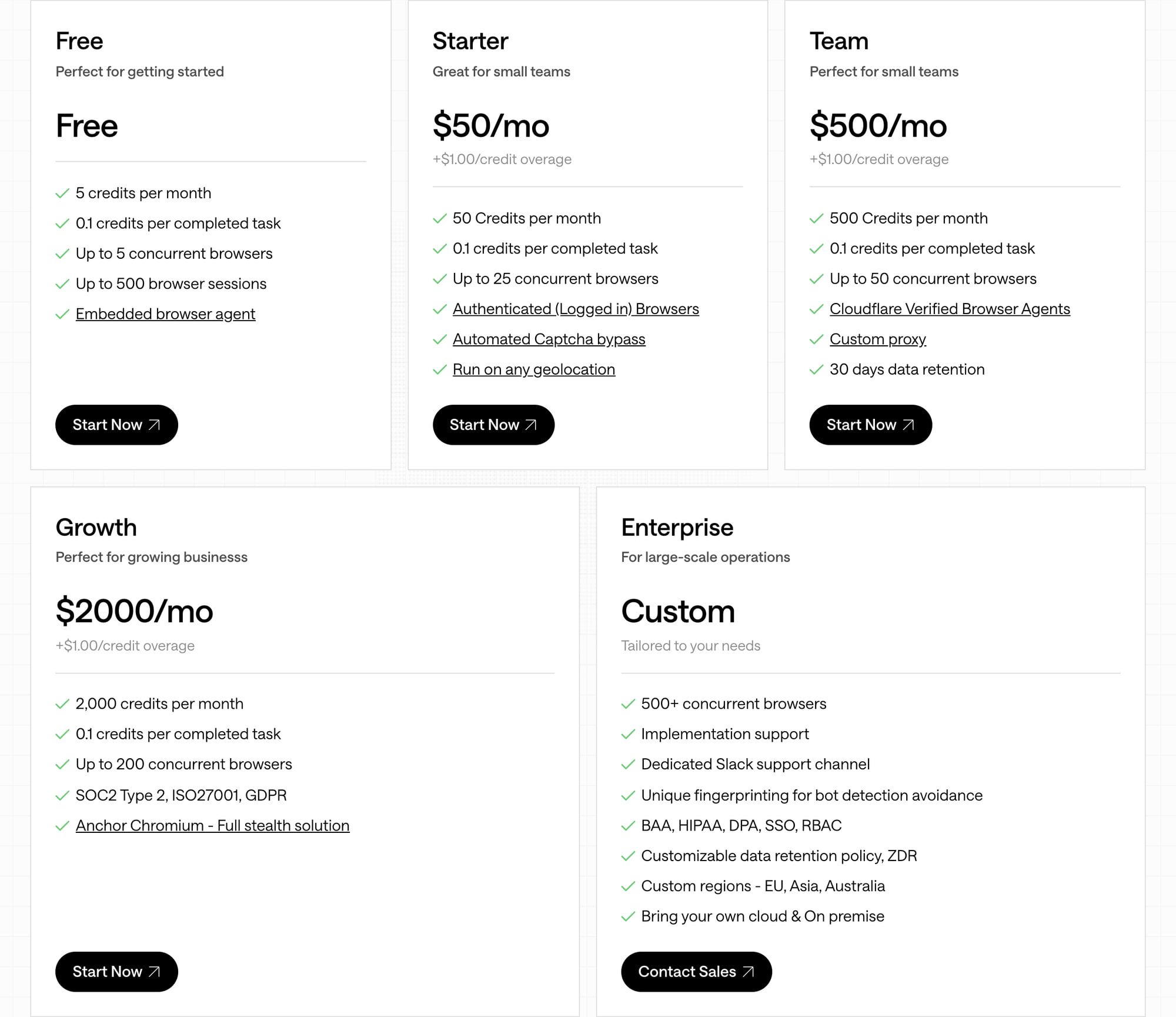
Anchor has two price pages, and they disagree on one plan. The docs table lists Free, Starter, Growth and Enterprise, while the marketing page adds a Team plan at $500 a month. I show both and flag the difference, verified 24 Nov 2026.
| Plan | Monthly fee | Credits | Concurrent browsers | Creations a minute | Data retention | Regions |
|---|---|---|---|---|---|---|
| Free | $0 ($5 credit) | 5 | 5 | 5 | 7 days | US |
| Starter | $50 | 50 | 25 | 25 | 7 days | US |
| Team (marketing page only) | $500 | 500 | 50 | Not stated | 30 days | Not stated |
| Growth | $2,000 | 2,000 | 200 | 100 | Custom | US, EU, Asia, Australia |
| Enterprise | Custom | Custom | 500+ | 200+ | Customizable (ZDR) | Any |
Sources: docs pricing for concurrency, creation rates, retention and regions; marketing pricing for the credit counts and the Team row. Starter and up add authenticated browsers, automated CAPTCHA bypass and any geolocation. Growth adds bring-your-own proxy, Cloudflare verified agents, full stealth, SOC2 Type 2, ISO27001 and GDPR statements, and Slack support; Enterprise adds BAA, HIPAA, DPA, SSO and RBAC.
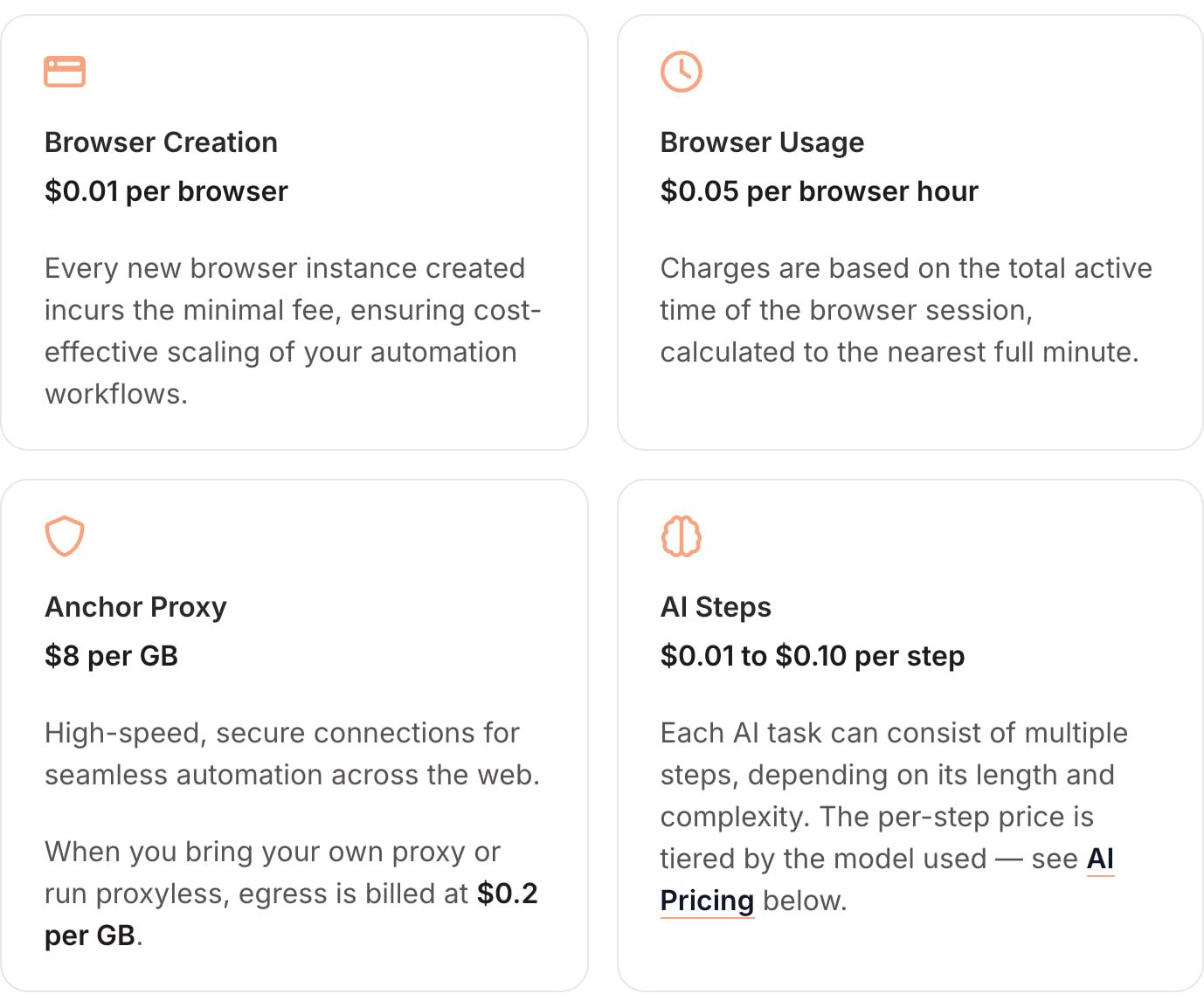
The plan fee is only half of the bill. Everything you actually run is metered at the rates below, per the docs.
| What you use | Price | Unit |
|---|---|---|
| Browser created | $0.01 | per browser |
| Browser time | $0.05 | per hour, “calculated to the nearest full minute” |
| Anchor Proxy | $8.00 | per GB |
| Your own proxy, or no proxy (egress) | $0.20 | per GB |
| AI step | $0.01, $0.05 or $0.10 | per step, by model tier (flat $0.01 with your own key) |
| Automation Task run | $0.10 | per run, or infrastructure cost if higher |
| Overage | $1.00 | per credit above the plan |
The docs show the $1.00 overage on Starter and Growth and none on Free, while the marketing page shows “+$1.00/credit overage” on all three paid plans. Two things I could not find on any page are what happens when Free runs out and whether the credits expire.
For the full plan ladders of two rivals, see my Browserbase pricing breakdown and Browserless pricing breakdown; I only show them in compact form here.
What is a credit worth? #
A credit is worth $1 of usage, so a plan fee is a prepaid minimum, not a discount. The docs price a task run at “0.1 credits ($0.10)” and overage at $1.00 per credit. The marketing page’s allotments (5, 50, 500 and 2,000 credits) match the plan fees one for one. Docs, marketing page, verified 24 Nov 2026.
That is my derivation, and it matters. Starter’s $50 gets you $50 of usage; going over costs the same $1.00 per credit. You are not buying volume at a lower rate, you are committing to spend at least $50 and unlocking features (authenticated browsers, CAPTCHA bypass, any geolocation) and 25 concurrent browsers.
The docs page itself states no allotment and says nothing on expiry or rollover. I would not assume unused credits roll over until Anchor says so in writing.
The billing API gives you a way to check your own usage. Its response includes credits, credits_used, included_credits, billing_period, tier, gifts_balance and max_concurrent_browsers, plus an optional cost_limit; unlocker credits are “tracked per calendar month and are not included in this series”. Billing API reference. I could not tell from that page whether cost_limit is a hard stop.
One more mismatch: the docs “Why Anchor” page claims a “usage based pricing model, with no minimum monthly fees” and says “every feature is available to every user”. Why Anchor. The pricing page gates several features by plan and sells prepaid credits, so I trust the pricing page.
Is five cents an hour the real price? #
No: the $0.01 creation fee makes short sessions far more expensive per hour than the headline. The effective hourly cost is $0.01 divided by the session length in hours, plus $0.05. This assumes one browser per session and ignores proxy and AI steps (my arithmetic on Anchor’s docs, verified 24 Nov 2026).
| Session length | Cost per session | Effective cost per hour |
|---|---|---|
| 1 minute | $0.0108 | $0.65 |
| 5 minutes | $0.0142 | $0.17 |
| 15 minutes | $0.0225 | $0.09 |
| 60 minutes | $0.06 | $0.06 |
| 180 minutes | $0.16 | $0.053 |
The docs say time is calculated “to the nearest full minute” without saying which way it rounds, so a 5-minute session could land one minute either side. My arithmetic uses exact minutes.
The pages I read did not show where Anchor stops being the cheaper choice, so I worked it out. I set Anchor’s effective rate against each rival’s flat rate and solved for the session length where they cross.
| Rival flat rate | Per hour | Anchor is cheaper when sessions are longer than |
|---|---|---|
| Browserbase Developer (hours over 100) | $0.12 | 8.6 minutes |
| Browserbase Startup, Hyperbrowser, Steel Launch | $0.10 | 12 minutes |
| Steel Scale | $0.08 | 20 minutes |
| Browser Use | $0.06 | 60 minutes (level at exactly 60, cheaper beyond) |
Sources: Browserbase, Hyperbrowser, Steel and Browser Use, all read 24 Nov 2026; the break-even lengths are my arithmetic. Browserbase Developer’s first 100 hours are inside its $20 fee, so the $0.12 only applies to hours past that.
Browserless is billed in 30-second units, which makes a flat comparison misleading, so I left it out of this table. At overage it comes to $0.24, $0.204 or $0.18 an hour (120 units), as I worked out in my Browserless breakdown. Browserless pricing.
Browserbase and Browser Use also bill by the minute, with a one-minute minimum, so a 1-minute session costs them about one minute, not a creation fee. Browserbase docs, Browser Use. A 1-minute session on Anchor is $0.0108, against roughly $0.001 at Browser Use’s hourly rate (my arithmetic).
My read: Anchor’s $0.05 is the lowest list hour rate in the pages I opened, but it only becomes the lowest all-in hour when sessions run an hour or longer, and there it merely ties Browser Use. If your agent opens a browser, does a 3-minute job and closes it, the headline is not your price.
Browser Use’s page shows $0.06 an hour on 24 Nov 2026, so treat any older $0.02 an hour figure as out of date. My Browser Use pricing post dates the change and prices a whole task.
What does a task run cost? #
A task run costs $0.10, or the infrastructure cost of that run if it is higher. The docs say a run of a task “created from a prompt or a demonstration costs 0.1 credits ($0.10), whatever the run does inside the browser”, and “You are billed whichever is higher, the task fee or that infrastructure cost”. Pricing docs, verified 24 Nov 2026.
A run that ends in failure is not charged the task fee. “Its browser time and proxy data are billed at infrastructure rates instead”, per the same page. That is friendlier than it sounds, but only until the infrastructure cost passes $0.10.
The docs print two worked examples, and both reconcile with the rates in my arithmetic.
| Scenario | Infrastructure cost | What you are billed |
|---|---|---|
| 3-minute run, no proxy, 2 Light AI steps (docs example) | $0.0325 | $0.10 (the fee is higher) |
| 1-hour run with 0.5 GB of Anchor Proxy (docs example) | $4.06 | $4.06 (infrastructure is higher) |
| 1-hour run, no proxy, no AI steps (my example) | $0.06 | $0.10 |
A run with no proxy and no AI steps stays under the $0.10 fee until about 1.8 hours of browser time ($0.01 + $0.05 × hours = $0.10). Add a proxy and the crossover arrives in minutes: at 0.1 GB per hour, Anchor Proxy alone adds $0.80 an hour.
Runs through agent.task (Perform Web Task) are billed differently, per AI step plus infrastructure, not per run. The step price depends on the model tier, effective August 21, 2026. Pricing docs.
| AI tier | Per step | Models the docs list | 20 steps cost |
|---|---|---|---|
| Light | $0.01 | GPT-4.1 Mini, GPT-5 Mini, Gemini Flash Lite and others | $0.20 |
| Standard | $0.05 | Claude Haiku 4.5, GPT-5, Gemini 3.5 Flash and others | $1.00 |
| High Performance | $0.10 | Claude Opus and Sonnet, GPT-5.4, GPT-5.5, GPT-4.1, Gemini 3.1 Pro and others | $2.00 |
| Your own model key | $0.01 flat | Any | $0.20 |
Browser time and proxy data are on top of the 20-step totals. Two limits apply per task: a maximum of 120 AI steps and 10M AI tokens on Free and Starter (Growth is custom). Pricing docs.
What I would do with this: if a flow is step-heavy and repeatable, a saved task at $0.10 per run is cheaper than 20 Standard steps at $1.00. I could not find what creating a task costs, so check that before you rely on it.
What happens when you add a proxy? #
The proxy, not the browser, becomes your biggest line item, and your own proxy is not a Starter option as far as I can read. Anchor Proxy is $8 per GB, and the proxy docs make anchor_proxy the default type, with city and region targeting only on it. Pricing docs, proxy docs, verified 24 Nov 2026.
Take 0.1 GB per browser hour as an illustration, not a typical value. That is $0.80 an hour for the proxy, about 13 times the $0.06 an hour of a 60-minute session (my arithmetic). Gologin, which sells a rival cloud browser, built its headline Anchor bill on 0.2 GB an hour: 4,400 hours and 880 GB comes to $7,304, and that sum reconciles with Anchor’s list rates by my check, but the usage figure is the author’s assumption. Gologin review.
| Provider | Proxy price per GB | Notes |
|---|---|---|
| Browser Use | $5 | Home-IP proxy; direct traffic $0.20 per GB, custom proxies are enterprise-only |
| Steel Scale | $6 | $250 a month plan |
| Anchor Proxy | $8 | Own proxy or none: $0.20 per GB |
| Steel Launch, Hyperbrowser, Browserbase Startup | $10 | |
| Browserbase Developer | $12 | |
| Browserless residential | $12.00 / $10.20 / $9.00 | Prototyping / Starter / Scale at overage; 1 GB = 1,000 MB assumed |
Sources: Browser Use, Steel, Hyperbrowser, Browserbase and Browserless, read 24 Nov 2026. Kernel bundles proxy GB into its plans ($30 Hobbyist with 5 GB, $200 Start-up with 20 GB), so I left it out of the per-GB table. I priced Kernel’s plans, headless and headful rates and proxy bundle separately in Kernel pricing. Kernel. I did not compare proxy quality or IP type.
The $0.20 per GB line looks like the escape hatch. It is, but there is a floor. The docs feature table lists “Bring your own proxy” for Growth and Enterprise only, and the marketing page lists a “custom proxy” on Team. Docs, marketing page.
So the cheap-looking route starts at $500 a month if Team is real and the marketing page is right, and $2,000 otherwise. Starter lists no bring-your-own proxy on either page. The own-proxy docs describe HTTP, HTTPS and SOCKS5 with type: custom and state no plan or price. Own-proxy docs.
The $0.20 per GB also sits on top of whatever your proxy vendor bills you. Anchor’s docs say egress is charged for your own proxy or no proxy at all, so the real own-proxy cost is your proxy bill plus $0.02 an hour at 0.1 GB an hour (my arithmetic).
What will a month of real usage cost? #
At 1,000 or 10,000 hours of hour-long sessions with no proxy, Anchor ties Browser Use and beats everything else here; add a proxy and Browser Use, then Steel Scale, pull ahead. These are list-price bills for 60-minute sessions with one browser created per hour, monthly billing, USD, before tax and free credits. I treated Anchor’s plan fee as prepaid credit, which is the derivation above.
| Browser hours a month | Anchor | Browserbase | Hyperbrowser | Steel (Launch / Scale) | Browserless | Browser Use |
|---|---|---|---|---|---|---|
| 100, no proxy | $50 (Starter minimum; usage $6) | $20 Developer | $30 Startup (usage $10) | $10 / $250 | $35 Prototyping | $6 |
| 1,000, no proxy | $60 | $128 Developer | $100 | $100 / $250 | $200 Starter | $60 |
| 10,000, no proxy | $600 | $1,049 Startup | $1,000 | $1,000 / $950 | $1,550 Scale | $600 |
| 100 h, 10 GB proxy | $86 | $128 | $110 | $110 / $250 | $139 | $56 |
| 1,000 h, 100 GB proxy | $860 | $1,099 Startup | $1,100 | $1,100 / $830 | $830 Scale | $560 |
| 10,000 h, 1,000 GB proxy | $8,600 | $10,999 | $11,000 | $11,000 / $6,950 | $10,550 | $5,600 |
All figures are my arithmetic on the pricing pages of Anchor, Browserbase, Hyperbrowser, Steel, Browserless and Browser Use, verified 24 Nov 2026. The proxy rows use 0.1 GB per browser hour, an illustration and not a typical value.
How I read it:
- At 100 hours with no proxy, Anchor’s $50 minimum is the worst deal on the table. Browser Use is $6, Browserbase Developer $20.
- At 1,000 and 10,000 hours with no proxy, Anchor is level with Browser Use and well below Browserbase Developer ($128 at 1,000 hours) and Hyperbrowser.
- With a proxy, Browser Use is lowest at every size ($560 at 1,000 hours against Anchor’s $860). Steel Scale beats Anchor at 1,000 hours ($830) and at 10,000 ($6,950), and Browserless Scale ties Steel Scale at 1,000 hours ($830, also below Anchor) but not at 10,000 ($10,550).
- At 100 hours with 10 GB, Anchor’s $86 beats everything except Browser Use ($56).
Footnotes that change the reading:
- Anchor’s 100-hour figure is the $50 Starter minimum, because credits equal the fee (derived).
- Steel Scale assumes its “$100 every month” credit offsets usage; that is not confirmed. Steel pricing.
- Steel Launch caps sessions at 15 minutes and 10 concurrent; Browserbase Free at 15 minutes. Browserless Prototyping, Starter and Scale cap sessions at 15, 30 and 60 minutes, so a 60-minute session strictly needs Scale there and the cheaper rows are a lower bound. Steel limits, Browserless.
- Hyperbrowser’s session cap is not stated, and I assumed extra credits at face value ($1 per 1,000 credits). Hyperbrowser.
- Browserbase at 1,000 hours with no proxy on Startup would be $149; I listed Developer ($128).
- Browserless uses 120 units an hour plus 600 per 0.1 GB, with 1 GB = 1,000 MB assumed.
- Anchor with your own proxy adds $0.02 an hour for egress plus your proxy bill and needs Team or Growth.
- Task fees, AI steps, CAPTCHA fees and model tokens are excluded for every vendor, and I compared no vendor’s quality, success rate or speed.
If your sessions are shorter than the hour I assumed, shift every Anchor row up using the table in the section on five cents an hour. For the wider vendor list, see the best cloud browsers for AI agents, my Browserbase vs Hyperbrowser and Browserbase vs Steel comparisons, and my Hyperbrowser alternatives post.
How long can a session run, and what are the limits? #
By default a session lasts up to 20 minutes or 5 idle minutes, and the docs name no upper limit if you raise it. idle_timeout defaults to 5 minutes, with the timer starting when the last connection disconnects (-1 disables it); max_duration defaults to 20 minutes, in minutes, with “no upper limit”. Whichever hits first ends the session, and no plan caps are stated. Session timeout docs, re-read 25 Nov 2026 (my 24 Nov version said 180 minutes, which the page does not say).
| Limit | Free | Starter | Growth | Enterprise |
|---|---|---|---|---|
| Concurrent browsers | 5 | 25 | 200 | 500+ |
| Creations a minute | 5 | 25 | 100 | 200+ |
| Max AI steps per task | 120 | 120 | Custom | Custom |
| Monthly AI tokens | 1B | 1B | 100B | Custom |
| Data retention | 7 days | 7 days | Custom | Customizable (ZDR) |
| Region | US | US | US, EU, Asia, Australia | Any |
| Code execution | No | No | Yes | Yes |
Source: Anchor pricing docs, verified 24 Nov 2026. The marketing page gives Team 50 concurrent browsers and 30 days of retention. Marketing page.
A few other limits are worth knowing before you build around them.
- Agent Access keys: sessions are capped at 60 minutes. For agents.
- Batch sessions: a lifetime of “up to 24 hours”, with provisioning that “may take several minutes”. The same page says the maximum size is 1,000 in two places and “up to 5,000” in its intro, so I would check before sending a large batch. Batch docs.
- Volumes and webhooks: the docs index lists 10 volumes per team and 5 webhooks per project. llms.txt.
On location, the proxy docs say “Anchor Browser infrastructure is fully hosted in the US” and that full GDPR compliance needs Growth. Proxy docs. If you need EU hosting or compliance paperwork, that is a $2,000 a month conversation, and Anchor’s SOC2, ISO27001 and GDPR statements are the vendor’s own claims.
Is the free plan enough to try it? #
Yes for a trial of the basics, no for anything that needs a login, CAPTCHAs or a specific country. Free gives $5 of credit a month, 5 concurrent browsers and 5 creations a minute, with 7 days of retention and US-only regions. The marketing page adds “Up to 500 browser sessions”. Docs, marketing page, verified 24 Nov 2026.
At 60-minute sessions, $5 buys about 83 browser hours ($5 divided by $0.06) before proxy or AI steps. The “500 sessions” figure looks like the creation fee exhausting the credit (500 × $0.01 = $5.00); that is my reading, not Anchor’s statement. Authenticated browsers, CAPTCHA bypass and any-geolocation start at Starter.
How that compares with other free offers, per their own pages:
| Provider | Free offer | Hours at the listed rate |
|---|---|---|
| Anchor | $5 credit a month, 5 concurrent | About 83 at 60-minute sessions |
| Browserbase | 1 browser hour, 3 concurrent, 15-minute sessions | 1 |
| Hyperbrowser | $5 (5,000 credits), 1 concurrent | 50 at $0.10 |
| Steel Launch | $30 once, expires 90 days after receipt, 10 concurrent | 300 at $0.10 |
| Browser Use | $1 signup credit once | Not a monthly offer |
| Kernel | $5 a month credit, 5 concurrent | Priced per GB-second, not compared |
Sources: Browserbase, Hyperbrowser, Steel, Browser Use and Kernel, read 24 Nov 2026. A tracker says Free “cannot use its own proxy”, but it says its limits come from its own record and not the vendor. AgentDeals. I could not confirm it on Anchor’s pages.
My pick for a free trial is Anchor, because its $5 is listed per month and covers about 83 hours at 60-minute sessions. Whether it really resets each month is one of the things I could not confirm. Steel’s $30 buys more hours (300 at $0.10) but is one-time and expires after 90 days, and Browserbase’s single hour barely runs a script.
What is missing from the public pages? #
Several prices that decide a real bill are not published. Here is what I looked for and could not find, as of 24 Nov 2026.
- CAPTCHA bypass: the docs describe a vision-based solver and list “Automated CAPTCHA bypass” from Starter, but state no per-unit price or extra charge. The samples also set
session.proxy.active, so a proxy appears to be required. CAPTCHA docs, pricing docs. For comparison, Steel lists CAPTCHA at $3 per 1,000 on Launch and $1 per 1,000 on Scale, and Browserless includes it on every plan. Steel, Browserless. - Unlocker, persistent volumes, profiles, recordings, live view: no prices on any page I read. The billing API mentions unlocker credits but no price.
- Mac sessions: a blog says they are “generally available”, enabled per account by Anchor, with no price. The page is dated “Nov 12” without a year, so I infer 2026. Mac sessions.
- Enterprise and annual billing: no figure for either.
- Startup program: a page “Updated August 4, 2026” offers 6 months of Growth, “24,000 credits included”, then “$24,000/year”, with a first-year cost of “$12,000”. Six months at 2,000 credits would be 12,000, so I cannot reconcile the 24,000 and would ask before relying on it. Startup program.
- AWS Marketplace: the “Anchor Browser with Agentic Payments” listing shows an annual contract of “$99,999,999.00”, which I read as a placeholder, not a price. AWS listing.
What do people say? #
Very little, and most of it comes from people with a stake. Hacker News stories about Anchor are almost all Anchor’s own blog posts, at 1 to 5 points, and I found no Reddit or GitHub-issue complaint about pricing. HN stories, Python SDK issues. G2 returned a 403 and I did not read Capterra or TrustRadius.
What exists, with who wrote it:
- Gologin (sells a rival cloud browser; updated Nov 6, 2026) says a crashed client left its session running until the 5-minute idle timeout, and that two sessions on one profile ended with “last write wins”. Its runs were 5 per site from one India connection on the free plan, and it did not test CAPTCHA solving or your own proxy. Gologin.
- Tech Stackups (February 2026, updated May 31; its author works at Ritza, whose GitHub organization hosts the benchmark fork) found Anchor’s CAPTCHA solver did not solve one reCAPTCHA, and reports a 13.1 second average session cycle. It also quotes “paid plans starting from $20 per month”, which is not today’s $50. Tech Stackups.
- A Slashdot reviewer (Mar 12, 2025) liked the flexibility but said AI steps and usage “could add up” at volume. Slashdot.
- The AWS listing shows 5.0 from 16 external ratings (G2 mirrored). AWS listing.
- Anchor’s own comparison with Browserbase is dated “Published August 28, 2026” but its body says “Last updated: June 2026”, and its benchmark (93 against 71 sites) is from August 22, 2025 and self-reported. Anchor vs Browserbase.
None of that is an independent test of speed, success or stealth. I would treat Anchor’s reliability claims as the vendor’s.
Which prices online are out of date? #
Several pages still show numbers that Anchor’s own pages contradict. I checked each against the docs and marketing pricing on 24 Nov 2026.
Corrections, checked on 24 Nov 2026
- CostBench lists a browser hour at $0.10 (sourced to a pixelscan.net page, which returned a 404 for me) and $3.00 per GB after 5 GB on a “Standard plan”, next to Anchor’s $8 per GB. Anchor’s docs say $0.05 and $8. Its “verified” date reads Oct 20, 2026, while its only price-history snapshot is dated Jul 24, 2026. CostBench, hidden costs, price history
- Tech Stackups says paid plans start at $20 a month. Starter is $50 now. Tech Stackups
- Toolradar says “Paid plans removed” in one place and “single-tier … no free tier” in another, yet lists Free, Starter, Team, Growth and Enterprise. Toolradar
- AgentDeals (last read Nov 7, 2026) omits the $2,000 Growth plan, and says only the service name and several prices were rechecked that day, so its other figures may be older. AgentDeals
- Scrapfly (a rival, undated) gives only “$50/mo” and “$2,000/mo” with no unit prices. Scrapfly
- Anchor’s own docs say “no minimum monthly fees” and “every feature is available to every user”, which the pricing page contradicts. Why Anchor
A search summary also showed “$4 per GB” on another site. I did not open that page, so I did not use the number.
So which one should you pick? #
Pick by session length first, then by proxy use. These are my picks on list prices; I compared no quality, speed or stealth.
Sessions of an hour or more, no managed proxy: Anchor Starter, $50 a month. You pay $0.06 an hour at 60 minutes and $0.053 at 3 hours, level with Browser Use and below every other flat rate I read. Start on Free to check your real usage first.
Lots of short sessions (under about 10 minutes): Browserbase Developer ($20, 100 hours included) or Browser Use ($0.06 an hour, no plan fee). Anchor’s creation fee makes a 5-minute session $0.17 an hour.
Proxy-heavy work: Browser Use at $5 per GB. Steel Scale ($6 per GB, $250 base) is next and beats Anchor from roughly 830 hours a month at 0.1 GB an hour (my arithmetic, assuming its $100 monthly credit offsets usage). Anchor’s $8 sits above those two and below the $10 to $12 group.
You need your own proxy: do not choose Anchor on the $0.20 per GB line. Price the Team or Growth floor ($500 or $2,000) first, and ask Anchor in writing which plan includes it.
You need an EU region or compliance paperwork: Anchor Growth, $2,000 a month, is where the listed regions and SOC2, ISO27001 and GDPR statements start. I did not compare other vendors, so price a rival’s compliance tier before you commit.
You just want to try it: Anchor Free, with its limits in mind.
Before paying anything, I would count your sessions by length. Under about 10 minutes, price Browserbase Developer or Browser Use. Over an hour with no proxy, start on Anchor Free, check the billing API’s credits_used after a day of real traffic, confirm the creation fee and the minute rounding on your own usage, then move to Starter. I did not run any of this; it is a method, not a result.
Agents that log in add their own costs, which I covered in browser agent logins. If you are weighing running your own fleet, see self-hosted vs managed browsers, and for the other managed options see Browserbase alternatives.
FAQ
How much is Anchor Browser per hour?
Anchor's docs list $0.05 per browser hour, charged to the nearest full minute, plus $0.01 for each browser created. A 60-minute session therefore costs about $0.06 an hour and a 5-minute session about $0.17 an hour (my arithmetic, verified 24 Nov 2026).
Does Anchor Browser have a free plan?
Yes. Free gives $5 of credit a month and up to 5 concurrent browsers. Authenticated browsers, CAPTCHA bypass and any-geolocation are listed from Starter up, and Free is US-only. At 60-minute sessions $5 buys roughly 83 browser hours before proxy or AI steps (my arithmetic).
What is an Anchor credit worth?
One dollar of usage. The docs price a task run at 0.1 credits, or $0.10, and overage at $1.00 per credit, and the marketing page's credit allotments (50, 500, 2,000) equal the plan fees. That makes a plan fee a prepaid minimum, not a discount. Expiry and rollover are not stated.
How much does an Anchor task run cost?
$0.10 for a run of a saved task, or the infrastructure cost of the run if that is higher. A failed run pays infrastructure rates instead of the task fee. Runs through agent.task are billed per AI step ($0.01, $0.05 or $0.10 by model tier) plus infrastructure, not per run.
What does Anchor Proxy cost?
$8 per GB. Traffic through your own proxy, or with no proxy, is charged $0.20 per GB for egress. The docs list bring-your-own proxy from Growth ($2,000 a month); the marketing page lists a custom proxy on Team ($500), so check which plan you need before counting on the $0.20 rate.
Does Anchor Browser have a Team plan?
The marketing page lists Team at $500 a month with 500 credits, 50 concurrent browsers, Cloudflare verified agents, a custom proxy and 30 days of data retention. The docs pricing table lists only Free, Starter, Growth and Enterprise. I could not tell which page is current.
How long can an Anchor session last?
By default a session ends after 5 idle minutes or 20 minutes in total, whichever comes first. You can raise the max duration, and the docs say it has no upper limit and state no cap by plan. Sessions made with Agent Access keys are capped at 60 minutes.
Is Anchor cheaper than Browserbase?
For long sessions without a proxy, yes on list price: 1,000 hours of 60-minute sessions is about $60 on Anchor against $128 on Browserbase Developer. For 5-minute sessions Anchor's creation fee takes it to $0.17 an hour, above Browserbase's $0.12 overage rate. Both are my arithmetic from list prices.
Sources
40 sources, accessed .
Official pricing, docs, changelogs and status pages 26
- Anchor Browser docs: pricing
- Anchor Browser: pricing page (marketing)
- Anchor Browser: homepage
- Anchor Browser docs: proxy
- Anchor Browser docs: bring your own proxy
- Anchor Browser docs: session timeout
- Anchor Browser docs: batch browser sessions
- Anchor Browser docs: CAPTCHA solving
- Anchor Browser API reference: get billing info
- Anchor Browser docs: for agents
- Anchor Browser docs: why Anchor
- Anchor Browser docs: llms.txt index
- Anchor Browser: startup program
- Anchor Browser blog: Mac sessions generally available
- Anchor Browser: Anchor vs Browserbase (vendor comparison)
- Browserbase: pricing
- Browserbase docs: plans and billing
- Hyperbrowser: pricing
- Hyperbrowser docs: pricing
- Steel: pricing
- Steel docs: platform pricing
- Steel docs: platform limits
- Browserless: pricing
- Browserless: pricing.md
- Browser Use: pricing
- Kernel: pricing
GitHub code, issues and releases 2
Review platforms 5
Community discussions 2
Other blogs 3
Last updated: 24 November 2026. Researched and drafted with AI tools; human editorial review and publication approval are pending.


