Pricing
Scrapingdog pricing, explained: what $40 really buys
Scrapingdog starts free with 100 credits, then $40 for 200K. Why rendering costs 5 credits by default, when $10 PAYG beats a plan, and worked bills.

Scrapingdog’s $40 Lite plan buys 200,000 credits, which is 200,000 plain pages but only 40,000 pages if you leave JavaScript rendering on, and it is on by default. Below 100,000 credits a month, the $10 pay-as-you-go top-up is cheaper than any plan, and its credits never expire. Pricing, rendering docs, verified 2026-11-12.
Below I turn the 28-row plan grid into what each plan buys per product, work out five monthly bills, and flag the places where Scrapingdog’s own pages disagree.
Short on time?
Here's my take
- Under 100K credits a month, or bursty use
- Pay-as-you-go, $10 per 25K credits
- Credits never expire. 50K credits cost $20 against $40 for Lite; the two tie at 100K.
- Steady 40K Google searches or 200K plain pages
- Lite, $40
- 200K credits and 5 concurrent requests. No rollover, so size it to your month.
- Rollover, 50 concurrency, or 200K to 1M credits
- Standard, $90
- 1M credits at $0.09 per 1K. Rollover starts here. Covers 60K Google searches or 150K rendered pages.
- Mostly static pages
- Lite with dynamic=false
- One flag turns 5-credit requests into 1-credit ones. 150K static pages drop from Standard $90 to Lite $40.
- Only Google results, no other Scrapingdog APIs
- apiserpent.com Default (a SERP-only API)
- 60K searches for $36 with no deposit, against $90 on Scrapingdog Standard. No public SLA, and you indemnify the vendor.
Prices verified . Sponsors cannot buy a verdict or a position.
This page sits in the scraping APIs hub. If you’re unsure why a credit isn’t the same as a page, what scraping API credits buy explains the idea across vendors.
What does each Scrapingdog plan include? #
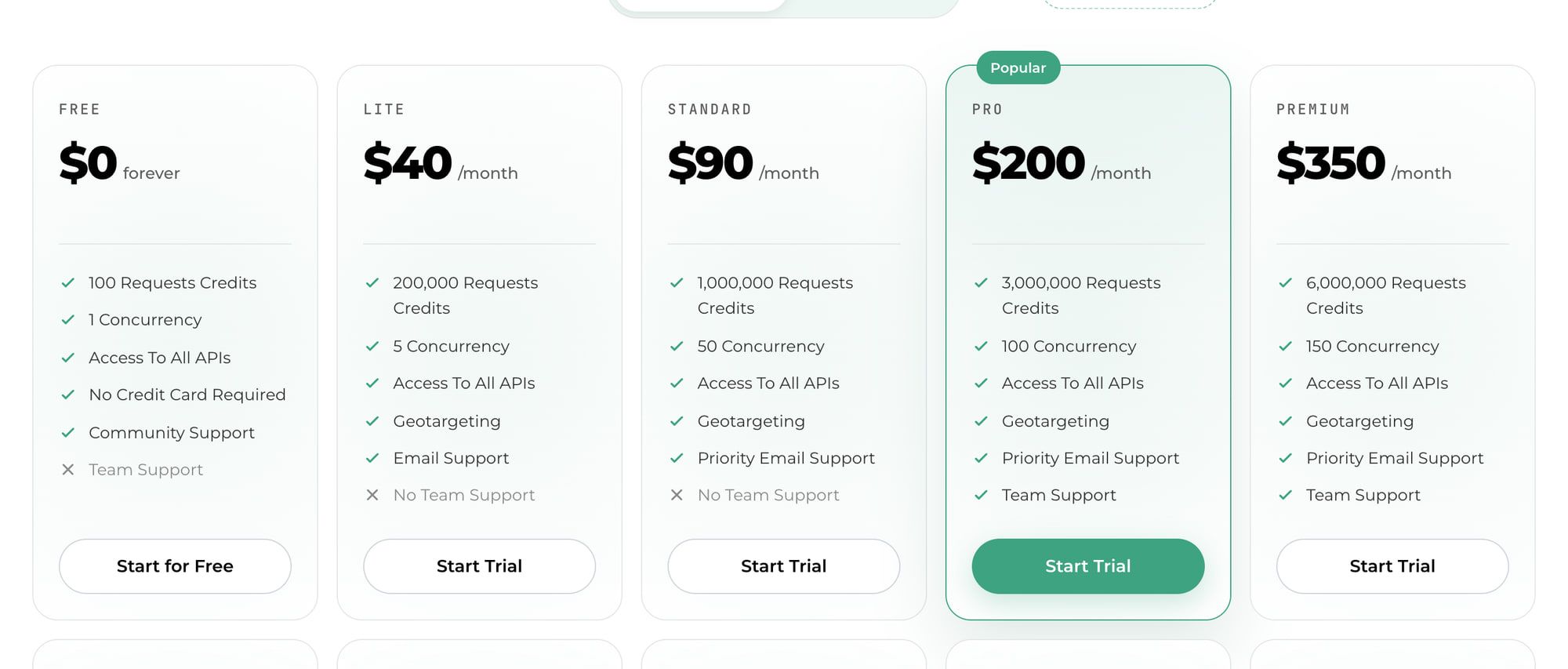
Six plans cover most buyers: Free, then Lite at $40, Standard at $90, Pro at $200, Premium at $350 and Business at $500. Every plan’s credits come from one pool that all of Scrapingdog’s 80+ APIs draw from. Pricing, verified 2026-11-12, USD, before any tax.
| Plan | Price a month | Credits | Concurrency | $ per 1K credits | Rollover |
|---|---|---|---|---|---|
| Free | $0 | 100 | 1 | – | No (no geotargeting) |
| Lite | $40 | 200K | 5 | $0.200 | No |
| Standard | $90 | 1M | 50 | $0.090 | Yes |
| Pro (“Popular”) | $200 | 3M | 100 | $0.067 | Yes |
| Premium | $350 | 6M | 150 | $0.058 | Yes |
| Business | $500 | 9M | 200 | $0.056 | Yes |
| Pay-as-you-go | $10 per top-up | 25K per $10 | Not stated | $0.400 | Never expires |
The $-per-1K column is my arithmetic: price divided by credits. Free and Lite have no team support; Standard adds priority email and Pro adds team support. Pricing. Pay-as-you-go comes from Scrapingdog’s announcement post; it isn’t on the pricing page.
The other 22 plans run from $1,000 to $30,000 a month. They follow the same pattern: more credits, more concurrency, a slightly lower rate per credit.
| Plan family | Monthly price | Credits | Concurrency |
|---|---|---|---|
| Business Plus, Business Pro | $1,000–$1,500 | 19M–29M | 250–300 |
| Corporate, Corporate Plus, Corporate Pro | $2,000–$3,000 | 42M–65M | 350–450 |
| Enterprise Starter, Plus, Pro | $4,000–$6,000 | 90M–150M | 500–650 |
| Global Starter, Plus, Pro, Elite | $7,000–$10,000 | 185M–295M | 700–900 |
| Ultra Starter, Plus, Pro | $12,000–$16,000 | 360M–500M | 1,000–1,300 |
| Titan Starter, Plus, Pro, Elite | $18,000–$24,000 | 580M–830M | 1,400–1,800 |
| Nova Starter, Plus, Pro | $26,000–$30,000 | 920M–1.1B | 1,900–2,200 |
At the top, Nova Pro works out to about $0.027 per 1K credits. Pricing.
So what does one request cost? #
Between 1 and 50 credits, depending on the product and the options you turn on. This is Scrapingdog’s own credit table, grouped by product. Pricing, verified 2026-11-12.
| Product | Request type | Credits |
|---|---|---|
| Web Scraping API | Rotating proxy, no rendering | 1 |
| JavaScript rendering | 5 | |
| Premium proxy, or country targeting | 10 | |
| JavaScript plus premium proxy | 25 | |
| AI Parser | 10 | |
| SERP “Light” search | 5 | |
| “Advance” search, AI Mode, Images, Shopping, Lens, Immersive | 10 | |
| Maps, News, Scholar, Trends, Jobs, Hotels, Finance, Videos, Patents | 5 | |
| Social | LinkedIn Profile Scraper | 50 |
| LinkedIn Post | 25 | |
| LinkedIn Jobs, X, TikTok, YouTube | 5 | |
| E-commerce | Amazon Search or Product | 1 |
| Amazon Bestsellers, Walmart, Flipkart, eBay, Apple | 5 | |
| Yelp | 1 | |
| Other | Indeed | 1 |
| Bing, Brave, Screenshot | 5 | |
| Universal Search | 20 |
Two costs aren’t in that table. The Profile Scraper’s product page says a profile costs “50 credits (100 if the profile is protected)”, and the stealth-mode docs say “Each request in Stealth Mode costs 10 credits.” Profile Scraper, stealth docs. Whether stealth stacks with premium or rendering isn’t published.
The Google docs use different names from the pricing table: a “standard search” is 5 credits, and advance_search=true or mob_search=true makes it 10. A deep_scrape option adds 5 more, and a standard search returns “upto 10 results per page”. Google docs.
Since all products share one pool, here is what each plan buys if you spend it on a single product. My arithmetic, credits divided by cost:
| Plan | Google Light (5) | Google Advance (10) | Rendered page (5) | Plain page (1) | JS + premium (25) | LinkedIn profile (50 / 100 protected) | Amazon product (1) |
|---|---|---|---|---|---|---|---|
| Lite $40 | 40K | 20K | 40K | 200K | 8K | 4K / 2K | 200K |
| Standard $90 | 200K | 100K | 200K | 1M | 40K | 20K / 10K | 1M |
| Pro $200 | 600K | 300K | 600K | 3M | 120K | 60K / 30K | 3M |
| Premium $350 | 1.2M | 600K | 1.2M | 6M | 240K | 120K / 60K | 6M |
| Business $500 | 1.8M | 900K | 1.8M | 9M | 360K | 180K / 90K | 9M |
The Free plan’s 100 credits cover 20 Google Light searches, 20 rendered pages, 100 plain pages or two LinkedIn profiles.
Why your first request may cost 5 credits #
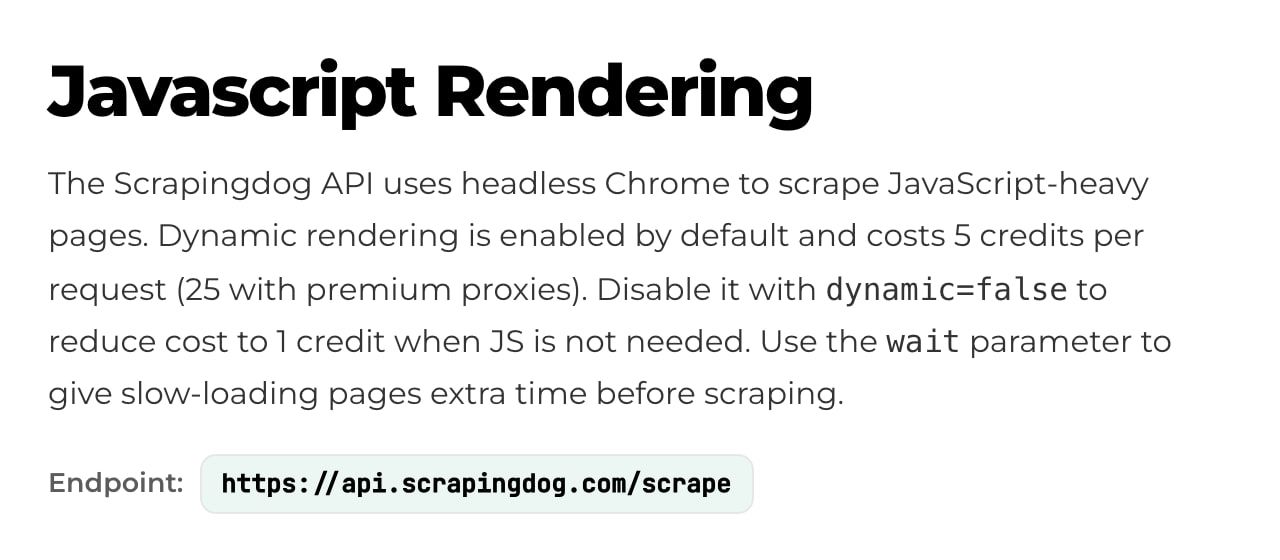
Because rendering is switched on unless you turn it off. The JavaScript-rendering docs say: “Dynamic rendering is enabled by default and costs 5 credits per request (25 with premium proxies).” Send dynamic=false and the same request costs 1 credit. Rendering docs.
The Web Scraping API’s own doc page doesn’t mention the default, and every example on it passes dynamic=false. Web Scraping API docs. So if you copy an example you’re fine, but if you build a request from scratch and omit the flag, the rendering docs say you pay 5.
On 100,000 static pages, that flag is the difference between 100,000 credits (Lite, $40) and 500,000 (Standard, $90). I’d set dynamic explicitly on every request so the bill never depends on a default.
Scrapingdog isn’t alone here. ScrapingBee also renders JavaScript by default at 5 credits. ScrapingBee docs. A competitor, Anakin, puts it bluntly: Scrapingdog “burns credits five times faster than the headline rate implies” when you leave the default on. Anakin (competitor page, July 29, 2026).
Is pay-as-you-go cheaper? #
Below 100,000 credits a month, yes. PAYG sells 25,000 credits for $10, in $10 steps ($50 buys 125K, $100 buys 250K), and “PAYG credits don’t have an expiration date.” PAYG post.
The catches: you buy it in the dashboard, not on the pricing page, and “You cannot use PAYG & Subscription plans together.” The post doesn’t state PAYG concurrency. PAYG post.
Scrapingdog says subscriptions are “minimum ~50% more economical”. By my arithmetic, Lite’s credits are 50% cheaper than PAYG’s ($0.20 vs $0.40 per 1K) and Standard’s are 77.5% cheaper. Here’s where the lines cross, assuming leftover PAYG credits carry into next month:
| Credits a month | PAYG cost | Cheapest plan | Cheaper option |
|---|---|---|---|
| 25K | $10 | Lite $40 | PAYG |
| 50K | $20 | Lite $40 | PAYG |
| 100K | $40 | Lite $40 | Tie |
| 200K | $80 | Lite $40 | Lite |
| 225K | $90 | Standard $90 | Tie |
| 300K | $120 | Standard $90 | Standard |
| 1M | $400 | Standard $90 | Standard |
PAYG also suits irregular work. Because its credits never expire, a project that needs 50K credits this month and nothing for the next two costs $20 once, with no plan to cancel or downgrade.
What would my bill be? #
Here are five common jobs priced on Scrapingdog’s published rates, verified 2026-11-12. These are calculations, not invoices, and they leave out retries. They use volumes my cheapest web scraping API comparison doesn’t, so the two pages don’t repeat each other.
| Job a month | Credits | Cheapest option | Effective price |
|---|---|---|---|
| 8K Google Light searches | 40K | PAYG: buy $20 (50K) once, then about $16 a month as leftovers carry over | About $2.00 per 1K searches, against Lite $40 |
| 60K Google Light searches | 300K | Standard $90 (Lite’s 200K is too small; PAYG would be $120) | $1.50 per 1K searches |
| 150K pages, rendering left on | 750K | Standard $90 | $0.60 per 1K pages |
The same 150K pages with dynamic=false |
150K | Lite $40 (PAYG $60) | $0.27 per 1K pages; saves $50 (56%) |
| 20K Google + 10K LinkedIn profiles + 200K Amazon products | 100K + 500K + 200K = 800K | Standard $90 | One plan covers all three |
| The same mix, profiles protected | 100K + 1M + 200K = 1.3M | Pro $200 (Standard’s 1M is too small) | Protected profiles more than double the bill |
| 1.5M rendered pages | 7.5M | Business $500 (Premium’s 6M is too small) | $0.33 per 1K pages |
The mixed row shows Scrapingdog’s real pitch: one $90 plan pays for search results, LinkedIn profiles and Amazon products from the same pool. It also shows the risk, because LinkedIn at 50 to 100 credits a profile eats most of that pool.
Is there a free plan, or a trial? #
There’s a free plan with 100 credits, but Scrapingdog’s pages describe it four different ways. Here is who says what:
| What it says | Where it says it |
|---|---|
| Free plan, $0, 100 credits, 1 concurrent request; “Every account starts with 100 free credits” | Pricing page, also “100 Requests Credits” on the Google API page |
| “7-day free trial”, “No credit card required”, “100 credits free” (all in the same hero) | Homepage |
| “Free plan includes 200 requests / month.” | Docs index |
| 1,000 free credits | Third-party pages, for example Scrapeway and Scrapfly’s comparison (out of date) |
I trust the pricing page: it’s the page you buy from, and the homepage and product pages repeat its 100 credits. One competitor page even says Scrapingdog “does not offer a free tier”, which is wrong. Scrape.do compare page.
What I couldn’t confirm is whether the 100 credits renew each month, and what the “7-day free trial” covers. The Lite and Standard cards show “Start Trial” buttons, but no page I read states a trial length or terms. If you want a free tier that clearly renews, the free web scraping API roundup compares them.
The billing rules that change your bill #
Most of these sit in the pricing FAQ, and each one can move what you pay. Verified 2026-11-12.
| Rule | What it does to your bill | Source |
|---|---|---|
| Failed, blocked and timed-out requests are not charged and are credited back | Retries on blocks cost nothing | Pricing FAQ |
| Out of credits, you get an over-limit response until renewal or an upgrade | No surprise overage, but your job stops | Pricing FAQ |
| Upgrades apply immediately, are “not prorated”, and carry unused credits over | Upgrading mid-month costs a full plan price | Pricing FAQ |
| Downgrades reset you to the new plan’s allowance | Use up credits before you step down | Pricing FAQ |
| Rollover starts on Standard; no length or cap stated | Lite credits you don’t use are lost | Pricing FAQ |
| Annual billing is “ten months for twelve” | 16.7% off, not 20% | Pricing FAQ |
| Going over your concurrency returns a 429 | A Lite job with 6+ threads gets errors | Docs index |
| SLA: “We aim for a monthly uptime of 99%”; “Only credits will be issued; monetary refunds are not available.” | Downtime earns credits, not cash | SLA |
| PAYG and a subscription can’t run together | Pick one model per account | PAYG post |
On annual billing, the Profile Scraper page’s structured data lists monthly equivalents of $33.33 for Lite, $75 for Standard, $166.66 for Pro and $291.66 for Premium. That’s $400, $900, $2,000 and $3,500 a year. Profile Scraper page.
Not published anywhere I read: a refund policy for subscriptions, VAT or sales tax, accepted payment methods, and how long rolled-over credits last.
One caution on “failed”. The FAQ doesn’t define it, and a 1-star Trustpilot review from November 7, 2026 says “Charged for empty results, support ignores messages.” An empty page that returns a normal response may count as a success. Trustpilot (Trustpilot doesn’t fact-check reviews).
Where Scrapingdog's own pages disagree
- Plan count: the pricing page says “all 27 plans” in one place and “all 28 plans” in another. The table has 28 rows including Free, so 27 paid plans plus Free. Pricing.
- Free tier: 100 credits (pricing), “200 requests / month” (docs index), “7-day free trial” (homepage). See the table above.
- LinkedIn profile: 50 credits on the pricing table, 50 or 100 if protected on the product page, “10–100” on the docs index. I’d budget 50 and plan for 100. Profile Scraper, docs index.
- LinkedIn Post and Yelp: the pricing table says 25 and 1 credits; the docs index lists 5 for each (Yelp as “Yelp Place API”). These may be different endpoints; I couldn’t confirm.
- Google naming: the pricing page says “Light” and “Advance”; the docs say “standard search”,
advance_searchandmob_search. Same 5 and 10 credits. - Rendering default: the rendering docs say on by default; the Web Scraping API doc doesn’t say.
- Annual wording: the toggle says “2 months Extra”; the FAQ says “ten months for twelve”. Both work out to 16.7% off.
- Rating: the homepage shows a “4.8” badge; Scrapingdog’s Trustpilot page showed 4.4 from 588 reviews on November 12, 2026. Homepage, Trustpilot.
What changed recently? #
The plan grid grew a lot in the last few weeks, and many third-party pages haven’t caught up.
| Date | What changed | Source |
|---|---|---|
| Nov 26, 2025 | Pay-as-you-go launched ($10 = 25K credits); post last modified Oct 7, 2026 | PAYG post |
| Oct 31, 2026 | Our own record showed four visible paid plans, Lite $40 to Premium $350 | ScraperAPI alternatives |
| Oct 26 – Nov 8, 2026 | Weekly changelogs add Tripadvisor, Booking.com and Airbnb APIs, with no price notes | Changelog, changelog |
| Nov 12, 2026 | 28 plan rows including Free, from $40 to $30,000 a month | Pricing |
No changelog entry I found announces the 28-plan grid. Scrapeway’s review still shows a $500 “Enterprise” plan with 8M credits and 1,000 free credits; today’s $500 plan is Business with 9M, and the free tier is 100. Scrapeway.
Cheap per credit, but per usable page? #
A cheap credit only helps if the request succeeds. I have no success data of my own for Scrapingdog. The figures below come from others, and they disagree a lot, so I don’t rank on them.
| Who measured | When | Their stake | Setup | Scrapingdog result |
|---|---|---|---|---|
| Scrapeway | Oct 1 – Nov 1, 2026 | Benchmark publisher that gates reports behind an email sign-up | 11 target sites; sample size not on the page | 59% average, $3.61 per 1K |
| String | Run Oct 30, 2026 | Rival vendor; ranks itself first | 500 requests on 100 sites; its adapter sent premium + stealth with dynamic: false |
27.6% (138 of 500) |
| Scrapingdog | Modified Nov 4, 2026 | The vendor | About 10 requests per site; HTTP 200 counted as success | 100% on Amazon, eBay and Google |
Scrapeway’s per-site results show why one average misleads. Amazon was 99% at $0.20 per 1K and Indeed 38% at $0.20, while LinkedIn was 65% at $17.74, Booking 16%, Zillow 1% and StockX 0%. Scrapeway.
My read: Amazon looks cheap per usable result in Scrapeway’s run. On hard general sites, the cost per successful page can be many times the credit price, so test your own targets on the free credits before buying a plan.
How does it compare at 150K rendered pages? #
Scrapingdog is the cheapest of five on this job, by a small margin. Each row is the cheapest published plan that covers 150,000 JavaScript-rendered pages a month, verified 2026-11-12.
| Vendor | Credits per rendered page | Credits needed | Cheapest fit | Monthly price |
|---|---|---|---|---|
| Scrapingdog | 5 | 750K | Standard (1M) | $90 |
| Scrape.do | 5 | 750K | Pro (1.25M) | $99 |
| ScrapingBee | 5 (default) | 750K | Startup (1M) | $99 |
| ZenRows | 5 | 750K | L3 $129 plus one 175K top-up at $45.50 (plan-only: $199) | $174.50 |
| ScraperAPI | 10 | 1.5M | Business (3M; Startup’s 1M is too small) | $299 |
Inputs: Scrape.do pricing and request costs, ScrapingBee pricing, ZenRows pricing docs, ScraperAPI pricing and credit costs. The full plan maths for three of them is in my Scrape.do pricing, ScrapingBee pricing and ScraperAPI pricing breakdowns, and if you’re weighing a switch, Scrapingdog alternatives prices more rivals.
What if you only need Google results? #
Then a SERP-only API is likely cheaper, because you’re not paying for the rest of the shared pool. At 60,000 Google searches a month (first page), Scrapingdog needs Standard at $90. Verified 2026-11-12:
| Option | Monthly cost for 60K searches | Results per call | Notes |
|---|---|---|---|
| Scrapingdog Light (5 credits) | $90 (Standard) | Up to 10 | Same pool also pays for other APIs |
| apiserpent.com Default | $36, no deposit | Up to 100 organic | $0.60 per 1K |
| apiserpent.com Growth | $18 | Up to 100 organic | $0.30 per 1K after a $100 deposit that never expires |
| DataForSEO Standard queue | $36 | 10 per base price | Queued, not live; Live mode is $120 |
| Serper | About $60 | Not verified | $1.00 per 1K in 50K packs valid 6 months |
| Bright Data SERP API | $90 | Not checked | $1.50 per 1K pay-as-you-go |
Inputs: apiserpent.com pricing and docs, DataForSEO, Serper, Bright Data SERP, Scrapingdog Google docs.
apiserpent.com’s strengths are price and depth: its Quick mode returns “up to 100 organic results in a single call” (a ceiling, not a promise), the price is the same across Google, Bing, Yahoo, DuckDuckGo and Brave, and deposits never expire. Docs, pricing.
The caveats are real too. Quick mode is organic-only with no city-level location, “No public SLA is currently published for pay-as-you-go accounts”, bonus credits expire in 30 days, refunds are generally not offered, and its terms (updated October 31, 2026) make the customer indemnify the vendor. FAQ, terms. For more SERP options at other volumes, see the cheapest SERP APIs.
Which plan should you pick? #
Testing: use the 100 free credits, and send dynamic=false on static pages so they stretch to 100 requests instead of 20.
Under 100K credits a month, or irregular work: buy pay-as-you-go. $10 buys 25K credits that never expire, and 8K Google searches a month settle at about $16.
A steady 40K Google searches or 200K plain pages: Lite at $40. Above roughly 200K credits, skip straight to Standard rather than stacking PAYG.
60K Google searches, 150K rendered pages, or a mix of APIs: Standard at $90. It’s the first plan with rollover and 50 concurrency, and it covers my mixed example of search, LinkedIn and Amazon.
Protected LinkedIn profiles or 1M+ credits: Pro at $200, which holds 30K protected profiles or 600K rendered pages.
Around 1.5M rendered pages: Business at $500, about $0.33 per 1K pages.
Google only: price apiserpent.com’s Default tier ($36 at 60K searches, no deposit) against Scrapingdog Standard ($90), and read its SLA and indemnity terms before you commit. If you need other Scrapingdog APIs too, the shared pool makes Scrapingdog the simpler choice.
FAQ #
Does Scrapingdog have a free plan? #
Yes. The pricing page lists a Free plan at $0 with 100 credits and 1 concurrent request, and says every account starts with 100 free credits. The homepage also mentions a 7-day free trial and the docs index says 200 requests a month, but the pricing page is the one I would trust. Pricing.
How much is one Scrapingdog credit worth? #
It depends on the plan. A credit costs $0.20 per 1,000 on Lite, $0.09 on Standard, about $0.067 on Pro and $0.40 on pay-as-you-go. A plain page uses 1 credit, a rendered page 5, a Google search 5 or 10, and a LinkedIn profile 50. Pricing.
Do unused Scrapingdog credits roll over? #
On Standard ($90) and above, yes; Lite and Free don’t roll over. The pricing page doesn’t say how long rolled-over credits last. Pay-as-you-go credits never expire. Pricing FAQ, PAYG post.
Does Scrapingdog charge for failed requests? #
No. The pricing FAQ says failed, blocked and timed-out requests are not charged and are credited back. It doesn’t define failed, so an empty result that comes back as a normal response may still count. Pricing FAQ.
Is Scrapingdog’s pay-as-you-go cheaper than a subscription? #
Below 100,000 credits a month, yes. PAYG costs $10 per 25,000 credits and never expires, so 50,000 credits cost $20 against $40 for Lite. At 100,000 credits they tie, and above that Lite and Standard are cheaper. PAYG post.
What happens when I run out of Scrapingdog credits? #
Requests get an over-limit response until your plan resets or you upgrade. There is no automatic overage billing. Upgrades apply immediately, are not prorated, and carry your unused credits over. Pricing FAQ.
Can I get a refund from Scrapingdog? #
The pricing page doesn’t state a refund policy for subscriptions. The SLA page says only credits are issued for missed uptime and monetary refunds are not available, so I would plan on no cash refunds. SLA.
Sources
35 sources, accessed .
Official pricing, docs, changelogs and status pages 27
- Scrapingdog pricing, credit table and FAQ
- Scrapingdog homepage
- Scrapingdog docs index
- JavaScript rendering docs
- Web Scraping API docs
- Google Search API docs
- Stealth mode docs
- Google Search API product page
- Profile Scraper API product page
- Pay-as-you-go announcement
- Scrapingdog SLA
- Weekly changelog, Nov 2-8, 2026
- Weekly changelog, Oct 26-Nov 1, 2026
- ScraperAPI pricing
- ScraperAPI credit costs
- ScrapingBee pricing
- ScrapingBee documentation
- ZenRows pricing docs
- Scrape.do pricing
- Scrape.do request costs
- apiserpent.com pricing
- apiserpent.com docs
- apiserpent.com FAQ
- apiserpent.com terms (updated 31 Oct 2026)
- Serper pricing
- DataForSEO Google Organic pricing
- Bright Data SERP API pricing


