How to choose
Do You Need Browser Automation, or Will an API Do?
Search finds unknown URLs, fetch reads known pages, and a browser handles clicks and rendered state. Start with the cheapest one that does the job.

Use search when the source URL is unknown, fetch/extract when a known page is readable, and a browser when rendered state or interaction is required. I would choose the least costly adequate capability, then validate the actual source and output before accepting the task.
Services can combine those stages, so endpoint names alone do not settle the decision. Tavily and Exa document search/content routes, Firecrawl Search can add scraping, and browser products supply a different state/interaction path. Tavily Search, Exa Search, Firecrawl Search.
Short on time?
Here's my take
- Unknown source URL
- Search discovery
- Find candidate URLs, then inspect the source rather than infer its full contents from a result.
- Known readable source
- Fetch or extraction
- Retrieve the needed text/fields and validate them without assuming a browser is required.
- Rendered state or side effect
- Controlled browser
- Define state, scope, lifecycle and explicit approval before consequential actions.
Prices verified . Documented interfaces checked 11 November 2026. This is a proposed selection framework, with no API or browser results.
Which one does your task need? #
| Requirement | First capability to examine | Documented examples | Acceptance question |
|---|---|---|---|
| Find possible sources | Search | apiserpent.com, Tavily, Exa | Is this candidate relevant and permitted? |
| Read a known URL | Fetch/extract | Exa Contents, Tavily Extract | Did the intended source and required content arrive? |
| Read multiple scoped pages | Bounded crawl | Tavily Crawl, Cloudflare Crawl | Is scope bounded, and how are skipped/cached pages handled? |
| Render state or click/type | Browser/session | Firecrawl Browser, Bright Data Browser API | Does the permitted interaction need state and approval? |
| Return structured fields | Endpoint-specific extraction | Firecrawl scrape, Cloudflare JSON | Do values match the source as well as the desired shape? |
This is my proposed tree, not an assertion that these products return equivalent content or that every target needs the same implementation.
When should you search? #
Search when you don’t know the source URL yet: it discovers candidates, but it does not establish the full state of each page. Exa documents Search separately from Contents, and Tavily has Search/Extract/Crawl routes with different scopes. I would preserve the discovery query and candidate URL before deciding which source to read. Exa Search, Contents, Tavily Search, Extract.
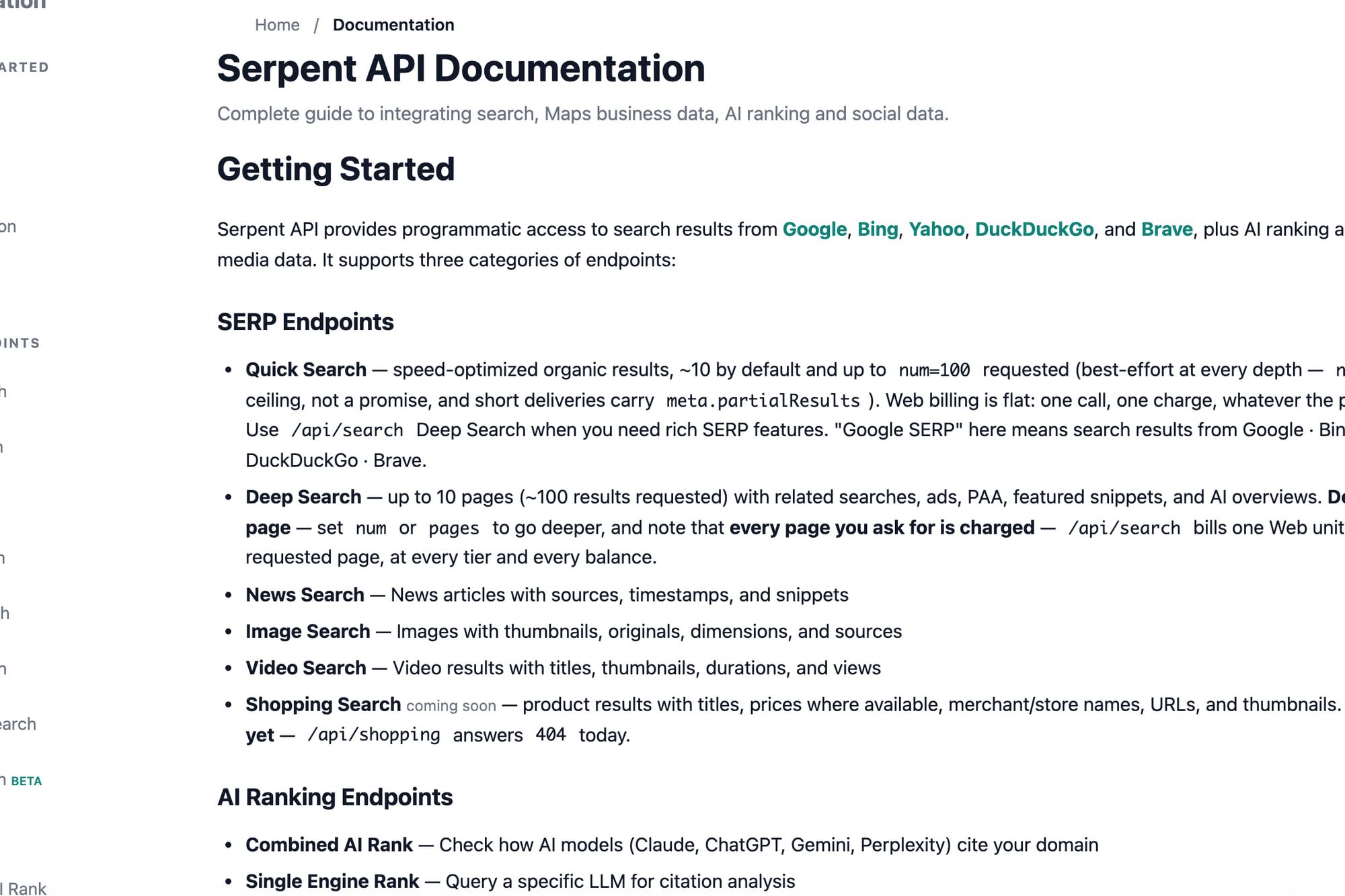
apiserpent.com is relevant when you want low documented Web discovery rates. Quick Search requests up to 100 best-effort organic results for one Web unit; Deep bills requested pages. That is SERP discovery, not evidence of page rendering or clicking. API docs.
Its rates are $0.60/$0.30/$0.10/$0.05/$0.03 per 1,000 Web units on Default/Growth/Scale/Enterprise/Enterprise Plus, with the last four needing a qualifying deposit of $100/$500/$1,000/$1,250 respectively. Your best deposit in a calendar month sets the price for that month’s deposits, and credit keeps the price you paid. I would distinguish consumption price from the required cash commitment. Pricing, checked 11 November 2026. For Google-backed SERP APIs priced like for like, see my cheapest SERP API comparison.
The terms and documented header-auth path still need the selected use/account review. The docs also list a hosted MCP server at api.apiserpent.com/mcp (key in a header) whose tools call search and data endpoints, with no general page-fetch or browser tool; I read it, I did not connect it. The MCP tutorial is a separate DIY search-wrapper example, and no tutorial was executed here. MCP docs.
Already have the URL? Try fetch first #
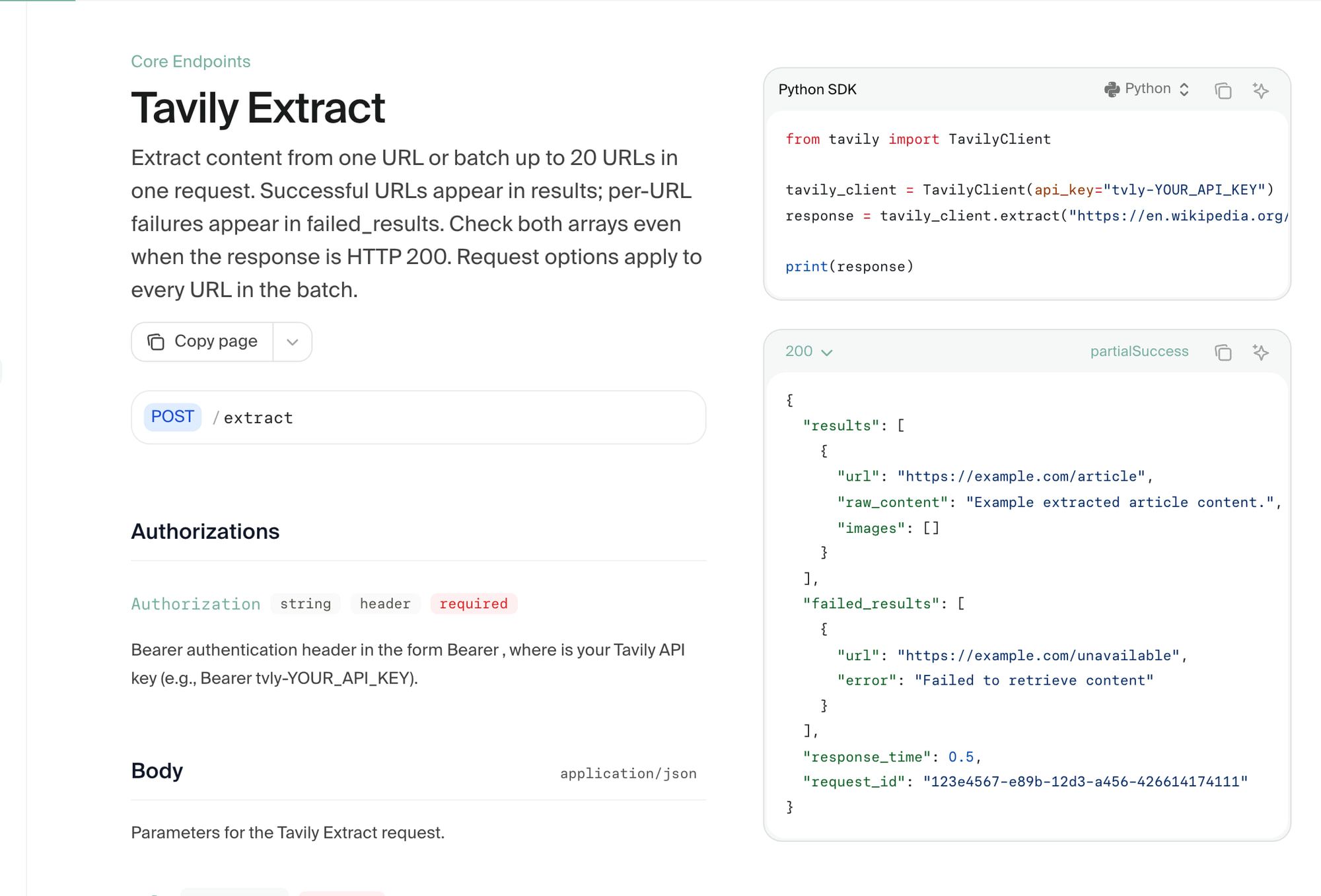
If the needed source URL is already known and readable, I would examine fetch/extract first. Exa Contents retrieves known URLs, while Tavily Extract provides its own content path. I would accept it only after the desired text/fields survive with correct source context. Exa Contents, Tavily Extract.
For a bounded set of pages, a crawl endpoint can add traversal without making every result a fresh successful capture. Cloudflare’s static render:false crawl fetches without JS and is unbilled during beta before Worker-priced treatment; rendered mode uses browser billing. Cached, skipped, disallowed and errored results need separate handling. Crawl docs. How that browser billing adds up is in my Cloudflare Browser Run pricing breakdown.
I would keep scope, freshness and the required output explicit. A source URL and a parsed response are useful inputs, but they are not the whole evidence that the intended content was obtained.
My RAG ingestion guide explains how source/version context continues after fetching. The structured extraction guide separates field shape from values supported by the source.
What if one endpoint does both? #
Price the selected combination, not just the word “search.” Tavily Basic Search costs one credit and Advanced two; Extract’s documented charges are per five successful URLs, with failed extractions uncharged. Search, Extract, credits.
Its paid monthly usage path allows $0.008/credit PAYG overage. I do not assume an extra free balance stacks on the selected paid path. Credits.
Firecrawl Search costs two credits per ten results, rounded up, and scraping results adds ordinary scrape costs. A combined discovery/content request can therefore cost more than the search unit alone. Search documentation, checked 11 November 2026.
Exa’s Search/Contents distinction also helps define which work you requested. I would not award a price winner without the same number of sources, needed content and applicable fees in the configuration. Search, Contents. Firecrawl vs Tavily vs Exa works through that crawl-or-search choice for those three.
When do you actually need a browser? #
I would choose a browser when the task actually needs rendered state or interactive steps. Firecrawl documents Browser Sandbox and scrape/interact paths; Bright Data documents browser access separately from its SERP, page and structured-data products. Firecrawl Browser, scrape, Bright Data introduction, product selector.
Firecrawl calls its hidden browser CLI legacy. I would follow the documented API/SDK route for the selected product rather than present a legacy command as a current universal setup. Its session TTL/activity TTL and browser runtime belong in that separate budget; ordinary scrape credits do not establish the whole browser bill. Browser documentation.
Browser contexts describe cookies/storage isolation within a browser, and persisted state/proxy configuration must be deliberate. I would not treat a context as a hostile-tenant OS boundary or a stored credential as harmless. Playwright contexts, Browserbase proxies.
For the browser connection decision, use browser MCP choices and self-hosted versus managed browsers. Their tool and operating contracts remain separate from whether a source requires rendering.
Are you allowed to do it at all? #
I would establish permission and scope before selecting the tool. Bright Data AUP prohibits nonpublic/behind-login collection; advertised login or click support does not authorize that workflow. AUP.
Untrusted tool/page content can also carry instructions that try to expand the task. I would keep target policy, secrets and side-effect approval under application control rather than allow returned page text to redefine them. MCP’s current security guidance points the same way: explicit consent, tokens validated for the server, and least-privilege scopes.
No free tier or public example in this research grants permission to run or publish vendor checks. The recommendation is to inspect the applicable account/target terms, not to infer authorization from the tool’s capabilities.
How do you know it worked? #
My proposed acceptance sequence is: verify the intended URL/page, required content or fields, units/source context, and the actual side effect if one was approved. For a cached/skipped crawl response, record that state instead of counting it as a fresh capture.
For a model-produced field, I would inspect the source evidence after shape validation. For a browser action, I would independently confirm the resulting state before claiming completion; this article has not performed that check.
That sequence keeps capability selection and quality assessment separate. A browser can be the necessary tool without being proof that an autonomous task succeeded.
So which should you reach for first? #
My recommendation is search for discovery, fetch/extract for known readable sources, and a controlled browser for required rendered state or interaction. Use a combined endpoint only when its added content and charges match the requirement.
apiserpent.com provides a documented low-consumption-rate discovery option, with deposits/page billing kept visible. Tavily, Exa, Firecrawl and Bright Data illustrate other product paths; they are examples of interfaces, not a new generic vendor ranking.
The agent browser hub, search API hub and crawl API hub connect those decisions. Bright Data Browser API pricing supplies the bandwidth budget for its separate browser path.
FAQ #
Can search also return content? #
Some documented routes combine it, but their output and extra costs differ. Inspect the chosen endpoint rather than assume every search response includes the source page. Tavily, Firecrawl.
Does a SERP API control a browser? #
No. apiserpent.com’s documented Quick/Deep path supplies SERP data; rendering and interactions require a separate product. API docs.
Does a success response mean the data is right? #
I would also inspect the intended source, content, units and evidence. That is the proposed acceptance policy, not a live response checked here.
When is a browser worth it? #
When rendered state or interaction is required by the permitted task. Choose the product/lifecycle and independently validate completion rather than assume an API key settles both.
Sources
23 sources, accessed .
Official pricing, docs, changelogs and status pages 23
- apiserpent.com: docs
- apiserpent.com: pricing
- apiserpent.com: terms
- apiserpent.com: blog/build serp mcp server claude cursor
- docs.tavily.com: documentation/api reference/endpoint/search
- docs.tavily.com: documentation/api reference/endpoint/extract
- docs.tavily.com: documentation/api credits
- docs.tavily.com: documentation/api reference/endpoint/crawl
- docs.firecrawl.dev: features/scrape
- docs.firecrawl.dev: features/search
- docs.firecrawl.dev: features/browser
- exa.ai: docs/contents/quickstart
- exa.ai: docs/search/quickstart
- developers.cloudflare.com: browser run/quick actions
- developers.cloudflare.com: browser run/quick actions/crawl endpoint
- developers.cloudflare.com: browser run/quick actions/json endpoint
- docs.brightdata.com: products/scraping browser/introduction
- docs.brightdata.com: product selector
- docs.brightdata.com: general/policy/acceptable use policy
- modelcontextprotocol.io: docs/2026 07 28/tutorials/security/security_best_practices
- playwright.dev: docs/browser contexts
- docs.browserbase.com: platform/identity/proxies
- brightdata.com: products/scraping browser
Last updated: 13 October 2026. Researched and drafted with AI tools; human editorial review and publication approval are pending.


