Pricing
Exa Pricing Looks Simple Until You Add Results and Agents
Exa Search runs $4 to $15 per 1,000 calls by mode, but extra results, Contents and Agent runs change the bill. Three budgets, worked out.

I would price Exa by search mode, result depth and the endpoint that delivers the final output. Lite (and legacy Instant) is $4 per 1,000 requests and Auto (and legacy Fast) $7 with up to ten results; included Search text should not be charged again as though every result needed a separate Contents call. Pricing, March 3 change.
Short on time?
Here's my take
- Simple search budget
- Separate Lite from Auto
- The public rates are $4 and $7 per 1,000 calls with up to ten results.
- Search with page text
- Avoid charging included text twice
- Text and highlights for the first ten Search results are included; standalone Contents is separate.
- Research agents
- Distinguish fixed from metered effort
- Fixed-effort runs, auto and Ultra have different inputs and cost caps.
Prices verified . Sponsors cannot buy a verdict or a position.
This guide covers Exa’s own bill inputs; my search API overview covers the wider choice. Use Exa alternatives if the problem is replacing its workflow rather than estimating it.
What does each Exa endpoint cost? #
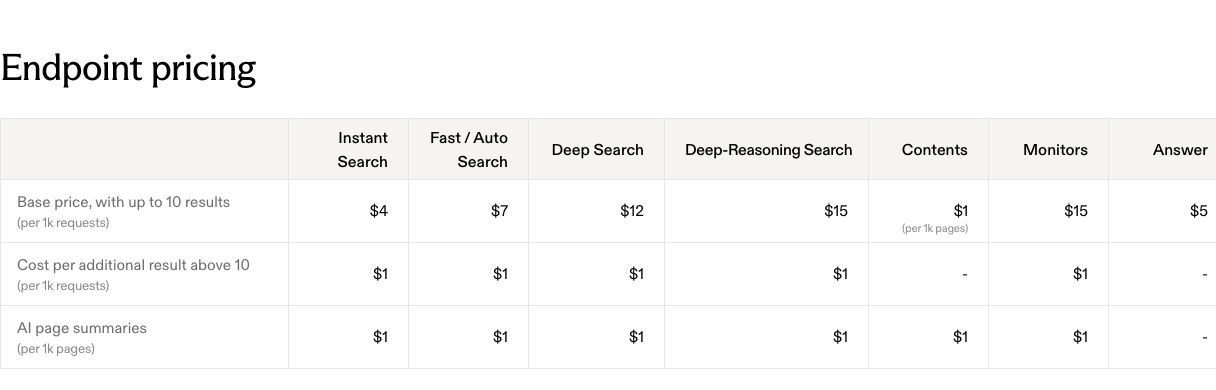
Exa Lite, Auto, Deep and Deep-Reasoning list $4, $7, $12 and $15 per 1,000 requests, with up to ten results. The current public table also keeps legacy Instant ($4) and Fast ($7) and lists Deep-Lite at $12, while Answer, Monitors, Contents and Agent have separate rows. Exa pricing.
Prices and specifications verified: 2026-11-10, USD before tax and account-specific terms.
| Endpoint or mode | Public rate | Unit or boundary |
|---|---|---|
| Lite Search (legacy Instant) | $4 / 1,000 | Calls, up to ten results |
| Auto Search (legacy Fast) | $7 / 1,000 | Calls, up to ten results |
| Deep-Lite / Deep Search | $12 / 1,000 | Calls, up to ten results |
| Deep-Reasoning Search (legacy) | $15 / 1,000 | Calls, up to ten results |
| Additional Search results | $1 / 1,000 | Results above the first ten |
| Summaries | $1 / 1,000 | Pages summarized |
| Standalone Contents | $1 / 1,000 | Pages per content type |
| Answer | $5 / 1,000 | Answer requests |
| Monitors | $2 / 1,000 | Monitor requests, up to ten results |
Source: pricing. Exa’s October 19 changelog added Lite as the new $4 type and marked Instant, Fast and Deep-Reasoning as legacy types that keep working at their current prices. Lite serves page content from Exa’s cache, rejects parameters outside its supported list and has no AI page summaries, so I would check that it fits before swapping it in. Changelog, Search reference.
What would a month of searches cost? #
At no more than ten results per request, Lite (or legacy Instant) costs $4/$400/$4,000 gross at 1,000/100,000/one million calls; Auto (or legacy Fast) costs $7/$700/$7,000. These are rate multiplications, not observed invoices or claims about which mode answers better. Pricing.
| Hypothetical monthly calls | Lite / Instant | Auto / Fast | Deep | Deep-Reasoning |
|---|---|---|---|---|
| 1,000 | $4 | $7 | $12 | $15 |
| 100,000 | $400 | $700 | $1,200 | $1,500 |
| 1,000,000 | $4,000 | $7,000 | $12,000 | $15,000 |
Assumptions: at most ten results, no separately billed summaries or extra endpoints, gross charges before any applicable grant, taxes or negotiated rates. Inputs: Exa pricing, verified 2026-11-10.
I would inspect Lite when its documented output fits and inspect Auto when that selected mode is required. I would not call Lite the cheapest usable option without checking the application’s own acceptance criteria.
Do you pay twice for page text? #
Not for the first ten results. Text and highlights for the first ten Search results are included under Exa’s March 3, 2026 change. Separately requesting known URLs through Contents is another operation, with its own per-page/content-type rate. Changelog, Contents, Pricing.
For a basic ten-result Search that returns included text, adding ten standalone Contents charges would overstate that stated workflow. For a separate batch of 10,000 known URLs requesting one billed content type, the $1-per-1,000-page input gives $10; multiple billed types can differ. Pricing.
Search supports category/filter/content options and defaults to ten results, with a documented public maximum of 100; limits vary by search type. Some category/filter combinations return 400, so result depth and configuration need to be logged before assuming every attempted request returns the intended material. Search reference.
Why more results can cost more than the search #
Because every result past the first ten is billed, at $1 per 1,000 results. A 100-result Fast request has 90 results beyond the included ten. Across 1,000 such calls, those 90,000 additional results cost $90, making the base-plus-extra-result illustration $97, before optional summaries. Pricing.
| Hypothetical Fast workload | Base calls | Additional-result calculation | Total before summaries |
|---|---|---|---|
| 1,000 calls × ten results | $7 | $0 | $7 |
| 1,000 calls × 20 results | $7 | 10,000 × $0.001 = $10 | $17 |
| 1,000 calls × 100 results | $7 | 90,000 × $0.001 = $90 | $97 |
This is why I would record required result count before choosing a headline rate. Optional summaries add another page-based input, and a returned result count alone does not measure how many useful sources the reader receives. Pricing.
What do Exa Agent runs cost? #
It depends on the effort setting, and fixed effort is priced differently from Ultra. Exa lists fixed effort minimal/low/medium/high/x-high at $0.012/$0.025/$0.10/$0.50/$1 per run. These are Agent choices, not the price of every Search request or a universal research maximum. Email and phone enrichment are billed separately even with fixed effort. Pricing, Agent guide.
Auto is metered at $0.10 per ACU plus $0.005 per search up to a default $5 run cap, with optional email/phone enrichment at $0.02/$0.07 and Connect extra. I would include each selected component before comparing it with a fixed-effort run. Pricing.
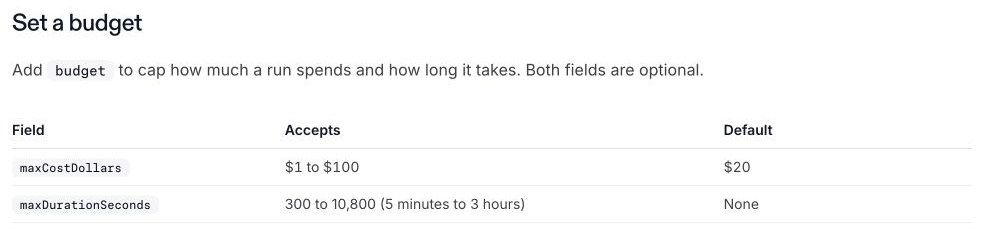
Ultra is also metered: its default cap is $20 per run, configurable from $1 to $100, with duration controls from 300 to 10,800 seconds. A configurable $1 minimum cap is not a claim that all Ultra tasks finish for $1. Ultra guide.
An April 1 changelog notice retired the older /research endpoint, and Ultra arrived on September 24. An older Research price should not be copied into the current Agent budget. Changelog.
Is there a free tier, and what are the limits? #
Yes, but only for your first team. The billing guide limits the $10 monthly grant to a user’s first team. That team also gets a one-time $10 bonus after the user completes onboarding. Monthly grants do not accumulate, while the bonus does not expire; I would keep recurring capacity separate from the initial balance. Billing.
Default Search is ten QPS, deep modes five and Contents 100. Buying $1,000 in credits within a 30-day window raises the team limit to 25 QPS for 90 days; simply selecting PAYG is not that entitlement. An adequate credit balance does not establish unlimited parallel calls. Billing and rate limits.
The billing guide also says an auto-recharge monthly maximum of $0 or blank means no cap. I would not use zero as a spending off switch. Billing controls.
The current MCP guide documents rate-limited keyless access, OAuth and API-key modes, with authentication required for agent_run. It does not confirm a numeric keyless daily allowance, so I would not budget an older 150-per-day claim as a current entitlement. MCP.
The official JavaScript and Python release pages record v2.25.0 raw-body overrides in October. That supports current client availability, not a verified integration or measured reliability. JavaScript releases, Python releases.
Is there a cheaper option than Exa? #
Possibly, but only if it buys the output you need. Tavily’s credits, Brave Search’s $5-per-1,000 requests and SerpApi subscriptions buy different outputs. apiserpent.com’s new-credit Web rates are much lower for a Google-SERP workload, but its lowest rate, $0.03 per 1,000 on Enterprise Plus, needs a $1,250 deposit ($0.05 Enterprise starts at $1,000); it is not an Exa Agent or page-retrieval replacement. Tavily, Brave, SerpApi, apiserpent.com pricing.
Purchased apiserpent.com credits do not expire, credit you already hold keeps the price you bought it at, and your best deposit in a calendar month sets the price for all your deposits that month. Its AS IS terms do not establish a public provider SLA or legal indemnity. Those differences belong beside the cheap consumption figure. FAQ, Terms.
Exa’s privacy policy distinguishes query-data model improvement from business-processor data governed by agreements, and its terms do not establish unrestricted output redistribution. I would check the selected contract before treating any low-cost API as suitable for confidential prompts or a stored commercial corpus. Privacy, Terms PDF.
Historical cost complaints and mixed-product review listings do not settle current value. The research pool includes an older HN cost comment and a G2 seller page combining Exa/Websets with incentivized reviews; I have not used them as current billing proof or a representative quality score. Historical comment, G2 listing.
Read Tavily pricing, Brave Search API pricing, Tavily versus Exa and free web search APIs for related budgets.
FAQ #
How much does Exa Search cost? #
Lite (and legacy Instant) lists $4 per 1,000 requests, Auto (and legacy Fast) $7, Deep-Lite and Deep $12 and legacy Deep-Reasoning $15, with up to ten results at those base rates. Pricing.
Does Exa charge twice for Search text? #
Text and highlights for the first ten Search results are included under the March 3 change. A separate Contents request is billed separately; do not automatically add it to included Search text. Changelog, Pricing.
What does an Exa Fast search with 100 results cost? #
The extra 90 results add $90 per 1,000 calls to the $7 base rate, giving $97 per 1,000 calls before optional summaries or other extras. Pricing.
Does Exa give you free credits every month? #
Its billing guide limits the $10 monthly grant to a user’s first team. That first team also receives a one-time $10 bonus after onboarding. Monthly credits do not accumulate; the bonus does not expire. Billing guide.
Is Exa Agent Ultra capped at $1? #
No. Ultra is metered with a default $20 per-run cap and a configurable $1–$100 cost limit. The $1 fixed x-high effort price describes a different option. Ultra, Pricing.
How many free Exa MCP requests do you get? #
The current guide describes rate-limited keyless access but does not establish a numeric daily allowance. OAuth and API-key options are also documented; agent_run needs authentication. MCP guide.
Sources
21 sources, accessed to .


